

Inspiring
July 18, 2017
Answered

Creating captions in image and video ( frames both top and bottom)

  • July 18, 2017
  • 7 replies
  • 1165 views

I see how to create captions either in the bottom or top of a frame. I need to know how to create both top and bottom captions like this
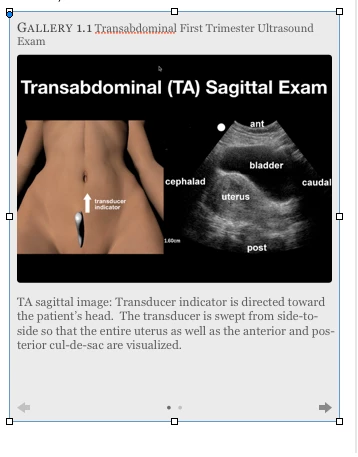

    This topic has been closed for replies.
    Correct answer JonathanArias

    Print layout, DPS, interactive .pdf? i see a next and forward arrow? doing a multi state object?

    7 replies

    JonathanArias
    Brainiac
    July 24, 2017

    Bob, is MOS supported by Epub 3.0. i want to say no but you know better...

    BobLevine
    Community Expert
    July 24, 2017

    FXL EPUB is EPUB 3.0 but MSOs are not supported in reflowable.

    JonathanArias
    Brainiac
    July 24, 2017

    I have done Bob's course. 5 stars and a must watch if you want to go in to creating these kinds of documents

    JonathanArias
    Brainiac
    July 24, 2017

    link to box.com or dropbox. however, you want to do epub 3.0 and it does not look like multi state object are supported, i can help you see why the one you are making does not work. but if you are exporting a feature that is not supported we hit a dead end.

    Inspiring
    July 24, 2017

    Understood as I have no problem creating multi state objects for slideshow, buttons work great but outside of the object image I need to have  captions on top and bottom of each image in its state. I can place a caption underneath or on top of the image within the selected area but i obviously need the caption to change once the image button is pressed so the next caption for the next stage can be seen.

    I would think there is a way to group images and text within a state, no?

    anyway here is a dropbox link to a file which is one chapter that has a video and a few slideshows, incomplete.

    Dropbox - PocusIntroChapter1DRAFT2NoVID Folder.zip

    BobLevine
    Community Expert
    July 24, 2017

    Just add them to the state.

    I have Lynda.com course on MSOs where I cover adding items to states.

    InDesign: Multistate Objects

    JonathanArias
    Brainiac
    July 24, 2017

    Maria has an amazing video training on Epub you must watch to better understand what you can and cannot do, i know muti-state objects for adobe dps and i use them with IN5.

    I do not want to take you down the wront path or waist time back and forth, you need to watch and learn from Maria:

    InDesign CC 2014: EPUBs

    andh:

    Creating a Fixed-Layout EPUB

    JonathanArias
    Brainiac
    July 24, 2017

    i don't believe you can do a multi state object on epub 3.0:

    Multi state object slide show not working in EPub3 (iBooks, Google Books, etc.)

    JonathanArias
    Brainiac
    July 24, 2017

    can you share the file?

    Inspiring
    July 24, 2017

    Can I zip the package folder here?

    JonathanArias
    JonathanAriasCorrect answer
    Brainiac
    July 18, 2017

    Print layout, DPS, interactive .pdf? i see a next and forward arrow? doing a multi state object?

    Inspiring
    July 18, 2017

    Got it thx

    Inspiring
    July 24, 2017

    SO Sorry I had marked this incorrectly as I'm still having problems finding out how to put captions on the top and bottom of images inside multi state objects. All the tutes on this have the captions on top ( embedded) in the images.

    'this is for a FIXED  ePub 3.0