



frameexpert
Community Expert
Community Expert
June 2, 2020
Answered

Creating InDesign Tagged Text via XSLT

  • June 2, 2020
  • 2 replies
  • 1764 views

Hi, I am on Windows and using Oxygen XML Editor to convert XML to tagged text. When I place the text in InDesign, I get the Text Import Options dialog box.
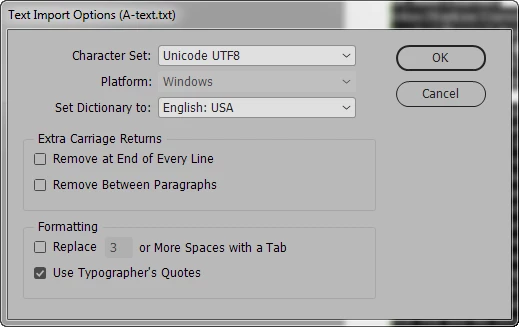


I am specifying UTF-8 and using <UNICODE-WIN> as the first line of the file. If I copy and paste the content into a "reverse-engineered" tagged text file, I get the correct Import dialog box. I would like to be able to do this without having to copy/paste every time.


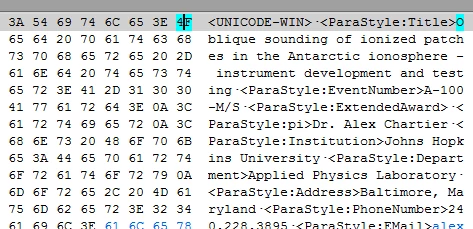
If I view the files in a hex editor, there is definitely a difference:

Oxygen generated:
 

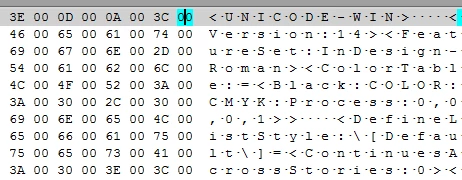
Exported from InDesign as Tagged Text:
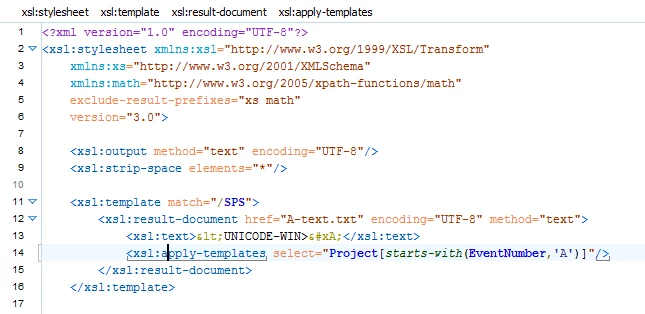
Here is a partial view of my XSLT stylesheet. Any suggestions would be appreciated.
This topic has been closed for replies.
Correct answer Jongware

That Tagged Text export from InDesign is not UTF-8, it is UTF-16.

I'm actually surprised you are able to re-import that file into InDesign even if you tell it this "is" UTF-8. InDesign must be smarter than that.


Set your XSLT to export UTF-16 should work. I use "encoding="utf-16le"" and it has worked fine for me on both Mac and Windows (never minding that "UNICODE-WIN" line at the top -- I just checked, I happened to have "UNICODE-MAC" and InDesign does not bat an eye even on Windows).

2 replies

Legend
June 2, 2020

While you try UTF-8 in both UI and XSLT, that second hex dump appears to be UTF-16LE.

When matching it a look at the BOM may also help - e.g. why it is accepted even with your import options, but unfortunately you cropped out the first bytes from your screen shot.

Edit: After a second look, there is no BOM.

Jongware
Community Expert
JongwareCommunity ExpertCorrect answer
Community Expert
June 2, 2020

That Tagged Text export from InDesign is not UTF-8, it is UTF-16.

I'm actually surprised you are able to re-import that file into InDesign even if you tell it this "is" UTF-8. InDesign must be smarter than that.


Set your XSLT to export UTF-16 should work. I use "encoding="utf-16le"" and it has worked fine for me on both Mac and Windows (never minding that "UNICODE-WIN" line at the top -- I just checked, I happened to have "UNICODE-MAC" and InDesign does not bat an eye even on Windows).

frameexpert
Community Expert
Community Expert
June 2, 2020

Thank you! UTF-16LE and UNICODE-MAC is working for me. UNICODE-WIN doesn't work, but as long as I get the correct results, I am happy. I appreciate all of you InDesign wire-heads.