



Answered
Delete imported styles (Paragraph and Character Styles from MS Word) - No Preserve Formatting
Hello everyone,
I need to create several files in indesign using text import from MS Word. (I don't use "Show import Options", just copy and paste with "All information" marked in Preferences > clipboard handling).
After applying some actions in GREP, I need to delete all the styles that appeared due to import, they are indicated by indesign with an icon as shown in the image below:
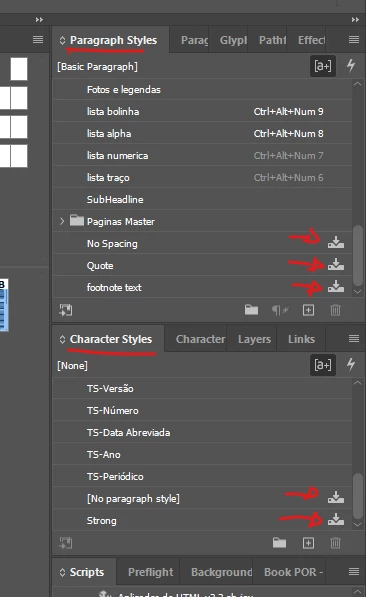
Is it possible to modify the script below to identify and delete these imported styles without keeping the formatting? Thanks in advance if anyone can help me modify it.
main();

function main(){
    var targetDoc = app.activeDocument;
    removeAllTypeStyles (targetDoc);
}

function removeAllTypeStyles (targetDoc) {

    //remove all paragraph styles
    for (var ps = targetDoc.allParagraphStyles.length - 1; ps >= 0; ps--) {

        if (targetDoc.allParagraphStyles[ps].name != "[No Paragraph Style]" && targetDoc.allParagraphStyles[ps].name != "[Basic Paragraph]") {
            targetDoc.allParagraphStyles[ps].remove (targetDoc.paragraphStyles.itemByName ("[No Paragraph Style]"));
        }

    }

    //remove all character styles
    for (var cs = targetDoc.allCharacterStyles.length - 1; cs >= 0; cs--) {

        if (targetDoc.allCharacterStyles[cs].name != "[None]") {
            targetDoc.allCharacterStyles[cs].remove (targetDoc.characterStyles.itemByName ("[None]"));
        }

    }

}  AdChoices