Inspiring
August 30, 2022
Answered

Deleting presets

  • August 30, 2022
  • 2 replies
  • 1673 views

Is there any way we can delete new document presets?

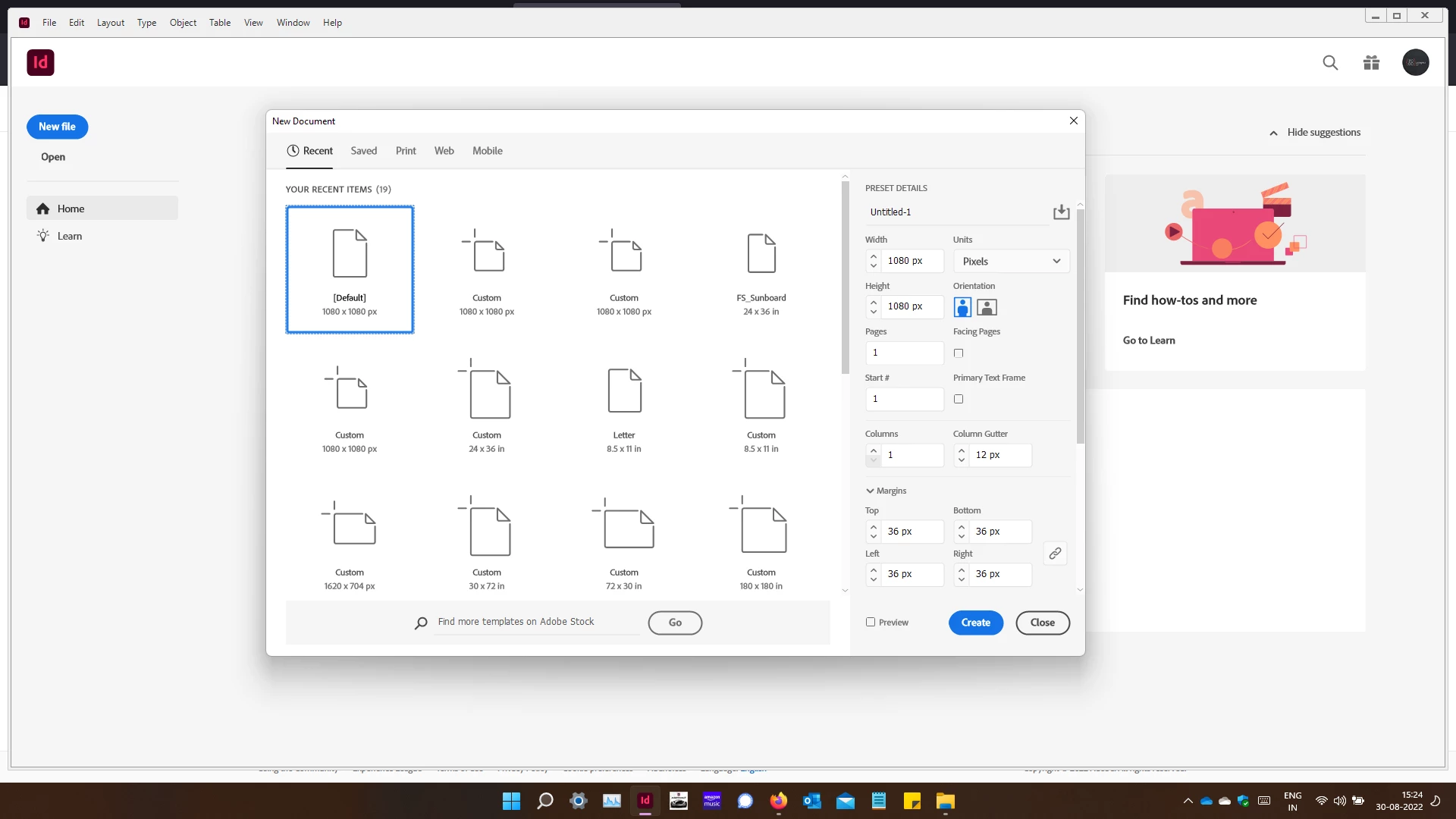
There are lots of recomendations but all seem to point towards removing the number of files opened or creted by you. I am attaching a screenshot which will probably give a better picture of what I am trying to delete.

Not that these are not useful but I don't use a lot of them now.


Vijay

This topic has been closed for replies.
Correct answer Mike Witherell

Bear in mind that there is a difference between deleting New Document Presets and Custom Page Sizes. Those are two different, yet similar, things.


I wouldn't recommend trashing ALL the settings just to prune back one thing. InDesign has upwards of 29 presets scattered throughout its program. The 3 finger reset is too scorched-earth. Instead, try these ideas...


Navigate to File > Document Setup. Click on the Page Size drop-down menu and choose Custom... In the Custom Page Size sub-dialog box, type in a name, choose a Height and Width, and then click Add and finally OK. You can also delete custom New Page Sizes within the same Custom Page Size sub-dialog box by selecting the named page size and clicking Delete. Once you click OK, the New Page Sizes.xml file will be rewritten and the Page Sizes folder (a folder under en_US) and New Page Sizes.xml file remain even if you delete all the named custom page sizes.


You can delete custom New Document Presets by choosing File > New Document > and going to the Saved tab. If you click on a custom New Document Preset, you will see a trashcan in the upper right corner. Clicking that trashcan icon will delete a saved new document preset.

 

2 replies

Mike Witherell
Community Expert
Mike WitherellCommunity ExpertCorrect answer
Community Expert
August 30, 2022

Bear in mind that there is a difference between deleting New Document Presets and Custom Page Sizes. Those are two different, yet similar, things.


I wouldn't recommend trashing ALL the settings just to prune back one thing. InDesign has upwards of 29 presets scattered throughout its program. The 3 finger reset is too scorched-earth. Instead, try these ideas...


Navigate to File > Document Setup. Click on the Page Size drop-down menu and choose Custom... In the Custom Page Size sub-dialog box, type in a name, choose a Height and Width, and then click Add and finally OK. You can also delete custom New Page Sizes within the same Custom Page Size sub-dialog box by selecting the named page size and clicking Delete. Once you click OK, the New Page Sizes.xml file will be rewritten and the Page Sizes folder (a folder under en_US) and New Page Sizes.xml file remain even if you delete all the named custom page sizes.


You can delete custom New Document Presets by choosing File > New Document > and going to the Saved tab. If you click on a custom New Document Preset, you will see a trashcan in the upper right corner. Clicking that trashcan icon will delete a saved new document preset.


Mike Witherell
Inspiring
August 31, 2022

Thanks a lot Mike. That was very helpful.


Vijay.

Participant
September 1, 2022

The Information you shared above is great. I have been reading all you shared here. In this you explained everything very well. If i want any further guideline we will contact you here https://community.adobe.com/t5/indesign-results-discussions/deleting-presets/m-p/13167628 Thanks

Rishabh_Tiwari
Legend
August 30, 2022

Hi,


Thanks for reaching out. Please try the suggestions shared here https://community.adobe.com/t5/indesign-discussions/how-can-i-delete-custom-page-sizes/m-p/9487113#M75283 


Feel free to reach out if you need any further assistance.


Regards

Rishabh

Inspiring
August 30, 2022

Thanks for the reply but I had already tried that.

Ctrl + Alt + Shift does nothing for me.


Vijay

Inspiring
August 30, 2022

Did you just post a reply & then mark it as an answer yourself too? 🙂

Who care whether it works or not right?