


Participating Frequently
April 12, 2024
Answered

Difficulty merging data

  • April 12, 2024
  • 2 replies
  • 3157 views
Good morning, I'm encountering a problem in Indesign.
I want to create a catalog in indesign from the descriptions in excel. I used the data merge function but it is not pulling the photos.
The following warning appears.
"The data source references one or more missing images. It is not possible to view or merge the missing images. When creating a merged document, you can choose to generate the list of all missing images."
How do I resolve this issue?
Correct answer leo.r

I redid the file in another location.
But I'm still having problems.
I'm having a lot of difficulty with this.

All the information is entering Indesign but the photos are not

@generous_rose29868 :


Try to place one of the images manually in InDesign. Then check its path in InDesign (select the image in the Links panel, the path will be in the Link Info panel, you can also copy the path via a right-click menu).


Compare this path to the path of the same image in your data source. Do you see any difference?

2 replies

Braniac
April 15, 2024

Hi @generous_rose29868 ,

in case you copied over your images to a distinct folder on e.g. your Desktop, do the following:

[1] Use the file names only with the right suffixes.

[2] Store your data source file for the data merge in the folder where your images are.


Regards,
Uwe Laubender
( Adobe Community Expert )

Participating Frequently
April 22, 2024

Good morning I did the test of placing the image manually and then seeing its path to compare with the spreadsheet I have. And unfortunately he is correct. I tried putting the photos in a folder on the desktop and the problem still persists

Robert at ID-Tasker
Braniac
April 22, 2024
quote

Good morning I did the test of placing the image manually and then seeing its path to compare with the spreadsheet I have. And unfortunately he is correct. I tried putting the photos in a folder on the desktop and the problem still persists


By @generous_rose29868


Have you just compared visually or have you copy&pasted it into your datasource file and tried DataMerge again?


Robert at ID-Tasker
Braniac
April 12, 2024

Where are your images stored?


Do you have correct paths to the images in your DataSource file?


Participating Frequently
April 12, 2024
All my photos are in Drive.
I put it as a link for the Images column.
I already tried to download the photos and I put the link that goes directly to my folder that contains the photos
And I both came across the same result. Indesign does not pull photos
Robert at ID-Tasker
Braniac
April 15, 2024
Good morning.
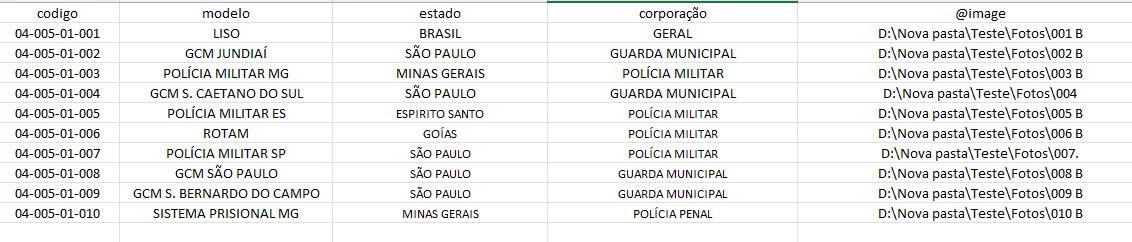
I updated the document as they informed me and the problem persists
What mistake am I making?
updated file image


quote
Good morning.
I updated the document as they informed me and the problem persists
What mistake am I making?
updated file image


By @generous_rose29868


What's the rest of the links?


What is the extension?


And also the a with accent - a-acute - can be the culprit: