inacio israeln53113395
New Participant
February 5, 2020
Answered

Disable clipping path when placing images

  • February 5, 2020
  • 1 reply
  • 2905 views

Hello,


Once i found this and now im lost. 


How do i set as default, disable PS clipingpath when placing images in Indesign?


A have 1000+ images palced and all of them are using the cliping path from PS... I want to disable this... 


Thanks

This topic has been closed for replies.
Correct answer David Popham

To set InDesign's default behavior to disable clipping paths when placing an image:

1. With any document open, choose File > Place.

2. In the Place dialog, hold down the Shift key and double-click on an image with a clipping path to open the Import Options dialog.

3. In the Image pane, uncheck Apply Photoshop Clipping Path. Any subsequent use of the Place command will use that setting until it's changed.
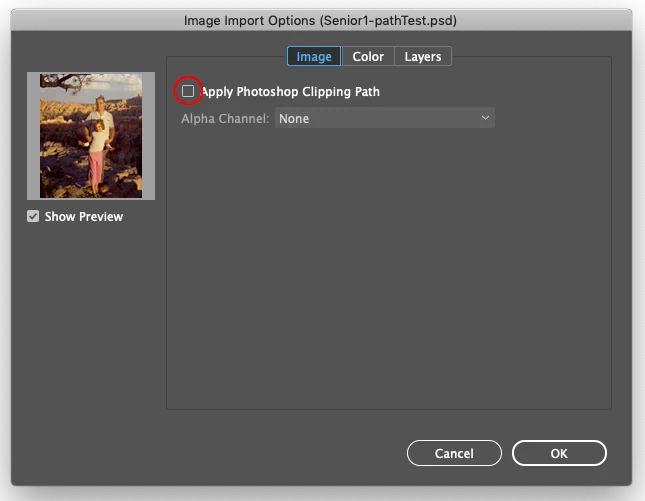


If you're wanting to change the the setting for images that have already been placed, you'll need to change each image manually using Object > Clipping Path > Options. Or a script can process all of the images in the document.


1 reply

David Popham
David PophamCorrect answer
Participating Frequently
February 5, 2020

To set InDesign's default behavior to disable clipping paths when placing an image:

1. With any document open, choose File > Place.

2. In the Place dialog, hold down the Shift key and double-click on an image with a clipping path to open the Import Options dialog.

3. In the Image pane, uncheck Apply Photoshop Clipping Path. Any subsequent use of the Place command will use that setting until it's changed.


If you're wanting to change the the setting for images that have already been placed, you'll need to change each image manually using Object > Clipping Path > Options. Or a script can process all of the images in the document.

inacio israeln53113395
New Participant
February 5, 2020

Hey David!


Thank you so much for the fast solution!

By the way Adobe, this should be a setting in the Options, insted of hiden in a menu, with a Shift+...


I don't remeber the last time I used the Place command! 99,99% Drag & Drop from Lightroom or Finder! That's why I wasnt find it!

Cheers! 

Ashutosh_Mishra
Inspiring
February 5, 2020

Hi there,


Glad to hear your issue was resolved. In order to change the workflow/location of this option, you may post a UserVoice request on https://illustrator.uservoice.com/

This is the best way of communicating with the Engineering and Product Management teams regarding issues and suggestions so they can be implemented in future releases. 


Regards,

Ashutosh