alexh43626177
New Participant
March 6, 2019
Answered

Disable hyphenation by default?

  • March 6, 2019
  • 8 replies
  • 36492 views

Hi all.

I'd like indesign to NEVER hyphenate a word for me. It seems I'm having to uncheck the hyphenation box for every text box.

I've tried turning hyphenation off and closing / quitting. When I start a new file it's checked again.

Any ideas?

Many thanks

Correct answer Thom Coverly

Yes, you can turn off hyphenation so that the box is unchecked for every new text box. 
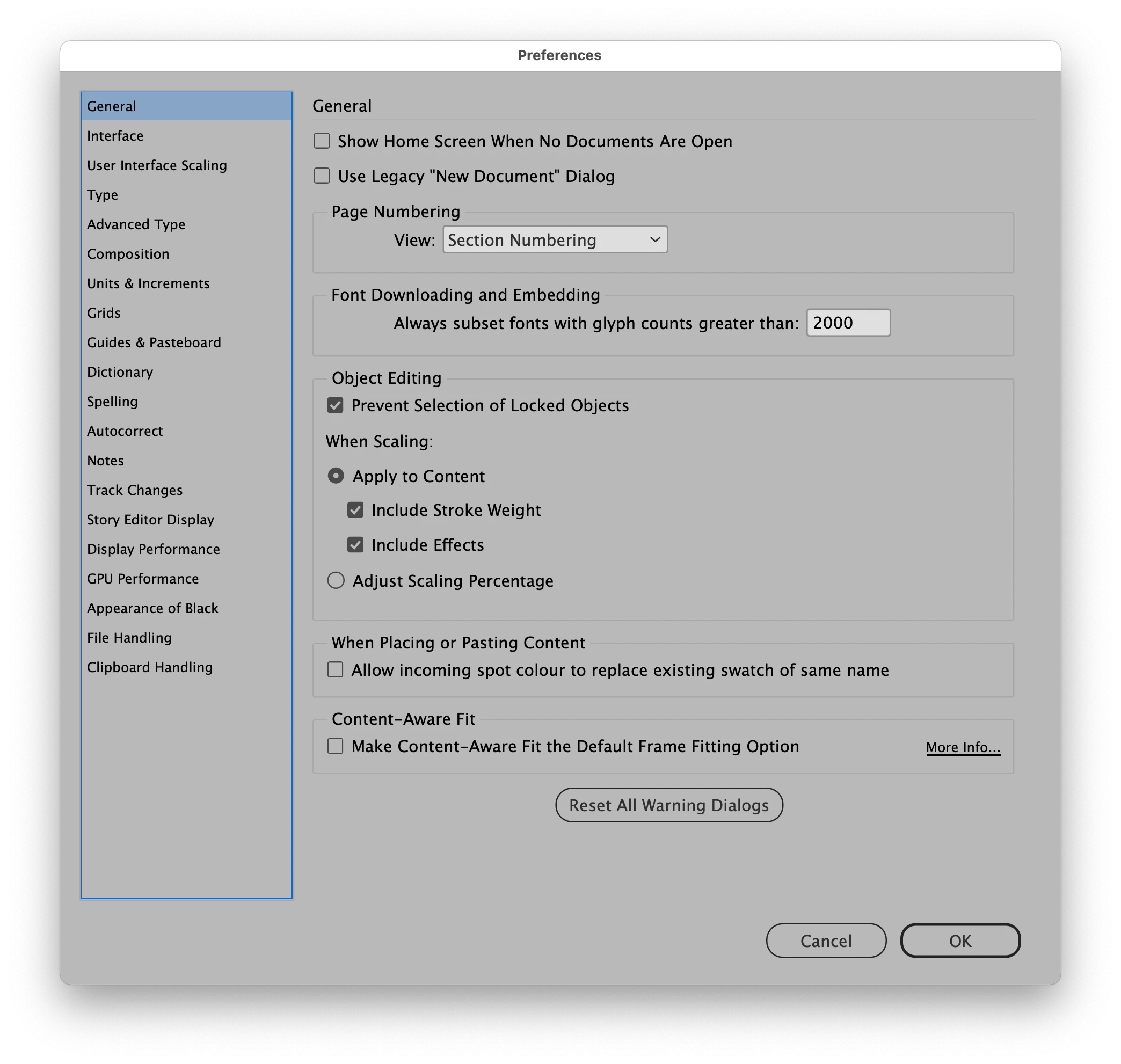
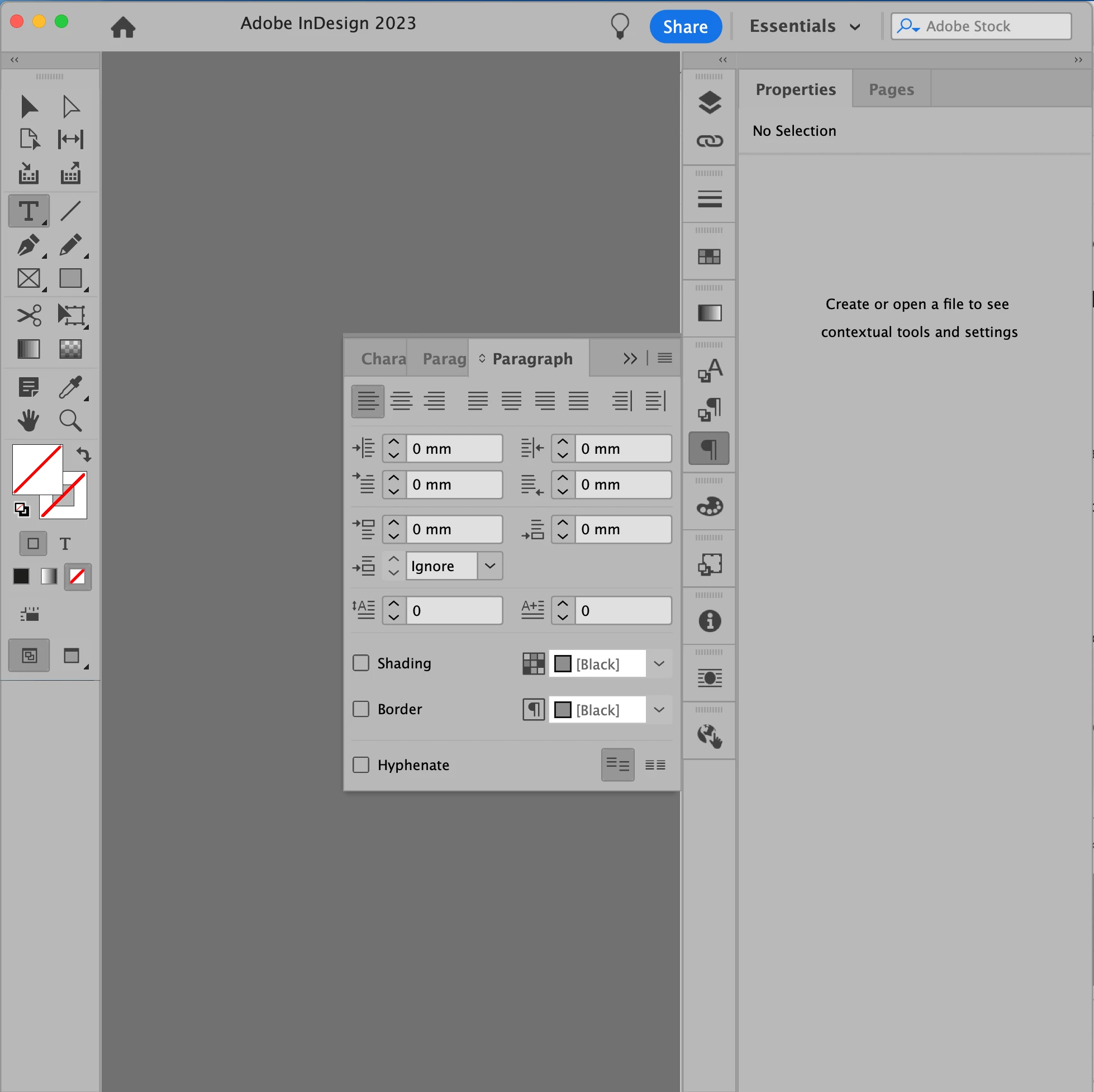
Screenshots at end…

1. If you haven't already, in Preferences > General, uncheck Show Home Screen When No Documents Are Open. (You can turn this back on later if you use its features.)
2. With no documents open, use CMD+OPT+T to open the Paragraph panel. (Alternatively, find it in Window > Type & Tables > Paragraph, OR type "paragraph" in the Help menu search field to jump to that menu item.)
3. Uncheck the Hyphenate option. 
Hyphenation is now off by default for all new text boxes and will "stick" when you close InDesign and restart.
Instructions applicable for InDesign 2023 and 2024.

8 replies

New Participant
July 14, 2024

Just set hyphenation options to unreasonnable numbers...


I set to
Words longerThan: 25 letters
After first: 15 letters

before last: 15 letters


Then it stopped forever!


jmlevy
Community Expert
July 14, 2024

I wonder why you don't simply untick the hyphenation chekbox.

New Participant
July 14, 2024

Probably the same reason why I'm wondering why you didn't think I'd already tried that.

Thom CoverlyCorrect answer
Inspiring
May 10, 2024

Yes, you can turn off hyphenation so that the box is unchecked for every new text box. 
Screenshots at end…

1. If you haven't already, in Preferences > General, uncheck Show Home Screen When No Documents Are Open. (You can turn this back on later if you use its features.)
2. With no documents open, use CMD+OPT+T to open the Paragraph panel. (Alternatively, find it in Window > Type & Tables > Paragraph, OR type "paragraph" in the Help menu search field to jump to that menu item.)
3. Uncheck the Hyphenate option. 
Hyphenation is now off by default for all new text boxes and will "stick" when you close InDesign and restart.
Instructions applicable for InDesign 2023 and 2024.


Participating Frequently
April 7, 2022

Any updates on this? Please do not respond with a paragraph of irrelevant information like the last "correct answer" and please do not respond with "close all your documents" then uncheck the hyphen box because the hyphen box is inaccessible when in fact we close all the documents. 

jmlevy
Community Expert
April 7, 2022

[…] the hyphen box is inaccessible when in fact we close all the documents.

This is absolutely untrue…

Participating Frequently
April 7, 2022

Absolutely is true sir. Stop the arguments please. 


Check out my screenshots sir....posted two of them where it shows the screenshot where the options are greyed out after closing all documents. It is a fact that will all documents closed.......my boxes are greyed out and unaccessible.


Show me where it works please good sir! I could certainly use your help. Provide screenshots so we can actually follow your progress in this area!

New Participant
October 14, 2021

I heartily disagee with Manan. If you can turn something off, you can always turn it back on. Too bad I've tried to disable it as well to no avail. It's annoying. It slows me down. I have been in the biz successfully for nearly 40 years and have never utilized hyphenation. I sure wish Adobe would make it so we could turn it off permanently.

Inspiring
October 23, 2020

As soon as you close all docs, I no longer have access to the palettes. 

Participating Frequently
March 25, 2021

You should still have access to the menu bar. Select Window > Type & Tables > Paragraph menu and this should pop the palletes back in. You should be able to make changes to the defaults without an open document from there.

alexh43626177
New Participant
March 6, 2019

Many thanks everyone! Disabling the start menu and making the changes with no docs open has worked!

Michael Bullo
Community Expert
March 6, 2019

Excellent

Michael Bullo
Community Expert
March 6, 2019

Changing settings with no documents open makes that the new default for all new documents. So you want to turn off hyphenation with no documents open.

This is now slightly complicated by InDesign showing the Start screen by default which we need to turn off. Uncheck the following option…

     Preferences > General > Show "Start" Workspace When No Documents Are Open.

Open the Paragraph Panel…

     Window > Type & Tables > Paragraph

Turn off the Hyphenate option in this panel.

You should now have turned off hyphenation for any new document. Congratulations

gregmaletic
Inspiring
August 9, 2019

I turned off the Start screen and made sure no documents were open… but it didn't fix the problem for me. Hyphenation is still on by default in new documents.

Community Expert
March 6, 2019

You will have to switch off the hyphenation in all your paragraph styles. For text with default paragraph style, you could switch off the hyphenation from the Paragraph panel, with all the documents closed, hence forth all the text that you add to the document should have hyphenation off by default.

-Manan

alexh43626177
New Participant
March 6, 2019

Thank you. I've just tried editing Basic Paragraph Style and turning hyphenation off. But when I open a new document it's back on again.

Community Expert
March 6, 2019

Hi Alex,

You should never edit the Basic Paragraph Style, it will cause more trouble for you. As i mentioned you just need make sure that no documents are open and then change the hyphenation to off from the Paragraph panel. Alternatively you could also create a new paragraph style with hyphenation off and make it the default paragraph style for your new documents.

Have a look at the link below for a description on why editing Basic Paragraph Style is a bad idea and how to make a paragraph style as default, in the link the property discussed is Font but the same applies to hyphenation as well.

https://indesignsecrets.com/3-ways-change-default-font-indesign-dont-edit-basic-paragraph.php

For any paragraph style that you have created and used in your old documents you would have to turn off hyphenation in all of them.

-Manan
