


Inspiring
May 19, 2025
Answered

Document isn't adding pages as expected; allows overset instead

  • May 19, 2025
  • 7 replies
  • 2791 views

I have a spread with a primary text flow on each page. They are connected (which we know, because InDesign does not allow primary flows on facing pages if they aren't).


I have a one-page document (which, not surprisingly, starts on the right page). If I insert a page break and keep typing; or if I type a bunch of extra lines and then go up and insert a page break; or if I just add enough lines to overlow the page... InDesign isn't adding a new page. It's allowing it to be overset.


Previously (including in the file I copied to start this one), InDesign added pages. Why would this suddenly cease to happen? All files are members of the same book, by the way.
Correct answer Eugene Tyson

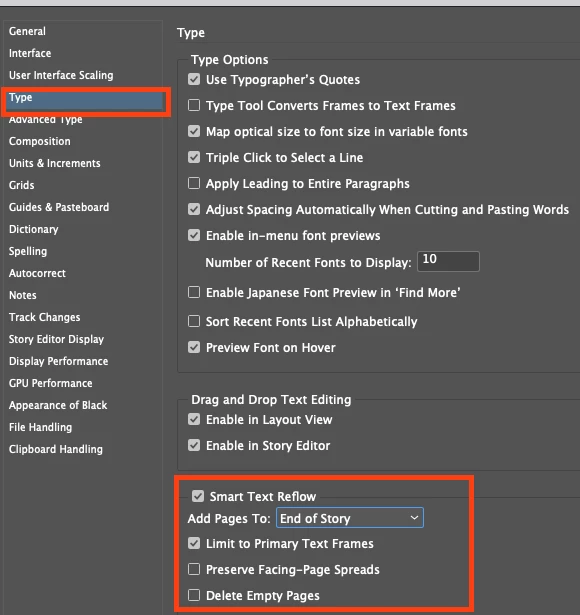
That would be in the Preferences - under Smart Text Reflow 


You have these options. 


If it's not working it's perhaps the Primary Text frame was overrident (released from the Parent Page)

Delete the text frame and reapply the Parent Page and should fix it. 


7 replies

Barb Binder
Community Expert
Community Expert
May 20, 2025

Ugh. I'm sorry. Did I say this yesterday, or just intend to say it? I don't see it so I'm going to say it again just in case– it's really hard to teach yourself InDesign. It has nothing to do with your intelligence.


Placing is the preferred way to add text to InDesign, copy/paste isn't. You could have pasted into the primary frame when you started but if you didn't know that, a regular old paste without a insertion point will create a new frame that you potentially dragged over the primary frames and then continued with auto-flow, and those primary frames were left ignored. 


~Barb

~Barb at Rocky Mountain Training
Inspiring
May 20, 2025

No worries! No offense taken. My point is that issues like the defective selection indications are seldom covered.


As far as this issue goes: Before pasting, I always made sure that my selection point was sitting on-screen in the intended position in the existing text frame. Plus, the frames are still all interconnected from page to page, which wouldn't have happened if pasting had just created arbitrary new ones.

Barb Binder
Community Expert
Community Expert
May 20, 2025

Or maybe you don't remember! It seems like you are setting up your document correctly so the fix should be straightforward.


You could either uncheck limit to primary frames in Prefs or leave it limited and

  1. Save your file (and/or a copy, just in case)
  2. Click in the story and Select All,
  3. Edit > Cut
  4. Delete all of the body pages except page 1*
  5. Reapply the A-Parent or whatever you called the top level parent to page 1, then
  6. Click in the primary frame on page 1 and paste the content back in.


You should be back in business and using the primary frames as intended.


~Barb


___________

* This assumes that all content is in the main story and/or on parent pages. 

~Barb at Rocky Mountain Training
Barb Binder
Community Expert
Community Expert
May 20, 2025

Hmmm. Did you click into the primary frame on page one and the choose File > Place , or did you auto-flow on top?


~Barb


~Barb

~Barb at Rocky Mountain Training
Inspiring
May 20, 2025

I have never used File / Place. Everything in the doc is plain text cut & pasted from a Word doc or PDF.


But now I find that the child pages, once again, have a duplicate overlaying text frame that flows from page to page, while the "primary" one sits hidden and unused. I'm beyond fed up with that behavior. I never cut and paste entire frames; only text.

rob day
Community Expert
Community Expert
May 20, 2025

Hi @Thomas_Calvin , Sorry if this has already been mentioned, but select your pages in the Pages Panel and check your panel’s Allow Document Pages to Shuffle and Allow Selected Spreads to Shuffle settings. If you do not allow pages to shuffle, this can happen when you paste overflow text:


Pages are not added as needed:


With Allow... checked I get this when adding text to the Primary Text flow:


Barb Binder
Community Expert
Community Expert
May 20, 2025

Hi @Thomas_Calvin!


Let's start by double-checking that you are using primary frames since you have it set to (the default) Limit to Primary Frames. When you select a primary frame, the badge should be visible, even with Show Text Threads enabled.


~Barb

~Barb at Rocky Mountain Training
Inspiring
May 20, 2025

It doesn't appear on regular pages. It does appear on all parent pages, and indicates that it's the primary flow.

Barb Binder
Community Expert
Community Expert
May 20, 2025

Here's a quick demo, @Thomas_Calvin:


~Barb

~Barb at Rocky Mountain Training
Inspiring
May 20, 2025

Thanks Barb. That's basically what I did, with the difference being that I used "duplicate" instead of creating a new one "based on." I guess this option creates extra frames for everything, whereas "based on" doesn't. I've re-done it now.


Now I'm facing another perplexing problem: Pages aren't being added after the last page, despite the primary (and only) text flow being connected across pages and "Smart Text Reflow" being on, set to add pages to "end of story."


Barb Binder
Community Expert
Community Expert
May 19, 2025

Hi @Thomas_Calvin:


I don't think I've seen your layout but I do think you are working on technical documentation that will eventually grow very lengthy. We typically use primary text frames for long document layout so that text can flow continuously from one spread to the next.


I can't picture any scenario when I would want to duplicate a spread when using primary frames.


I'm not here to defend Adobe—or InDesign—but I think of it like Flow A in FrameMaker., if that rings a bell. I'd never add a disconnected page—ok, a few exceptions like adding landscape tables to a portrait document—I'd just click and insertion point to add more content. If you have supporting graphic elements, they may—again may, since I can't picture your layout—be better suited to adding to parent pages?


~Barb

~Barb at Rocky Mountain Training
Inspiring
May 19, 2025

Hey Barb,

I don't want to add disconnected pages. I want to change the header and footer in part of our document, which comprises supplementary pages. So I created a new two-page-spread parent based on the "regular" parent that's used for the rest of the document, and then overrode the footer. Text should flow in this section like any other, and pages should be added when necessary. How else would one achieve this?

Barb Binder
Community Expert
Community Expert
May 19, 2025

Do you know about linked parent pages? You can duplicate and link parent pages—for example, A-Parent might be the top level parent, assigned to the majority of the  body pages. Then you add a new parent for pages that need to look different: perhaps called B-Parent and based on A-Parent so it is still using the same primary frames. You can then  override the running heads to look the way you need them to and assign them to select body pages. Because they are linked, changing A-Parent changes all body pages assigned A-Parent, along with B-Parent and all body pages assigned B-Parent. 

I can record a quick video to show this a bit later or in the morning. 

-~Barb

~Barb at Rocky Mountain Training
Eugene TysonCommunity ExpertCorrect answer
Community Expert
May 19, 2025

That would be in the Preferences - under Smart Text Reflow 


You have these options. 


If it's not working it's perhaps the Primary Text frame was overrident (released from the Parent Page)

Delete the text frame and reapply the Parent Page and should fix it. 


Inspiring
May 19, 2025

Thanks. Those settings were active, and I have no idea why the master page would've been overridden. I did have to delete the text box and re-apply the master page.


Now I'm concerned that previous documents in the book are similarly messed up in random places, breaking text flow and presenting the opportunity for text to be lost.

Community Expert
May 19, 2025

Strange one - is it a lot of documents? Is there anything we can do to help speed up the checks? 
Let us know if you need further assistance.