



jan99x
Inspiring
June 11, 2020
Answered

document preset ppi 72 or 300

  • June 11, 2020
  • 2 replies
  • 4512 views

Hi,

I make a document to be printed. Printer-man asks document with 300dpi.

Via Menu / File / Document Presets ... I view following panel:
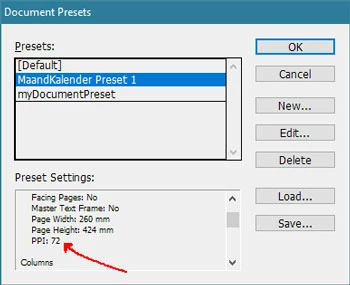
There I see -72 PPI-

Does that matter? Is that number related to screen-view 72 PPI? What does it mean for my print document for the printer ?

Is it neccecery to change that to 300 DPI? Where do I do that.


This topic has been closed for replies.
Correct answer rob day

InDesign has a Pixel measurement unit that isn’t related to image resolution. It is equal to 1/72"—1"=72ppi. The Pixel measurement unit is only useful for screen and web projects where you would need to export a page to an image format with a specific pixel dimension, and is not used for print projects.


The pages in a document are vector objects and have no resolution. Your printer wants any images placed in your document to have an output resolution of 300ppi. You can get that info by selecting a placed image and checking the Link Panel’s Link Info—the output resolution is listed as Effective Resolution. You can also use InDesign’s Preflight feature to flag images below a defined resolution.

2 replies

rob day
rob dayCorrect answer
Community Expert
June 11, 2020

InDesign has a Pixel measurement unit that isn’t related to image resolution. It is equal to 1/72"—1"=72ppi. The Pixel measurement unit is only useful for screen and web projects where you would need to export a page to an image format with a specific pixel dimension, and is not used for print projects.


The pages in a document are vector objects and have no resolution. Your printer wants any images placed in your document to have an output resolution of 300ppi. You can get that info by selecting a placed image and checking the Link Panel’s Link Info—the output resolution is listed as Effective Resolution. You can also use InDesign’s Preflight feature to flag images below a defined resolution.

jan99x
jan99xAuthor
Inspiring
June 11, 2020

jmlevy + rob_day... thanks.

I thougt so .. is was irrelevant but was not sure about it.

Remains... the only thing is to check te images for 300 dpi.

jmlevy
Community Expert
June 11, 2020

Hi,

I never noticed this information which seems absolutely irrelevant. The important thing is that the resolution of the placed images matches with the printer requests