Tom Reuter
Known Participant
July 16, 2021
Answered

Edge smoothing in Indesign creates lines where there should be none!

  • July 16, 2021
  • 6 replies
  • 8961 views

Something that is extremely annoying and obstructive when designing. This was once different and better!

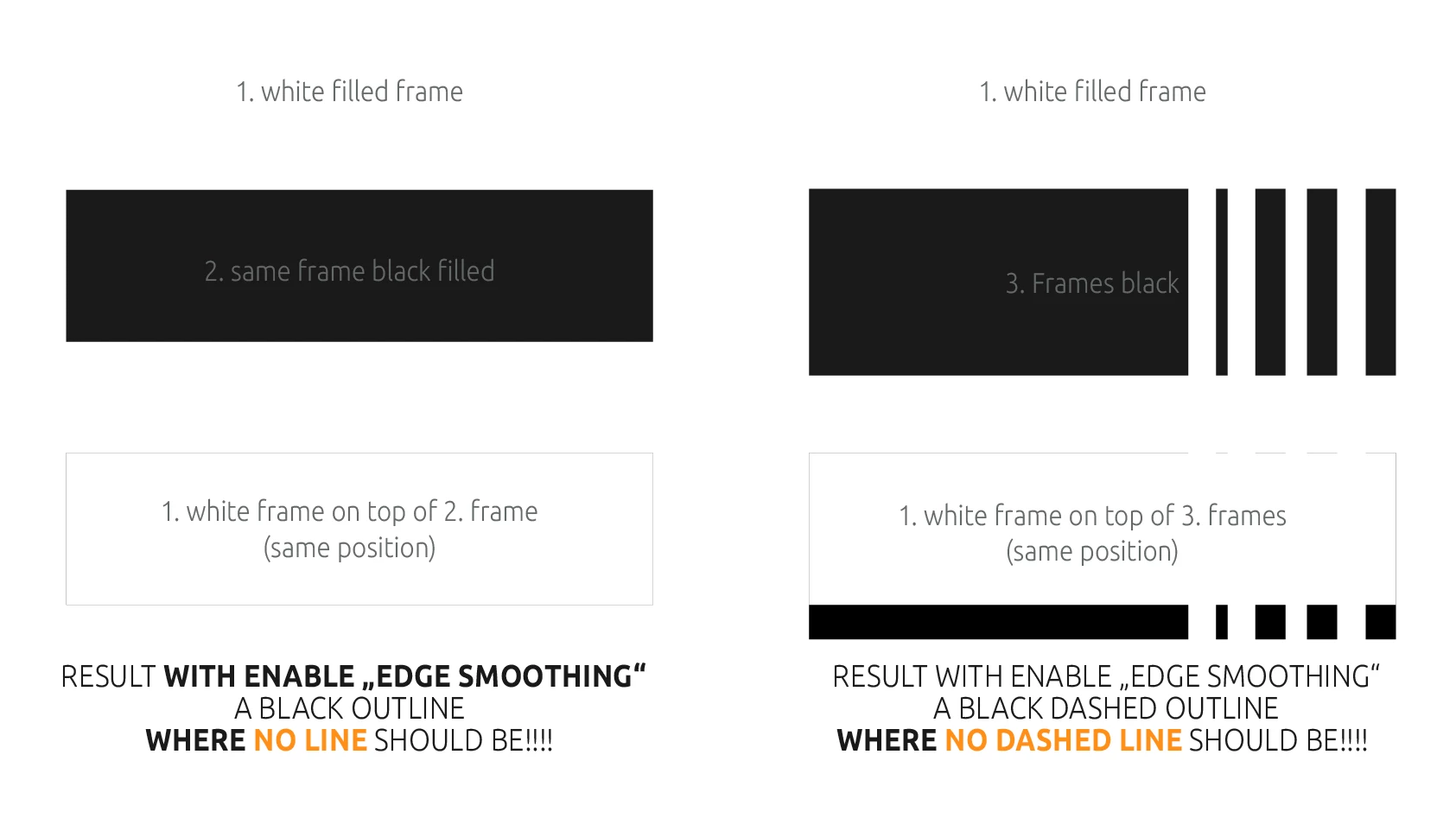
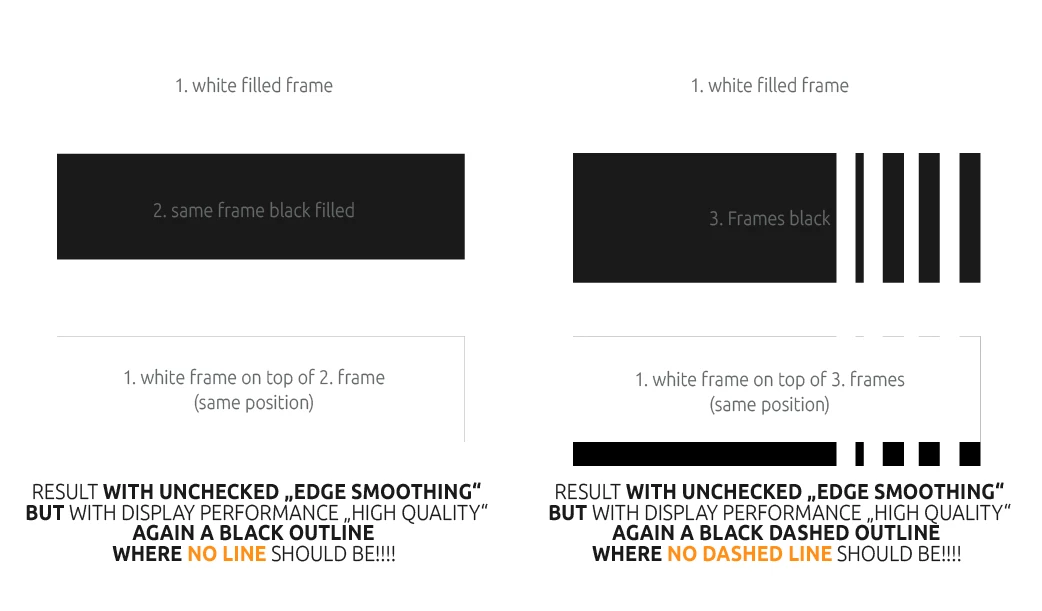
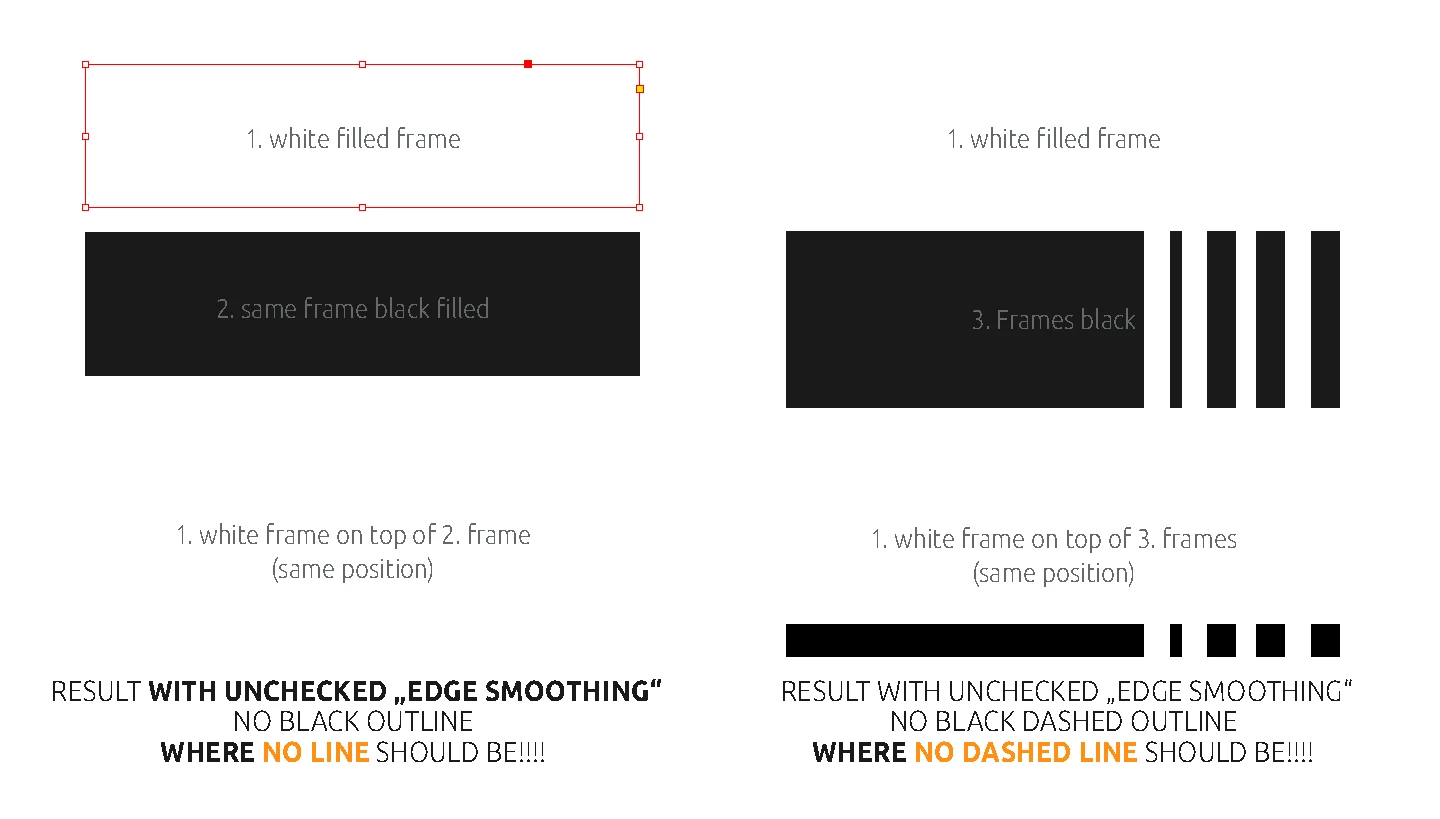
No matter if e.g. black or dark frames with white "narrow - narrow" outline or areas that cover others, hairlines appear everywhere where there shouldn't be any.

I don't know with which update this has crept in. But it nevt infinitely and it was no improvement.

The only way to get rid of these lines is to disable edge smoothing completely. But then you have a pixelated view with the charm of the 80s. So this is not an alternative either!
This topic has been closed for replies.
Correct answer rob day

disable edge smoothing completely


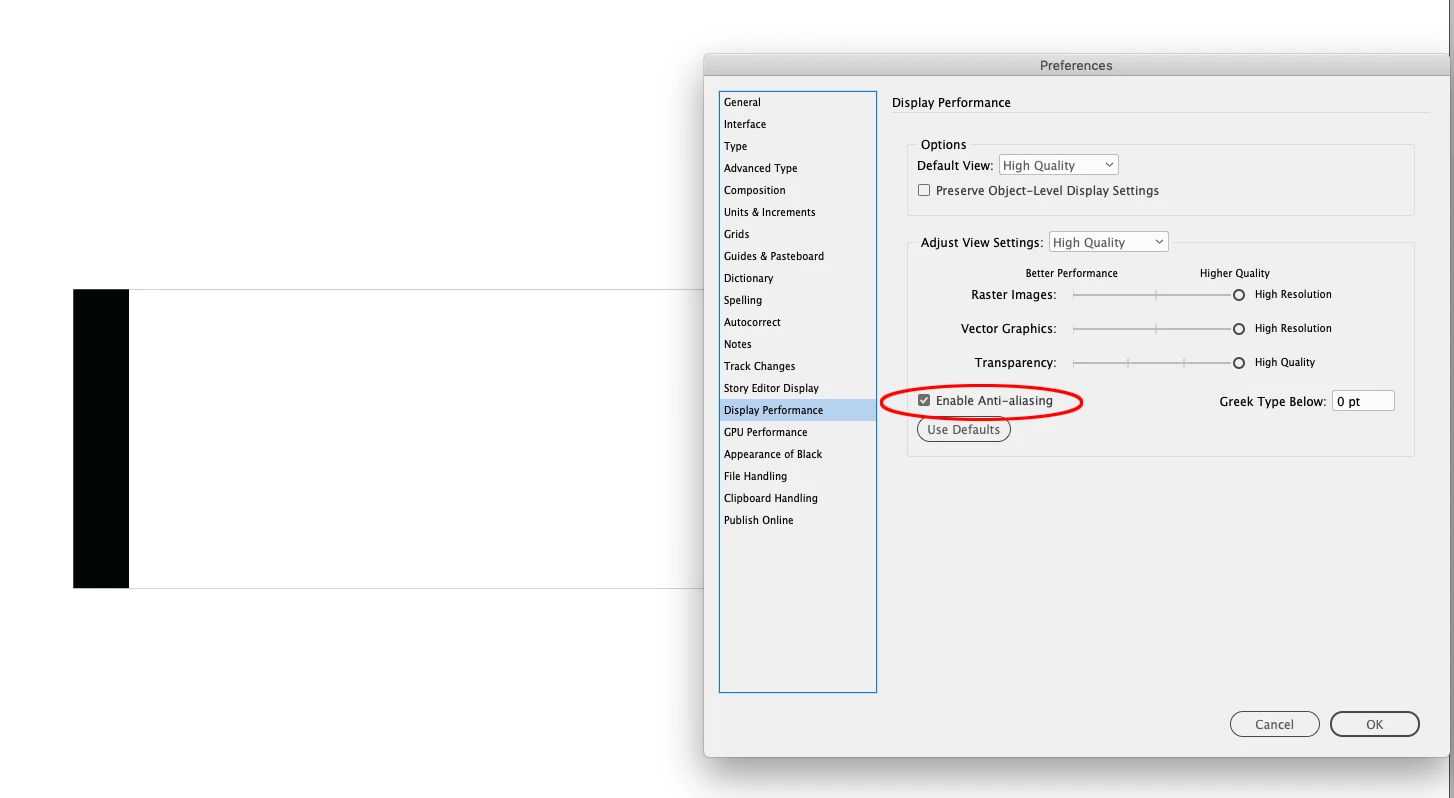
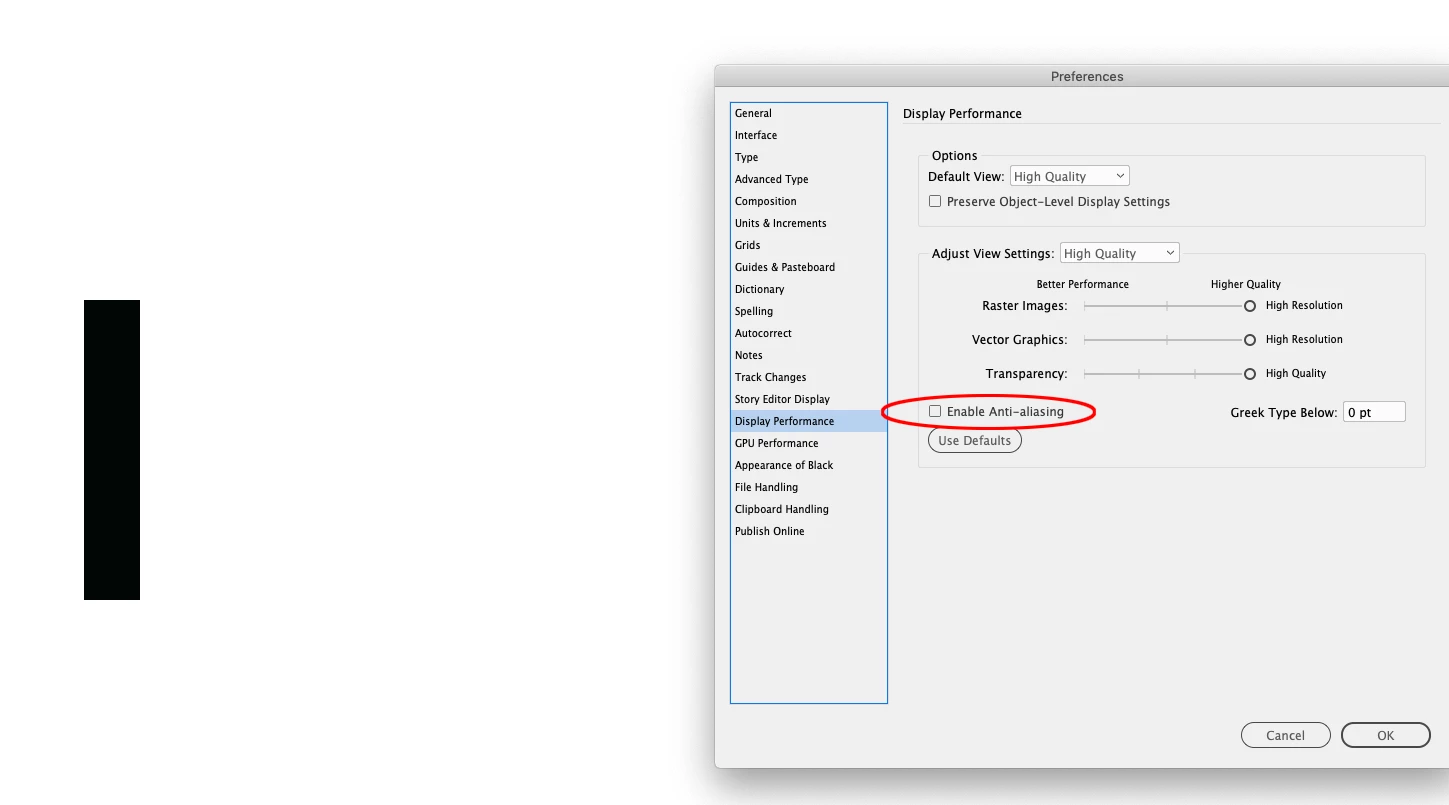
Hi @Tom Reuter , it could be happening because of your Display Performnce Anti-Aliasing setting—maybe that’s what you mean by edge smoothing?. I can replicate your problem by turning it on, which is the default for High Quality:


Anti-Aliasing is only needed for display quality where there will always be compromises. It shouldn’t be a problem for high resolution print output where there would be no anti-aliasing in the RIP.

6 replies

rob day
Community Expert
Community Expert
July 19, 2021

I don’t think there is a software solution to the anti-aliasing problem. You can’t rely on a relatively low res display if you are drawing objects that have to be pefectly aligned—you would have to check the transform numbers.


Here’s a case where the edges don’t actually align, but it doesn’t change the display because the difference is only .1pt on the right edge


The display via InDesign’s AA:


With Acrobat’s AA, the misalignment is hidden at a lower zoom magnification, and is only revealed when zoomed in, so it would be easy to miss, but this would show in print:


Community Expert
July 19, 2021

Hi Tom,

after reading all this and testing your IDML file I know now what this is all about.

GPU Preview is not the source of the issue. Anti-aliasing is revealing a possible issue, I think…

This issue is old. Goes back to day one of the feature perhaps.


Well, all that aside, Lukas Engquist has a solution for you. In case you had no chance to read his post:

https://community.adobe.com/t5/indesign/edge-smoothing-in-indesign-creates-lines-where-there-should-be-none/m-p/12184621#M437616


Question remains, if this phenomenon that is revealed by anti-aliasing could be visible in any output format.

With PDF Export for print production there should be no issue. Any other usage, even viewing with Adobe Reader or other PDF readers could be a source of irritation for the customer and the enduser. So I would stick with Lukas' solution as far as possible.


Regards,
Uwe Laubender

( ACP )

rob day
Community Expert
Community Expert
July 19, 2021

Question remains, if this phenomenon that is revealed by anti-aliasing could be visible in any output format.


Hi Uwe, It shouldn’t happen with a high res RIP because there is no need to anti-alias when the output resolution is the typical offset print 1200-2400 dpi. With RIP’d output, anti-aliasing would show itself in something like black only text—the anti-aliased gray values on the edges of the text would have to get halftoned.


I think this is related to flattened PDF stitching, which is a screen display AA problem, and doesn’t happen at high resolution print output.

rob day
Community Expert
rob dayCommunity ExpertCorrect answer
Community Expert
July 18, 2021

disable edge smoothing completely


Hi @Tom Reuter , it could be happening because of your Display Performnce Anti-Aliasing setting—maybe that’s what you mean by edge smoothing?. I can replicate your problem by turning it on, which is the default for High Quality:


Anti-Aliasing is only needed for display quality where there will always be compromises. It shouldn’t be a problem for high resolution print output where there would be no anti-aliasing in the RIP.

Tom Reuter
Known Participant
July 19, 2021

@rob day 

Yes Rob, a light came on for me today. Better late than never. Cough 😄

Yes I meant with edge smoothing actually anti-aliasing and I am also aware that if I turn off "anti-aliasing", the damn thin lines disappear the price is however that the preview looks really times very pixelated, which is also not nice.  Not really, but ist seems to me that i have to live with it.

I didn't have any problems with the effect or with anti-aliasing before. I'm pretty sure about that!

Thanks in any case that you have thought about it and your time.
With best regards Tom

rob day
Community Expert
Community Expert
July 19, 2021

I can get it to happen with CS6:


I don’t see it happening on an export to PDF—Acrobat has its own anti-aliasing methods—so exporting to PDF should reveal whether it’s going to be an output problem. Unchecking Smooth Line art hides PDF/X-1a stitching AA, so I leave it unchecked


@mj
Community Expert
Community Expert
July 18, 2021

Hi @Tom Reuter ,


I see you've posted on the Indesign User Voice more than a week ago with no response. The InDesign team is meant to be following that thread.


I've tried to recreate your problem unsucessfully. 


Are you applying effects to empty and solid frames? Have you checked Object Styles to make sure nothing weird is going on there?


Consider resetting ID preferences to purge any changes to default settings.


Best

mj


Tom Reuter
Known Participant
July 18, 2021

I have also deleted my preferences.
The effect with the lines remains. Unfortunately.

(IDMLs werden hier leider nicht hochgeladen)

Tom Reuter
Known Participant
July 18, 2021

By the way I have the same problem with my MacBook where Mojave is installed, so it doesn't seem to be specific only to my iMAC Pro.
I've looked at this on a variety of screens to rule out that the screens and their resolutions are the problem, but it was allways the same. (All screens have the original physical resolution)

I have reinstalled an ancient version of Indesign that I was sure was still good. But now also there appear these hairlines.

This makes me suspect that the problem is not directly with Indesign itself, but rather with a component (OPenGL? CPU/GPU components or whatever?) that all Adobe applications share.


Because the high resolution preview in Indesign, seems to in whatever way, fall back on parts of these global components and smooth the edges, even though this is extra disabled in the preferences.


If you think about the massive problems of Adobe with the GPU support and the so far failed attempts to fix this for all, then it is obvious that the rabbit lies in the pepper. They are working feverishly to get this working for the new Macs and apparently a few here and there with older systems (Catalina) and Macs like me are falling off.

Mayby an update to BigSur could be helpful. But ...  I'm not sure if I'm going to have any other problems. I mean, the name "Bugs Sure" in the forums is not a coincidence. Or?


Lukas Engqvist
Community Expert
Community Expert
July 18, 2021

Do you want a stroke? If so make a difference in size between the objects.

The hairline you are seeing is a result of antialiasing, and is an on screen artifact created by the constrains of mathematics. If you are trying to get a custom dashed line you can do as you are doing but make the box below slightly larger. The effect of having the lines dissapear will vary with zoom level, and is only affecting the representation on screen.

(you will get similar artifacts if you have a selection in photoshop, fill with black and then fill with white)

What is happening is that the computer is faking more resolution that you have by making partially darkened pixels on the screen grey rather than black or white. When you add the white box, pixels that are partially white will be lightened by the % covered by white to simulate since screen pixels cannot be split. Because if you darken by 50% and then lighten by 50% you don't end up at zero, you will get tis happen at certain zoom levels, and certain positions. 

Tom Reuter
Known Participant
July 18, 2021

Hi Lukas,

Yes, I know that these lines vary depending on the zoom level. Which unfortunately does not make it better. But the setting of my monitor is on original resolution and not scaled.

The artifacts that happen today in Indesign are new to me at least. Because I know that these lines did not exist before (at least not for me).

The lines appear e.g. also if one uses another, than the continuous line with borders, (thus e.g.: "Wide - wide" s. Screenshot) and the background is darker than the line.

However, it disturbs the design and I always have to explain it to my customers.

I know the lines in the kind of course already for years from Akrobat and know therefore around the trigger "the edge smoothing" and that they are not mher there in the pressure then. Nevertheless, the display is incredibly annoying.

If I knew with which update they came, I would posthaste install the old version of Indesign again. The updates have been buggy lately anyway.

However, I would find it even better if the old display state could be restored, as it was, namely good.

Thanks to you in any case

Tom Reuter
Known Participant
July 18, 2021

By the way, that linese appears whrer no lines should be, also happens recently when you put a cropped image in a frame with effect! This is also new for me.

s. Screenshot: on the left inserted into the frame on the right image above the frame

Community Expert
July 17, 2021

Hi Tom,

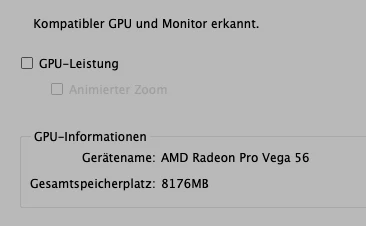
did you try to disable GPU support entirely for InDesign?

See InDesign's Preferences.


Regards,

Uwe Laubender

( ACP )

Tom Reuter
Known Participant
July 18, 2021

Hi Uwe,
You mean by "completely" quasi from the bowels of Indesign? How does that work? And what do I have to delete? GPU unfortunately does not work with Adobe at all, at least not without multiple problems.

Du meinst mit "komplett" quasi aus den Eingeweiden von Indesign? Wie geht das? Und was muss ich löschen? GPU funktioniert ja leider mit Adobe überhaupt nicht, zumindest nicht ohne multiple Probleme.

Beste Grüße
Tom Reuter

Tom Reuter
Known Participant
July 18, 2021

The GPU was already deactivated in advance in all screenshots. s last screenshot