selvam214
Inspiring
September 18, 2017
Answered

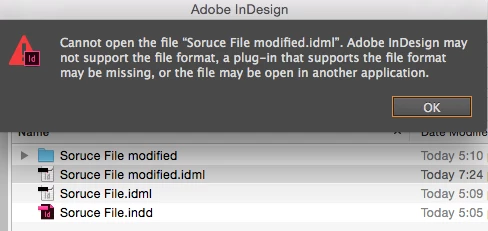
Edit IDML, remove metadata, save, again open in InDesign - can't open

  • September 18, 2017
  • 3 replies
  • 4762 views

Hi,

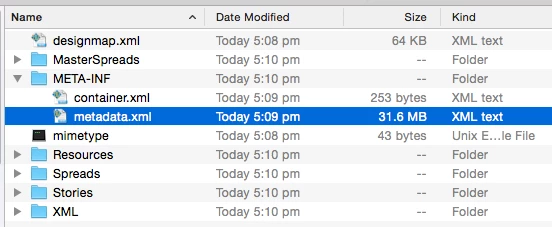
I have an InDesign source document within more than 30mb metadata info, when we use the source file in another document, adding 30mb additionally when getting pages one-by-one. So, we don't retain the meta info in source document. I'm trying to remove the metadata information from the source file and i can't open the document.

I have followed the below process,

1. Save the source file to IDML

2. Change the file extension from .dml to .zip

3. Unzip the zip folder

4. Edit the meta info in xml file and save

5. Zip the folder

6. Change the file extension from .zip to .idml

7. Then, I can't open modified file.

Can you please guide me know if I missed any important steps.
Thanks in advance,

Selva

This topic has been closed for replies.
Correct answer Loic.Aigon

Hi Selva,

You can easily edit XMP metadata without passing through IDML thanks to the Adobe XMPLIB library:

Given that file is the indd file you are after:

var main = function() {

var file = File.openDialog();

if  ( !file  || !/\.indd$/.test(file.name) ) return;

var xmpFile = new XMPFile(file.fsName, XMPConst.UNKNOWN,XMPConst.OPEN_FOR_UPDATE);

var xmp = new XMPMeta();

if (xmpFile.canPutXMP(xmp)) {

xmpFile.putXMP(xmp);

}

xmpFile.closeFile(XMPConst.CLOSE_UPDATE_SAFELY);

}

try

{

ExternalObject.AdobeXMPScript = new ExternalObject('lib:AdobeXMPScript');

main();

}

catch (e)

{

alert(e.message+"//"+e.line );

alert('Unable to load the AdobeXMPScript library!');

}

Be aware the file needs to be closed or it will fail.

3 replies

Stephen Marsh
Adobe Expert
June 27, 2018

There may not be any need to edit via IDML:

Prepression: Metadata Bloat – photoshop:DocumentAncestors

Stephen Marsh
Adobe Expert
June 27, 2018
Stephen Marsh
Adobe Expert
November 16, 2017

Another option is to use ExifTool to remove all XMP (or specific) metadata:

exiftool -r -XMP:all= 'MAC OS PATH TO FILE OR FOLDER'

exiftool -r -XMP:all= "WIN OS PATH TO FILE OR FOLDER"

Loic.Aigon
Loic.AigonCorrect answer
Brainiac
September 18, 2017

Hi Selva,

You can easily edit XMP metadata without passing through IDML thanks to the Adobe XMPLIB library:

Given that file is the indd file you are after:

var main = function() {

var file = File.openDialog();

if  ( !file  || !/\.indd$/.test(file.name) ) return;

var xmpFile = new XMPFile(file.fsName, XMPConst.UNKNOWN,XMPConst.OPEN_FOR_UPDATE);

var xmp = new XMPMeta();

if (xmpFile.canPutXMP(xmp)) {

xmpFile.putXMP(xmp);

}

xmpFile.closeFile(XMPConst.CLOSE_UPDATE_SAFELY);

}

try

{

ExternalObject.AdobeXMPScript = new ExternalObject('lib:AdobeXMPScript');

main();

}

catch (e)

{

alert(e.message+"//"+e.line );

alert('Unable to load the AdobeXMPScript library!');

}

Be aware the file needs to be closed or it will fail.

selvam214
selvam214Author
Inspiring
September 19, 2017

Hi Loic,

The alternate solution is tremendous. It's working fine on my file. Thanks you so much.

selva