



dinoprice
Participating Frequently
October 30, 2020
Answered

Email a PDF interactive form using 'submit form' button and including field data in the subject line

  • October 30, 2020
  • 5 replies
  • 9955 views

I'm building an interactive PDF form and using Submit Form button to email the form back to the HR dept and want to gather field data for the subject line. 

something like, mailto:noname@nada.org?subject="+Form.field.EmpName

This is not working. 

Any advice?
This topic has been closed for replies.
Correct answer Mike Bro

Hi dinoprice,

Steve is correct, this is not a InDesign issue......


You should be setting up the email action in Acrobat for the submit button to send email.

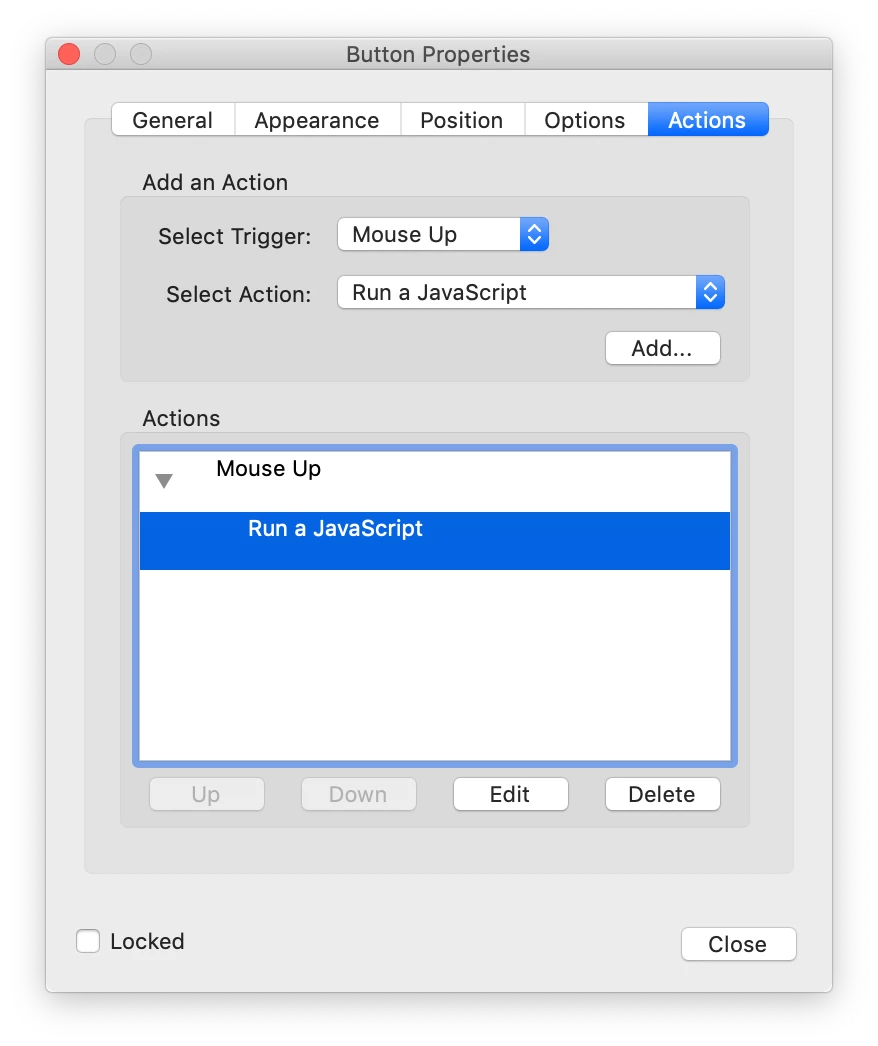
In Acrobat go to the submit button properties, select and Add the action "Run a JavaScript. Then you need to hit the edit button and paste in the below code and make the necessary edits.


var Employee = getField("EmpName").value

var date = new Date();

this.mailDoc({

cTo: "emailAddressGoesHere@ACME.com",

cCc: "",

cSubject: Employee + date,

cMsg: "Email Body Message if any"

});


Regards,

Mike

5 replies

JR Boulay
Community Expert
March 26, 2021

InDesign is not a tool for creating complex PDF forms.

Acrobate du PDF, InDesigner et Photoshopographe
New Participant
March 26, 2021

Hi Mike,


Sorry for jumping in on this. I am trying to set up a submit button as well on a form.

I need the form to go to a particular email address.  

Do I create the submit button in indesign or acrobat?

I was selecting submit form, on click, and mailto:email@....ie

i have not been able to get it to work.

when i select run javascript what should i be doing?  I'm knew to forms so any help to get this done would be great.

Thanks 

Caroline.

dinoprice
dinopriceAuthor
Participating Frequently
May 25, 2022

jr is right, this is not a good tool to create complex forms, unless you know how to code. 


so...that given:


1) Open in Acrobat DC.

2) GOTO Tools and [Prepare] your form.

3) [Open] your form

4) GOTO the Button properties

5) GOTO Actions

6) Create Action for [onmouseup]

7) insert javascript, something like: 


var Employee = getField("Empfullname").value
var mgr = getField("Manager").value
var date = new Date();
var vAddInfo = getField("AddInfo").value

this.mailDoc({

cTo: "info@yourdomain.com",

cCc: "help@youdomain.com",

cSubject: "Additional Support Request: " + Employee + " " + date,

cMsg: "Attn: InfoSec Desk," + "\n" + "\n" + "I need assistance for: " + Employee + "\n" + "\n" + vAddInfo + "\n" + "\n" + "Attached is the Support Request form with my approval." + "\n" + "\n" + "Warm regards," + "\n" + "\n" + mgr


});


run test. 


this may get you started in the right direction. 


Best of luck.


Dino

JR Boulay
Community Expert
November 3, 2020

The Tracker is just for managing responded and not responded. It can be moved from a computer to another, it is indicated how to do it in the forum of Acrobat but it is neither easy nor useful.


Responses/records are collected in the "_responses" portfolio file, that can be moved, copied, etc. as any PDF file.

Acrobate du PDF, InDesigner et Photoshopographe
JR Boulay
Community Expert
November 1, 2020

Placing a button with a "Submit" action is an outdated process.
Just open your form with Acrobat Pro, open the "Prepare form" pane tools, and click "Distribute" (by email).

Then you will be able to manage recipients (responded and not) using the Tracker, and to store their answers in the automatically created "_responses" PDF portfolio.


Acrobate du PDF, InDesigner et Photoshopographe
dinoprice
dinopriceAuthor
Participating Frequently
November 1, 2020

Thank you JR, I'll try the Tracker.

Just for clarity, I understand that by using the Tracker I will be distributing the form from my computer, thus collecting the responses? I think the Tracker is a time saver, but I don't want to retain HR records on my computer. Is there a way to move the Tracker to someone else's computer?

Steve Werner
Community Expert
October 30, 2020


This is really an Acrobat problem, not an InDesign issue. You should ask in the Acrobat forums.

I did find this: See if this article and the other one it references help:

https://acrobatusers.com/tutorials/dynamically-setting-submit-e-mail-address/

Form Submit/Email demystified


dinoprice
dinopriceAuthor
Participating Frequently
October 31, 2020

Thank you Steve, but you must have misunderstood my question or you did not read the article you suggested.