

adrianb58103430
New Participant
November 18, 2025
Question

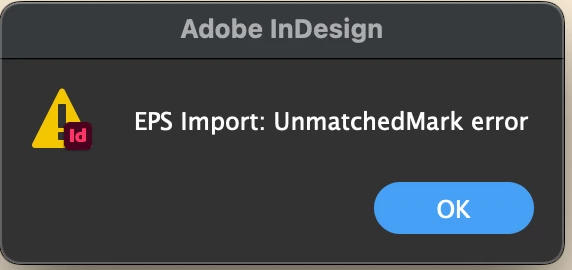
EPS Import: UnmatchedMark error

  • November 18, 2025
  • 4 replies
  • 258 views

This pops up when copy/pasting a vector image from Illustrator to InDesign. Only from recent update.

Needs to be fixed ASAP. 
 

4 replies

leo.r
Community Expert
November 18, 2025

Check the Clipboard Handling preferences in both InDesign and Illustrator and see if changing something there makes a difference.


Also, you mentioned that it's "only from recent update". Does it mean that you don't have this issue with the same Illustrator file when copy-pasting to InDesign 2025?


Mike Witherell
Community Expert
November 20, 2025

Agree. AI should copy AICB while InDesign might well turn off Prefer PDF when Pasting.

Mike Witherell
Community Expert
November 18, 2025

Good morning - advice from @Willi Adelberger and @Brad @ Roaring Mouse  is completely true. 


I know you want to copy and paste EPS as before, but EPS is really outdated file format and has only been supported for legacy files for a long time. 

Do you have to keep EPS format - can you save as .ai? Or is that too much work. 


Besides the warnings above - here's the alternative advice if the above is not good for you and your workflow.

It looks like this is a latest InDesign update. The “EPS Import: UnmatchedMark” message is tied to how InDesign translates clipboard data from Illustrator. Illustrator places several formats on the clipboard (PDF, SVG, EPS, WMF), and InDesign chooses one to interpret. Something in that chain is breaking since the update.


A few practical workarounds until Adobe patches it:

1. Use “Paste as” → AICB

In Illustrator:
Preferences > File Handling & Clipboard

  • Enable AICB (no transparency) (or with transparency if needed)

  • Disable PDF clipboard temporarily

This forces Illustrator to send the older, simpler clipboard format. Many people report this avoids the UnmatchedMark error.

2. Try “Paste in Place” instead of “Paste”

Weirdly, for some users one works and the other triggers the error.

3. Roll back Illustrator or InDesign

If copy/paste is essential to your workflow, rolling back one version of either app restores the previous clipboard handling.

(I never update to the latest version of anything - including Adobe Software, I have the latest installed, but I use 2023 and moving to 2024 soon).

4. Report it as a confirmed bug

Adobe engineers do monitor the UserVoice/Bug pages more closely than forum threads.
Multiple reports help it reach priority.


This is a valid workflow and it should work copying vectors from Illustrator to InDesign is used by loads of people. At the moment it might seem broken because of the update, not the workflow. Hopefully Adobe patches the clipboard interpreter quickly if it's the cause. 


*********************************************************************************************

If you do roll back a versoin and test it - then you know it's your content not the version.

If you confirm the version post it here for review

https://indesign.uservoice.com/forums/601180-adobe-indesign-bugs

*********************************************************************************************

Willi Adelberger
Community Expert
November 18, 2025
  1. Don't use EPS in modern times.
  2. Place files <8File > Place…)
  3. Use AI or PDF/X-4 or Illustrator native PDF.
Brad @ Roaring Mouse
Community Expert
November 18, 2025

You should PLACE the file. Why are you copy/paste-ing it? 

Known Participant
November 20, 2025

Been copy/pasting elements between Illustrator and InDesign for years - never been a problem til the latest downdate.


Seems to be that with every 'update' Adobe manages to break something that users have been able to do for years

Community Expert
November 20, 2025

I get ya - but doing it for a long time doesn't mean it's right or works forever. 


We all do things outside the norm - the general advice is not to do this, or limit it to certain scenarios. 


I gave some advice and got no feedback if working or not.
