


paulf53085977
Inspiring
August 29, 2018
Answered

EPub cover page issues...

  • August 29, 2018
  • 3 replies
  • 2131 views

I am designing an ePub in InDesign 13.1.

I ran into an issue. My ePub design resembles the look of a magazine. The JPEG cover has a masthead at top and a large photo with a headline. On the iBook library shelf it looks great. When I click on the ePub the cover appears for only a fraction of a second and the page flips revealing the first horizontal page (important note: my InDesign type and graphics are designed to resemble a magazine spread. But, in InDesign it’s not 2 pages side-by-side it’s one single horizontal page). Also, the cover page is added only when I export it as an ePub. It doesn’t have a page in my “Pages” InDesign menu,

My question is is there a way to have the cover page flip manually instead of automatically when viewing in iBooks?
This topic has been closed for replies.
Correct answer BobLevine

Hi Bob,

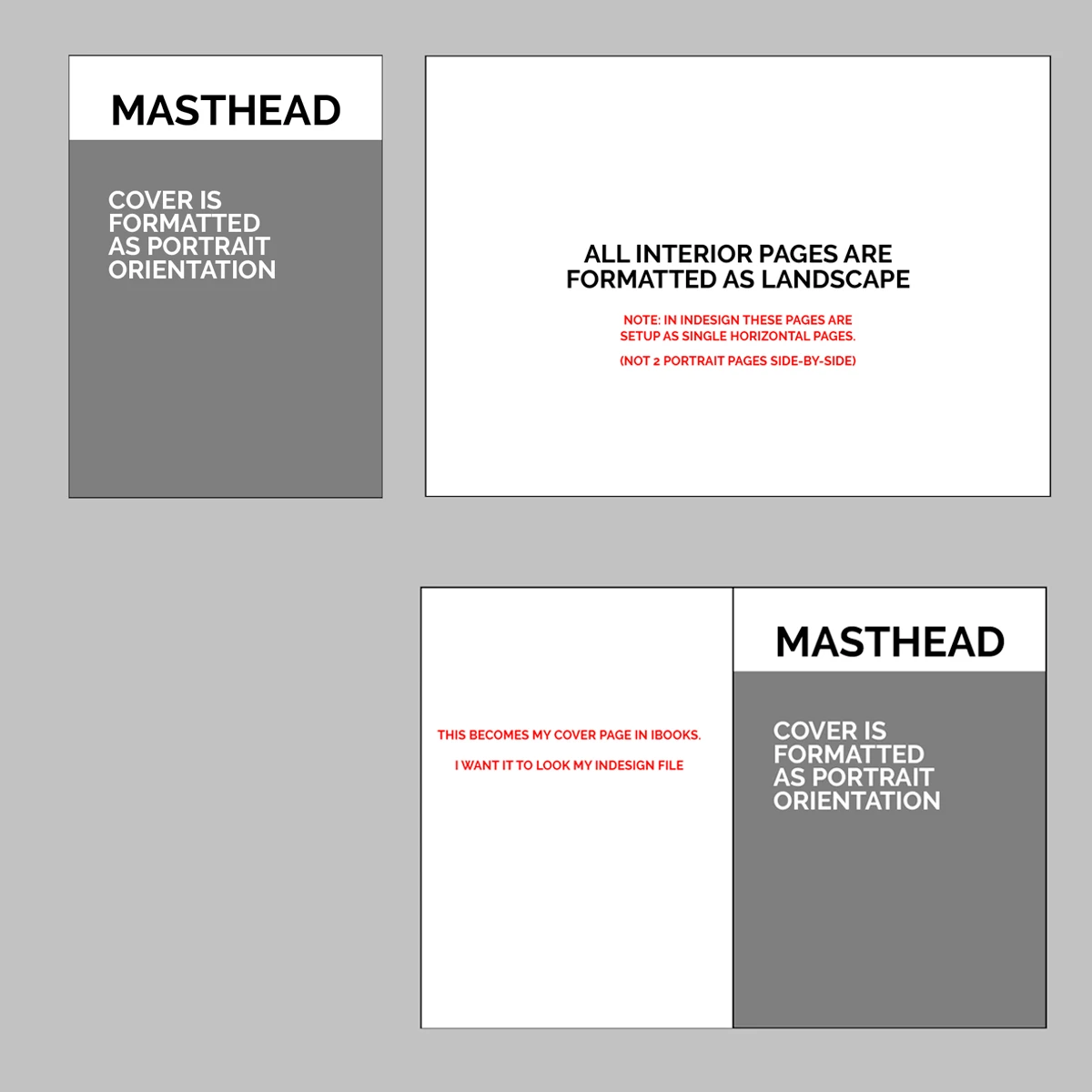
I did a visual reference to illustrate the issue. My cover page is set to half the width of my interior horizontal pages as a typical cover would be in a print pub. Yet, when I export it as an ePub and open it in iBook the last image on the bottom right occurs. Not sure if there's a workaround. I tried the transparent PNG approach to no avail. Also, each interior horizontal page is only one page not two side-be-side pages like it would be in a typical magazine print spread setup.

Thank you.


You need to create a new cover page the same size and orientation as the rest of the document. An EPUB is NOT a printed piece and should not be designed as one.

3 replies

Participant
December 3, 2023

My reflowable epub comes out very good except for one issue. It always creates two cover pages. Most book resellers don't want that. How can that be fixed so that it only creates one cover page?

James Gifford—NitroPress
Legend
December 3, 2023

You probably have "rasterize first page" selected in the export menu. Uncheck that.


You also don't put a cover page in the main document. You specify a separate image file in the Export menu.


(Actually, there are two or three ways to create/include a cover; the trick is to use one and only one. Start your document file with the half-title page or equivalent, do not "rasterize first page" to make a cover — that's really for bulk work like reports — and specify the cover image file under Export. That usually gives the best overall results.)

BobLevine
Community Expert
Community Expert
August 29, 2018

Add it as the first page.

paulf53085977
Inspiring
August 29, 2018

Hi Bob,

Thanks for responding.

As you suggest I added a cover page. I want it to be in a portrait magazine format rather than landscape. I'd like it to resemble the cover of a magazine.

But, for the subsequent pages I'd like them to be landscape layouts. These interior pages resemble the look of a magazine spread. But, are not built in InDesign as 2 side-by-side pages as traditional spreads would be. They are just one landscape page.

When I export to a fixed-layout ePub and open it it in iBooks. The portrait cover image is no longer a vertical it becomes the first horizontally oriented page. It puts my cover image on the left half side of the first landscape page.

Is there anyway to override this from happening? Can I designate the cover page to remain as formatted in InDesign?

Thank you!

BobLevine
Community Expert
Community Expert
August 29, 2018

Make the cover image a PNG file with the left half blank and transparent.

If that’s not what you’re after, I’m not sure I understand. Screenshots might help.

Steve Werner
Community Expert
Community Expert
August 29, 2018

Moving to InDesign EPUB forum