


New Participant
February 17, 2010
Answered

Export Grayscale PDF from a color InDesign doc

  • February 17, 2010
  • 6 replies
  • 160881 views

A much needed feature is a setting in the Export as PDF to export a color ID document as grayscale. I, like many designers I'm sure, often am asked to create a black and white or grayscale version PDF of an existing document. Right now I have to create a copy of the document, drop in grayscale images, strip out the colors and replace with tints of black. The other solution is to use Acrobat Pro to do the conversion, sometimes simpler, but not elegant by any means. It seems like it would only make sense to have this option available in the Export panel "Export as grayscale" or something. What do you think Adobe, is this doable?? I see a lot of people looking for it when I Google it.
    This topic has been closed for replies.
    Correct answer rob day

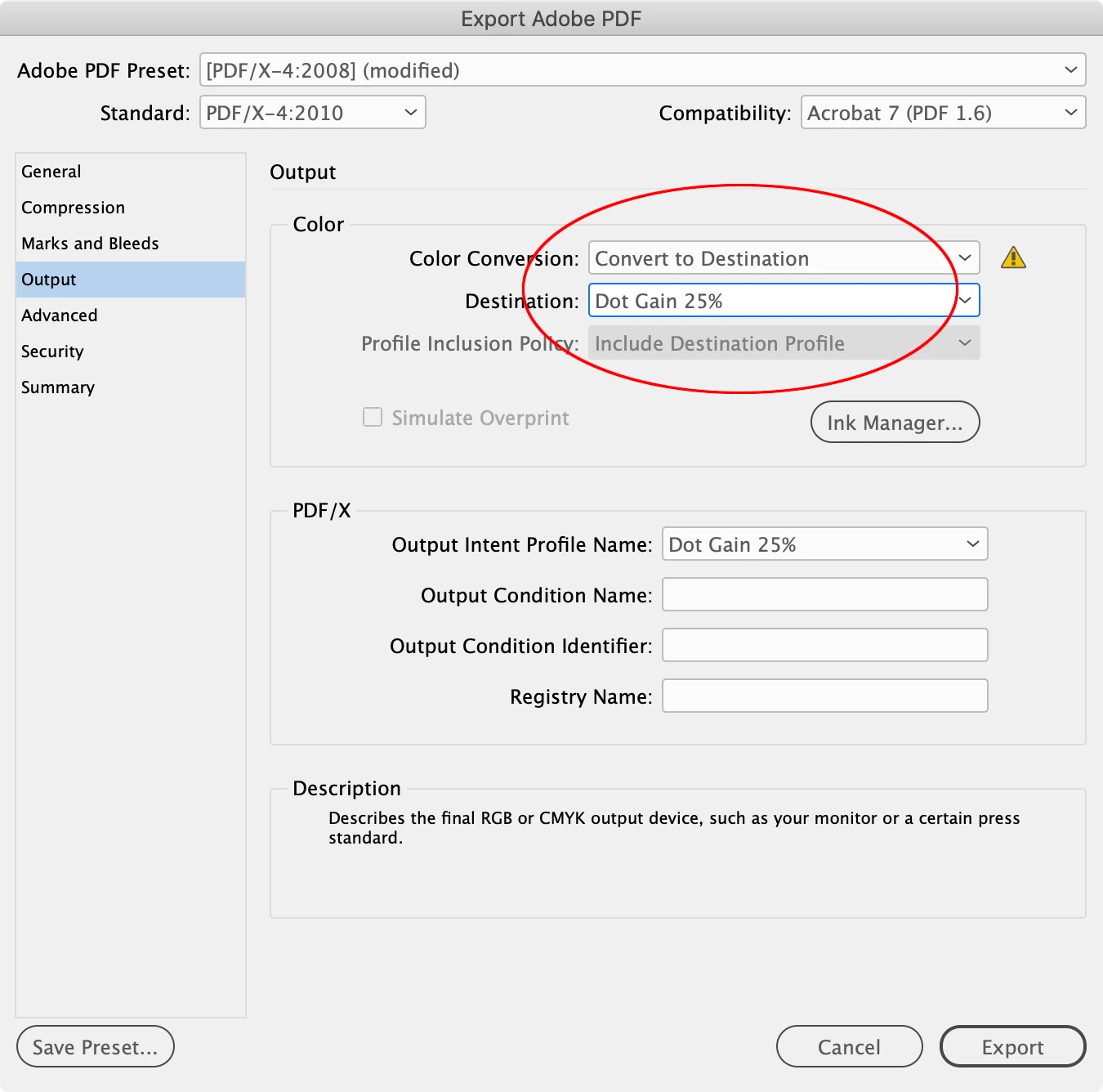
    Hi @PjMcCabe , The original post is from 2010, see @Peter Spier ’s answer from 2015. You can convert directly to any Grayscale destination by choosing a Gray profile from Output>Destination when Convert to Destination is chosen as the Color Conversion:


    6 replies

    creativigrafica
    New Participant
    October 9, 2014

    Hi. There's an option in Adobe Acrobat. In Tools > Print Production > Convert Colors > Convert Colors to Output Intent - Profile: Gray Gamma 1.8 / 2.2

    Participating Frequently
    January 9, 2023

    This is the answer everyone wants. Thanks!

    rob day
    rob dayCorrect answer
    Adobe Expert
    January 9, 2023

    Hi @PjMcCabe , The original post is from 2010, see @Peter Spier ’s answer from 2015. You can convert directly to any Grayscale destination by choosing a Gray profile from Output>Destination when Convert to Destination is chosen as the Color Conversion:


    Inspiring
    March 13, 2012

    Not sure if someone has suggested the following:

    1. Assign a Maximum GCR CMYK profile to the InDesign document. It is fairly easy to create one of these profiles in Photoshop.

    2. Change the Transparency Blend Space to RGB.

    3. Draw a paper filled box over the entire page. Change the blend mode to Color. I like to put this box on a top layer that I can hide to restore color to the document.

    4. Output PDF/X-1a. You will probably see a warning about the blend space, but continue on with the export.

    Resulting PDF is CMYK with empty CMY plates. Be advised this procedure should be used when all you want is a quick PDF with everything on the black plate, quality not being a major issue. It may be helpful if you want to avoid Post Script, Distiller, or an extra step in Acrobat Pro.

    Vikrant R
    Community Manager
    Community Manager
    September 18, 2012

    Grayscale Preview and Export is now available in InDesign CS6.

    I had written a small blog post about how to use it: http://blogs.adobe.com/vikrant/2012/05/indesign-cs6-grayscale-preview-and-export/

    laurens38360630
    New Participant
    March 27, 2015

    Easy peezy!! This is absolutely the way to go! Thank you!

    December 14, 2011

    Just set up your regular print menu for grayscale output, print to file for a .ps file,  open the .ps file in Acrobat and you should have a Black and White version.

    May 14, 2011

    There are several work arounds.

    • Exporting the EPS and then distillling
    • Exporting the PDF then converting
    • Using a third party InDesign plug in for the images - like: http://www.rorohiko.com/wordpress/indesign-downloads/color2gray/

    BUT...

    It would be great to include this as a PDF export option. Even better if you could apply a 'colour profile' or similar to darken or lighten the resulting imags.

    That would be SWEEEET!!

    New Participant
    May 14, 2011

    I've found that after exporting a CMYK print-ready pdf, if I want to convert to grayscale I do so in Acrobat. Under print production and preflight, you can go to the digital printing section and choose B/W which also does several other fixes, or you can just convert to grayscale in the pdf fixups section of the preflight window.

    Dov Isaacs
    Brainiac
    February 17, 2010

    The question is not whether it is doable, but rather whether any way it could be done automatically would be acceptable. Simply stripping off the color information and using the result often yields results that are very low in contrast with imagery that to put it mildly is not very pleasant.

    Those of us familiar with analog black and white photography may recall that black and white films were designed to provide sensitivity to different colors in a manner that would yield realistic results. Even then, serious photographers often used colored filters over their camera lenses to further fine tune the results.

    Those of us who often need to create monochrome images from color digital images typically treat each image individually to yield realistic and pleasing results.

    Thus, be careful what you ask for. A one-size-fits-all conversion from color to grayscale for a whole document can yield very mediocre results.

              - Dov

    - Dov Isaacs, former Adobe Principal Scientist (April 30, 1990 - May 30, 2021)
    dave9621Author
    New Participant
    February 17, 2010

    Dov, thank you for your well thought out, and correct, response. I agree with you whole heartedly about the sensitivity to different colors when converting to grayscale. In a perfect world when I design for black and white I carefully convert every image and balanced them as needed and build the InDesign document as a grayscale doc from the beginning. But what I'm really craving is the quick fix for a document that is done in color that a client now needs in grayscale. I get this a lot for newspaper ads. We do an ad for a magazine in color and then they say "hey, can I have this in black and white, we're going to run the same ad in a newspaper". If I could just export that same ID file as a grayscale PDF I'd be done. In this case I'd be willing to sacrifice a little quality...the same trade off as converting the PDF to grayscale in Acrobat Pro would be fine by me.

    Thanks again for your answer, I hope the wizards at Adobe can come up with a good solution...it's not a big feature, but a simple one that could save me a lot of hassle here and there.

    Dave

    New Participant
    April 13, 2010

    You can specify "grayscale" as an output option when you export an eps file.  Why would this option not also be available for pdf or even jpg exports?  Granted, you may not like the quality, in which case, you can always do things differently, but I do a LOT of B/W newspaper ads, and not being able to export pdf's as Grayscale is a real pain in the butt.