JonathanArias
Braniac
March 4, 2021
Answered

Export SVG from indesign

  • March 4, 2021
  • 4 replies
  • 30183 views

Hello,

i looked this up and i found a post fro 2016. wanted to see if this is available as a script or some other way?Maybe things have change?


Can i export to SVG from indesign or do i need to make a .pdf and drop that into illustrator to export from illustrator after that? 


thanks

jonathan

Correct answer rayek.elfin

There is no need for half-baked workarounds or expensive >$200 SVG export plugins.


Here's a cheap and cheerful method to export your InDesign pages to SVG and with good control:


[1] export your file as IDML.

[2] get Affinity Publisher (which happens to be 50% off right now: $29).

[3] open the IDML file in Publisher. Then choose File-->Export|SVG

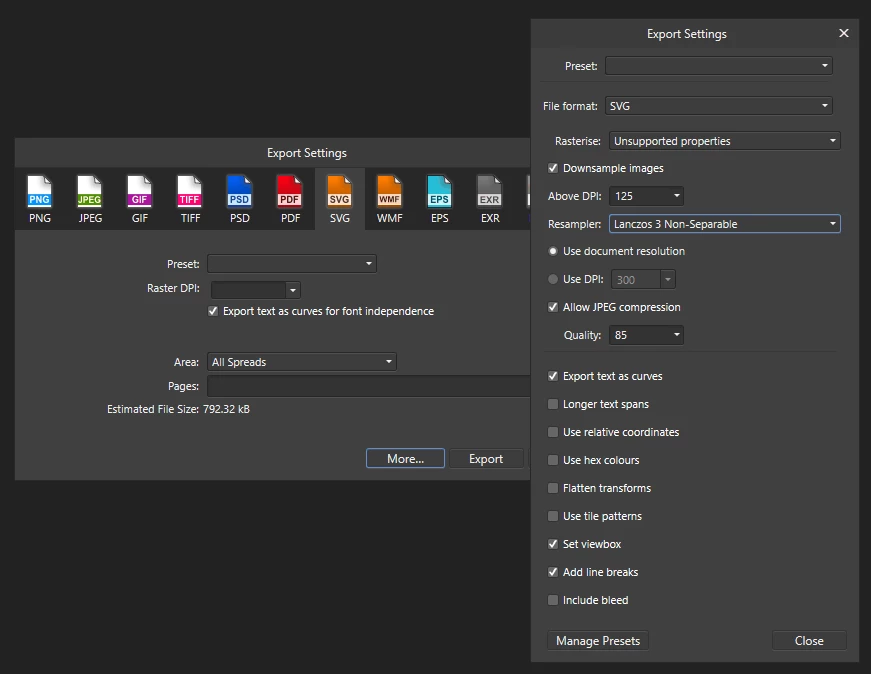
[4] decide whether fonts must be outlined, the required export resolution, and so on. Click MORE for additional SVG export options.

[5] export each page/spread to an SVG file.


Done. View your layouts in any browser and be happy. Publish to your web server, etcetera: regain control over your export. The SVG pages proportionally scale up and down in the browser. Even animated GIF images are maintained as animated bitmaps.


As I said: inexpensive and effective. 😛


As always, export quality depends a bit on how effects are applied in InDesign, of course. Certain effects may have to be rasterized before exporting to IDML for import into Publisher.


SVG export in Affinity Publisher features some good options: 
 

As far as I can tell, the only reason Adobe decided to rip SVG export out of InDesign is to force their users to remain tied to their ecosystem of cloud services. I agree with @Laubender .

Which only results in users driven to other alternatives in the long run.

4 replies

Braniac
June 14, 2021

"As far as I can tell, the only reason Adobe decided to rip SVG export out of InDesign is to force their users to remain tied to their ecosystem of cloud services. "


Don't think so. SVG export was dropped with InDesign CS4. That was some years before the cloud.

It was rather Flash vs SVG back then, I think. The developers concentrated on the preparation of Flash features with InDesign.


Regards,
Uwe Laubender

( ACP )

Geоrge
Braniac
October 24, 2022

>> SVG export was dropped with InDesign CS4

Strange decision.

Remember, never say you can't do something in InDesign, it's always just a question of finding the right workaround to get the job done. © David Blatner
Geоrge
Braniac
March 4, 2021
Remember, never say you can't do something in InDesign, it's always just a question of finding the right workaround to get the job done. © David Blatner
rayek.elfin
rayek.elfinCorrect answer
Braniac
June 13, 2021

There is no need for half-baked workarounds or expensive >$200 SVG export plugins.


Here's a cheap and cheerful method to export your InDesign pages to SVG and with good control:


[1] export your file as IDML.

[2] get Affinity Publisher (which happens to be 50% off right now: $29).

[3] open the IDML file in Publisher. Then choose File-->Export|SVG

[4] decide whether fonts must be outlined, the required export resolution, and so on. Click MORE for additional SVG export options.

[5] export each page/spread to an SVG file.


Done. View your layouts in any browser and be happy. Publish to your web server, etcetera: regain control over your export. The SVG pages proportionally scale up and down in the browser. Even animated GIF images are maintained as animated bitmaps.


As I said: inexpensive and effective. 😛


As always, export quality depends a bit on how effects are applied in InDesign, of course. Certain effects may have to be rasterized before exporting to IDML for import into Publisher.


SVG export in Affinity Publisher features some good options: 


As far as I can tell, the only reason Adobe decided to rip SVG export out of InDesign is to force their users to remain tied to their ecosystem of cloud services. I agree with @Laubender .

Which only results in users driven to other alternatives in the long run.

Participating Frequently
October 21, 2022

Be lovely if this worked. I just downloaded the trial of Publisher to try this out and the output of the highly formatted text and tables is garbled and useless. I guess tiff output from ID will be best for hires Word placement. EPS is likely better, but preview is disabled, if not placing eps in general.


Braniac
March 4, 2021

That was a strategic decision back then, I think.

Don't be too open with exchange formats.


Regards,
Uwe Laubender

( ACP )

Braniac
March 4, 2021

Hi Jonathan,

as far as I know and could test this, InDesign CS3 was able to export to SVG.

That feature was dropped with CS4.


Regards,
Uwe Laubender

( ACP )

JonathanArias
Braniac
March 4, 2021

seems like a strange thing to give and take back

