
Participant
November 24, 2021
Answered

Export to pdf destroys font

  • November 24, 2021
  • 2 replies
  • 1544 views

Hi everyone,

suddenly a pdf-export problem occured in my In Design file. I am using a CSV source to automatically fill in text and create several pdfs. Now with our font "Playfair" the letter "i" is destroyed in my export (it creates square symbols, leaving the dot above the "i" untouched). Just this letter and just in this font. Could anyone give me an idea how to fix that? Another font is not really a solution.
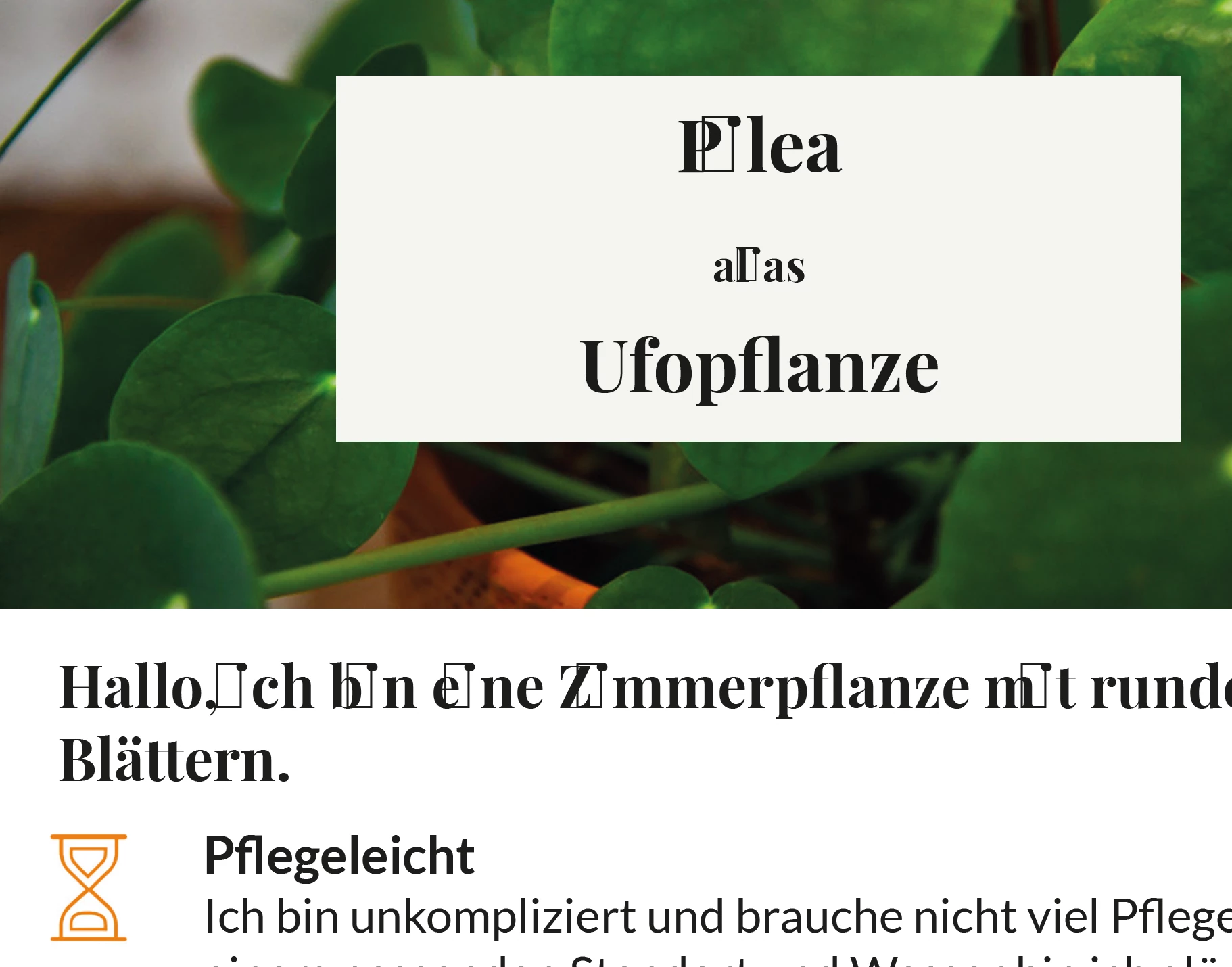
 

Thanks!

Robert

This topic has been closed for replies.
Correct answer Randy Hagan

I'd suggest that you may want to try a font repair utility like Font Doctor, which ios included with Extensis Suitcase or other utilities. Or, if you can, go back to the source and download the original font.


The reason I suspect that it shows up in Acrobat, rather than InDesign is that, depending on your workflow, creating a PDF may be "printing"/rendering that font, and that may well be where the corruption you're seeing resides.


Font corruption rarely happens, but it does happen. Hopefully you can repair/re-acquire the font and be back to an even keel working Playfair once again.


Good luck,


Randy

2 replies

Community Expert
November 24, 2021

Hallo Robert,

das ist ja sehr interessant. Danke für den Hinweis!

Wir hatten hier unlängst zwei ähnliche Fälle, die noch unbeantwortet im Forum dümpeln.

Zumindest der eine von den beiden Fonts dort war von Google Fonts heruntergeladen.


Welches Betriebssystem benutzt Du?
Welche Version von InDesign?

Hast Du unlängst ein Betriebssystem-Upgrade gemacht?


Hier die Links zu den beiden Beiträgen mit ähnlichem Problem:


Umlauts generate small square after export
SayMyNameSayMyName, Nov 22, 2021
https://community.adobe.com/t5/indesign-discussions/umlauts-generate-small-square-after-export/td-p/12542323


Can't export quotation marks in an open source font to PDF
Irrumba, 23.11.2021
https://community.adobe.com/t5/indesign-discussions/can-t-export-quotation-marks-in-an-open-source-font-to-pdf/td-p/12546830


Danke!

Uwe Laubender

( ACP )

Participant
November 24, 2021

Hallo. Ich nutze einen Mac.

Aktuell habe ich ID 17.0.1 und das wurde vor kurzem geupdatet.

Randy HaganCommunity ExpertCorrect answer
Community Expert
November 24, 2021

I'd suggest that you may want to try a font repair utility like Font Doctor, which ios included with Extensis Suitcase or other utilities. Or, if you can, go back to the source and download the original font.


The reason I suspect that it shows up in Acrobat, rather than InDesign is that, depending on your workflow, creating a PDF may be "printing"/rendering that font, and that may well be where the corruption you're seeing resides.


Font corruption rarely happens, but it does happen. Hopefully you can repair/re-acquire the font and be back to an even keel working Playfair once again.


Good luck,


Randy

Participant
November 24, 2021

Hi Randy. Thanks a lot. This helped. I deleted the complete font and reinstalled it. Problem solved.