


Inspiring
March 15, 2023
Answered

Exporting Both Digital and Print Files from the Same Document (CMYK/RGB)

  • March 15, 2023
  • 3 replies
  • 1805 views

Hello,


I have a document with about 20 different product flyers/sell sheets. I built the document in CMYK, but each flyer will need to be exported in both digital format (RGB with compression and without bleeds for web viewing), and print format (CMKY with bleeds and no compression for high quality printing). 

However, when I go to export my digital flyers, I get this error:
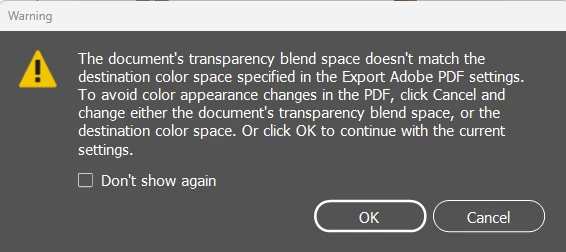
 

Which makes sense, I get that it's in a CMYK blend space but I'm trying to export to RGB color space. But how do I go about this? What is the best work flow for what I'm trying to do? If I have that many flyers I need both digital and print versions of, do I have to change over the transparency blend space in the document every time I export? That seems silly and a lot of extra work. Please advise.


Thanks in advance!!

This topic has been closed for replies.
Correct answer Mike Witherell

My recommendation is to build in an RGB flavored (Edit > Transparency Blendspace > RGB) InDesign document, where all artwork is placed as RGB colorspace graphics and photos. When it comes time to export to screen and print, you can export an RGB flavored PDF with a destination colorspace set to sRGB. The same layout and document can also be exported to a press-worthy PDF by choosing something like PDF-X/4 and choosing a CMYK colorspace that your commercial printing company has recommended to you.

3 replies

rob day
Community Expert
March 16, 2023

Hi @Marley C. The blend space warning is there because certain blend modes have a radically different color effect depending on whether the blend space is RGB or CMYK. You won’t get the warning if you flatten the transparency on an export to RGB, which is probably a good idea anyway so the browser isn’t interpeting live transparency.


Here the document’s blend space is CMYK and the top CMYK color is set to the Difference Blending Mode. If I export with Acrobat 7 Compatibility, the output color does not come close to the intended color:


If I flatten the transparency (Acrobat 4), there is no warning and the exported RGB color matches the ID color:


James Gifford—NitroPress
Brainiac
March 15, 2023

What format are you exporting to for web viewing? PDF or JPEG?


The simplest approach is to just export them and see if they appear as you wish. Sometimes things like transparency can completely ruin a document because the graphics don't overlay and mesh as they should, and other times it's just a technical hurdle that has no real effect on the end result.


Try it and see, and if the export meets your review, the warnings don't matter.


Marley C.Author
Inspiring
March 15, 2023

I export to PDF for web viewing. Thanks for the tip, I have definitely been playing around and exporting to see the changes, but at times it feels a bit like shooting in the dark. With this particular project, I don't have the luxury of time to allow me to do my own testing. 

Mike Witherell
Mike WitherellCorrect answer
Community Expert
March 15, 2023

My recommendation is to build in an RGB flavored (Edit > Transparency Blendspace > RGB) InDesign document, where all artwork is placed as RGB colorspace graphics and photos. When it comes time to export to screen and print, you can export an RGB flavored PDF with a destination colorspace set to sRGB. The same layout and document can also be exported to a press-worthy PDF by choosing something like PDF-X/4 and choosing a CMYK colorspace that your commercial printing company has recommended to you.

Mike Witherell
Marley C.Author
Inspiring
March 15, 2023

Thank you Mike, I will use your recommendation to build in RGB. Hwoever, when I'm exporting this to the print version, how do I choose the CMYK colorspace? I don't see anything for that when I go to export. Or is that something I need to choose that when I build my export preset?

Appreciate the tips!

rob day
Community Expert
March 17, 2023

In the export PDF dialog box > Output > Destination colorspace


build in an RGB flavored (Edit > Transparency Blendspace > RGB) InDesign document, where all artwork is placed as RGB colorspace graphics and photos.


Hi Mike, I think you have to be careful using an RGB Transparency Blend space when the print export is to PDF/X-4. If any of the objects have Blending Modes applied, the color might change because on an Export to a PDF/X Standard, the Transparency Blend Space will get converted to CMYK, and any live transparency with blend modes applied will get blended differently.


Here my InDesign blend space is RGB, and the image and native colors are all RGB.The conversion to Document CMYK unexpectedly changes the color—this is the reason for the warning: