


Inspiring
March 15, 2017
Answered

Exporting Pages and Spreads combined

  • March 15, 2017
  • 5 replies
  • 14185 views

Hi everyone,

this is the setup I have in Indesign.
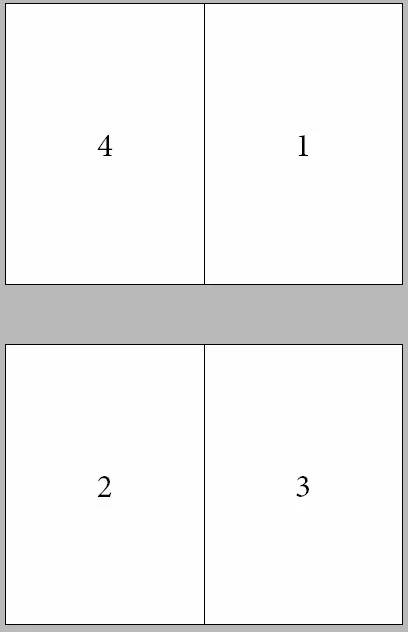
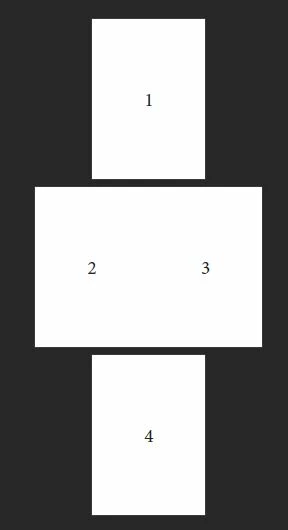
I need it to export like this: first page as cover page, second and third page as spread, last page. I did achieve it with exporting and combining inside Adobe Acrobat Pro DC, but I want to know if it's possible to achieve directly with InDesign or some script.
    This topic has been closed for replies.
    Correct answer dicom75886549

    None of the answers are the correct thing I required, but I did solve it with a complex export, because the pages 1 and 4 are connected with an artwork that I wanted to stay like that inside InDesign for easier modification.

    The process is:

    1. Export page 1 with the setting Pages

    2. Export page 4 with the setting Pages

    3. Export pages 1-3 with the settings Spreads and Cover Page

    4. Inside Adobe Acrobat DC delete the page 1 from third export and add the standalone page 1 from the first export,

    5. Add page 4 from the second export at the end of the third export

    Still thank you for your answers.

    5 replies

    dicom75886549AuthorCorrect answer
    Inspiring
    March 31, 2017

    None of the answers are the correct thing I required, but I did solve it with a complex export, because the pages 1 and 4 are connected with an artwork that I wanted to stay like that inside InDesign for easier modification.

    The process is:

    1. Export page 1 with the setting Pages

    2. Export page 4 with the setting Pages

    3. Export pages 1-3 with the settings Spreads and Cover Page

    4. Inside Adobe Acrobat DC delete the page 1 from third export and add the standalone page 1 from the first export,

    5. Add page 4 from the second export at the end of the third export

    Still thank you for your answers.

    rob day
    Community Expert
    Community Expert
    March 31, 2017

    Just curious, what happens to your printer spread document when you set the page range to 2,3,4,1 ?

    Inspiring
    April 1, 2017

    You did get is halfway correct but you don't get the page 2 and 3 connected as a Spread (A3 Landscape) and that's what my client requested. There is a split between your pages in the middle which means there is a split in the artwork.

    Mike Witherell
    Community Expert
    Community Expert
    March 15, 2017

    When you export to a PDF with your imposed layout, simply type a RANGE: 1, 2, 3, 4

    ... and choose 2-up (facing page) with or without continuous (which I also like)

    Although I agree with the others about "why make the imposed layout"; since it already IS an imposed layout for printing's sake, making a PDF in reader's imposition is still simple to accomplish.

    Mike Witherell
    rob day
    Community Expert
    Community Expert
    March 15, 2017

    It had never occurred to me before, but you could use Export to export a printer imposition from reader spreads, which is question that has come up occasionally.

    There is the option of Distilling a .ps file from Print Booklet, but that has the disadvantage of postscript flattening. A 4-page reader document could be imposed by exporting 4,1,2,3, an 8 page imposition could be 8,1,2,7,6,3,4,5, etc.

    Mike Witherell
    Community Expert
    Community Expert
    March 16, 2017

    Hey Rob, the OP file is already in printer's spread imposition. Unless I am misunderstanding, the OP wants to take the physically-layed-out printer's spread document and export a PDF in reader's spread order. This is the opposite of what we usually do. That is why I posted the idea of typing a range with page numbers separated by commas. That becomes the order of the PDF pages.

    Mike Witherell
    rob day
    Community Expert
    Community Expert
    March 15, 2017

    But why set the document up as printer spreads? If you setup as regular facing page reader spreads, you can use either InDesign's or Acrobat's Print Booklet to output the printer (4,1) (3,2) imposition and export the same doc as reader spreads with a regular export.

    Jeff Witchel, ACI
    Community Expert
    Community Expert
    March 15, 2017

    To expand on Barbara's answer, after you have page 1 and page 4 in the correct positions in the Pages panel, go to File > Export and choose PDF Print.

    In the general section of the Export dialog, check Spreads and Save. In the Acrobat, you'll have page 1 by itself, pages 2–3 as a spread and page 4 as a single page.

    Barb Binder
    Community Expert
    Community Expert
    March 15, 2017

    One idea: make a copy of the file, and then drag the pages in the InDesign Pages panel into the desired order of 1–4. Export to PDF. In Acrobat or Reader, choose View > Page Display > 2-Page View and View > Page Display > enable Show Cover Page for 2-Page View.

    ~Barb at Rocky Mountain Training