


Inspiring
May 14, 2022
Answered

ExtendScript, InDesign 2022: Return `parentPage`s of last cells of all tables

  • May 14, 2022
  • 6 replies
  • 4222 views

I’m trying to bring this function alive:


$.writeln( findPagesOfLastCells() );

function findPagesOfLastCells() {
// https://community.adobe.com/t5/indesign-discussions/javascript-property-to-tell-if-text-is-in-a-continued-table/td-p/6379093
    var aDoc = app.activeDocument,
        allTables = aDoc.stories.everyItem().tables,
        thePages = []; 
    if( allTables.length > 0 ) {
        for ( var i = 0; i < allTables.length; i++ ) {
            var theTable = allTables[i];
$.writeln('***********tables************\n'+theTable);
            if ( theTable.rows.length > 1 ) {
                var lastRowPage = 0;
                lastRowPage = theTable.rows[-1].cells[-1].insertionPoints[-1].parentTextFrames[0].parentPage;
$.writeln(lastRowPage);
                thePages.push(lastRowPage.name);
$.writeln(lastRowPage.name);
            }
        }
    }
    return thePages;
}


 The crucial parts is here:


lastRowPage = theTable.rows[-1].cells[-1].insertionPoints[-1].parentTextFrames[0].parentPage;

This doesn’t work and results to undefined. It works fine with this:

theTable.rows[-1].cells[-1].insertionPoints[-1]

I get an insertion point with all properties, including a parentTextFrames property. But extending to

theTable.rows[-1].cells[-1].insertionPoints[-1].parentTextFrames[0]

I get a text frame reference with no property at all.


Is this a bug? Am I doing something wrong?


Thanks for your kind help,

Tobias
 

This topic has been closed for replies.
Correct answer rob day

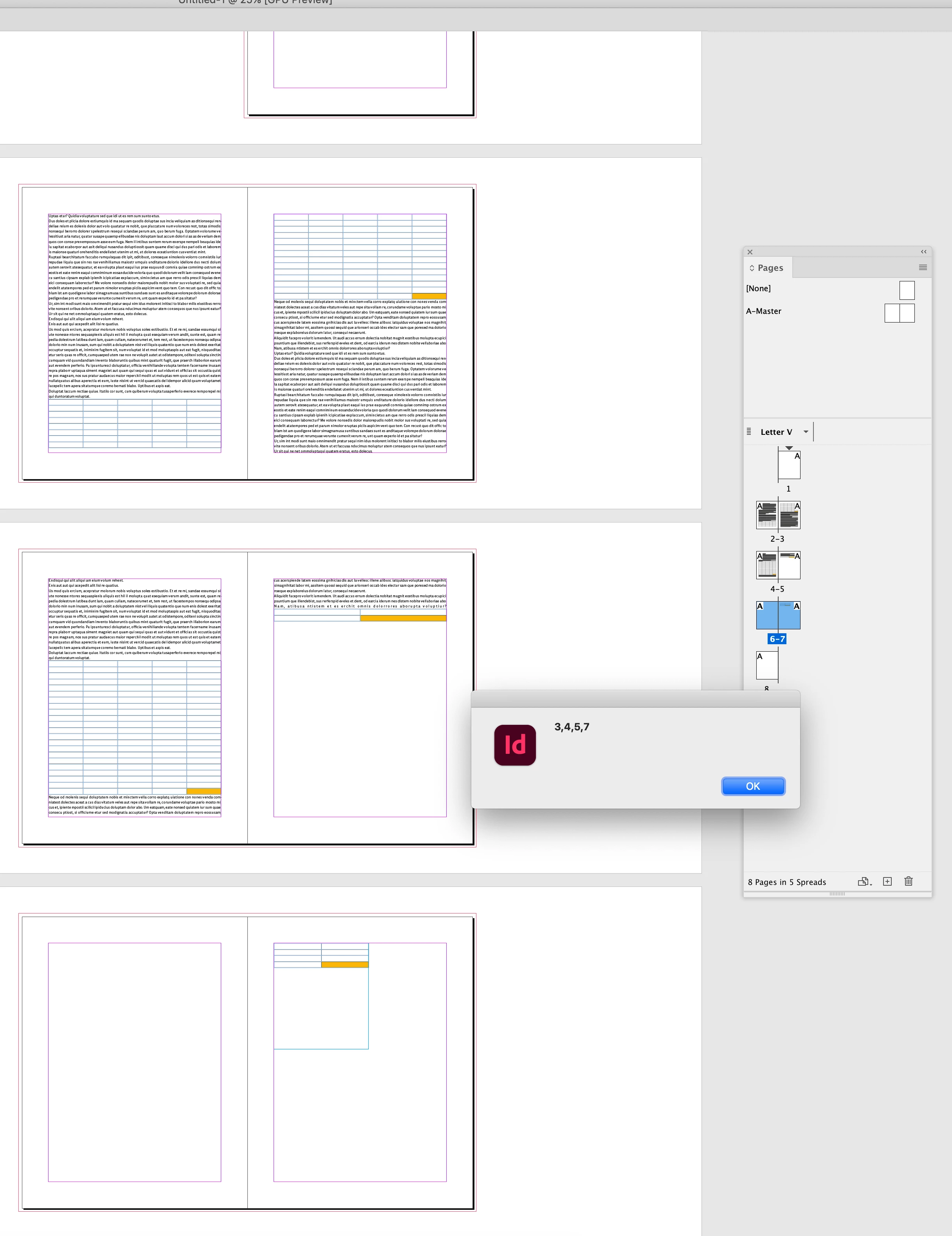
Hi @tobias.wantzen , Uwe used the table storyOffset property answering another post this morning, and it seems like it might work here. You can get a table‘s trailing insertionPoint to find which page it ends on. Something like this:


var et = app.activeDocument.stories.everyItem().tables.everyItem().getElements();

alert(findPagesOfLastCells(et))


/**
* Gets the parent page of a table’s end 
* @ param a collection of tables
* @ return an array of page names 
* 
*/
function findPagesOfLastCells(t){
    var a = new Array()
    var ti, psi;

    for (var i = 0; i < t.length; i++){
        ti = t[i].storyOffset.index;
        //the parent page of the insertion point at the end of the table
        psi = t[i].parent.parentStory.insertionPoints[ti+1].parentTextFrames[0].parentPage
        a.push(psi.name)
    }; 
    return a
}


6 replies

Community Expert
May 17, 2022


app.findTextPreferences.findWhat = "<0016>";


Hi Tobias,

this also has its charme.

Especially if you want to find nested tables. Tables that were added to text cells.

From the found text the table is only one step away:


found0016Characters[i].tables[0]


Fun facts

You can even find tables with a minimum of two body rows:


app.findTextPreferences.findWhat = "<0016><0017>";


Or with a minimum of three body rows:


app.findTextPreferences.findWhat = "<0016><0017><0017>";


Warning!

Be very careful with Find Text <0016> . Do not dare to replace a found instance with nothing or even with text.

Just tested that in the GUI. InDesign crashed instantly… The same with Find Text <0017> . That's the control character "End Of Transmission Block".


NOTE: If you look for <0017> only (without <0016> in front) you probably will find more than one instance per table. It depends on the number of body rows in the table. With two body rows, one instance of <0017> is found for the table. With three body rows, two instances of <0017> are found for the same table. Etc. etc.


It seems that the result of a Text Find with <0017> returns a "character", but it's a very strange character, a "ghost character" with only one insertion point. The position of that insertion point is the one exactly after the table character. It's always that position; regardless how many rows are in the table and so how many instances of <0017> for that particular table are found.


Regards,
Uwe Laubender

( ACP )

rob day
Community Expert
Community Expert
May 17, 2022

Seems like the problem with getting the character after the table is the table could have space after applied, which might force the character to the next page:


Community Expert
May 17, 2022

Hi Rob,

thanks for this test! Did also some testing and yes, the "position" of the insertion point we do exploit will move along with the text that is after the table. This is also the case with a default value for Space After and other reasons so that no character of the text following the table can be rendered in the text frame with the last row of the table.


So back to Tobias' algorithm?!


Regards,
Uwe Laubender
( Adobe Community Professional )

rob day
Community Expert
rob dayCommunity ExpertCorrect answer
Community Expert
May 16, 2022

Hi @tobias.wantzen , Uwe used the table storyOffset property answering another post this morning, and it seems like it might work here. You can get a table‘s trailing insertionPoint to find which page it ends on. Something like this:


var et = app.activeDocument.stories.everyItem().tables.everyItem().getElements();

alert(findPagesOfLastCells(et))


/**
* Gets the parent page of a table’s end 
* @ param a collection of tables
* @ return an array of page names 
* 
*/
function findPagesOfLastCells(t){
    var a = new Array()
    var ti, psi;

    for (var i = 0; i < t.length; i++){
        ti = t[i].storyOffset.index;
        //the parent page of the insertion point at the end of the table
        psi = t[i].parent.parentStory.insertionPoints[ti+1].parentTextFrames[0].parentPage
        a.push(psi.name)
    }; 
    return a
}


Inspiring
May 17, 2022

Thanks, Rob – this is genious!

Actually I thought about a similar approach either, but abandoned it. (I thought about looking for the paragraph sign `\r` after the table or the first character of the paragraph after the table, because finding a table start and its contents or the character behind the table’s paragraph is comparatively easy. Alternatively we could compare your

var et = app.activeDocument.stories.everyItem().tables.everyItem().getElements();

to

app.findTextPreferences.findWhat = "<0016>";

and see, which approach is faster.)

And I’ve abandoned it, because I really wanted to know, on which page a specific row (or cell) is placed. Looking for the insertion point after the table only tells me, on which page the table ends.


Thanks,

Tobias

Community Expert
May 14, 2022

Hi Tobias,

theTable.rows[-1]

is always in the first frame of that table if that row has at least one footer row.


So best change that to:

theTable.rows[ -1-theTable.footerRowCount ]


Regards,
Uwe Laubender

( Adobe Community Professional )

Inspiring
May 15, 2022

Uwe, this is pretty nasty, puh – thank you very much for pointing this out!

So for completeness sake:

$.writeln( findPagesOfLastCells() );

function findPagesOfLastCells() {
// https://community.adobe.com/t5/indesign-discussions/javascript-property-to-tell-if-text-is-in-a-continued-table/td-p/6379093
    var aDoc = app.activeDocument,
        allTables = aDoc.stories.everyItem().tables,
        thePages = []; 
    if( allTables.length > 0 ) {
        for ( var i = 0; i < allTables.length; i++ ) {
            var theTable = allTables[i];
            if ( theTable.rows.length > 1 ) {
                var lastRowPage = 0;
                var lastRowPage = getAOsParentPage( theTable.rows[-1-theTable.footerRowCount].cells[-1].insertionPoints[-1] );
                thePages.push(lastRowPage.name);
            }
        }
    }
    return thePages;
}

function getAOsParentPage(theAOReference) {
    var aDoc = app.activeDocument;
    var theAO = aDoc.rectangles.add({ geometricBounds: [0,0,5,5] });
    theAO.anchoredObjectSettings.insertAnchoredObject( theAOReference, AnchorPosition.ANCHORED );
    theAO.anchoredObjectSettings.releaseAnchoredObject();
    var theAOparentPage = theAO.parentPage;
    theAO.remove();
    return theAOparentPage;
}

But please be aware what Uwe pointed out in his first post of all further issues, which may be important for reusing this code in your own context!

Community Expert
May 14, 2022

Brian: "An insertion point in a cell has no parent text frame. "


Hi Brian,

of course it has.

If that's not the case, the insertion point is in overset text.


Regards,
Uwe Laubender

( Adobe Community Professional )

Community Expert
May 14, 2022

Hi Tobias,

I think it will make a big difference when allTables is an array and not a collection of tables:

var allTables = 
aDoc.stories.everyItem().tables.everyItem().getElements();


Other things to think about:

Are there perhaps graphic cells?

( I guess not, because your insertion point seems to be valid. )


Is a table perhaps in overset?

Is the last cell of a given row in overset?


Are there any footer rows in the table?

You will get the wrong page as the last one if the table runs through several text frames on different pages.


Regards,
Uwe Laubender

( Adobe Community Professional )

Inspiring
May 14, 2022

My code wasn’t meant to be bullet-proof, but to show, that parentTextFrame doesn’t work in tables and to ask for help on this topic. And my second code showed an approach to deal with that limitation as a workaround.

I’m absolutely with you: To be bullet-proof there have to be much more fine grinding. Thanks for your annotations showing manyfold directions, which has to be taken into account.


But let me ask one question:

> I think it will make a big difference when allTables is an array and not a collection of tables:

Why is using array over object better? Are there any other reasons except performance?


Thanks,

Tobias

Community Expert
May 14, 2022

"Why is using array over object better?"

The elements in that array are resolved. So you can be sure that the target elements actually result in meaningful properties/values if a given situation allows this.


Also read both articles about everyItem() from Marc Autret:

https://www.indiscripts.com/post/2010/06/on-everyitem-part-1

https://www.indiscripts.com/post/2010/07/on-everyitem-part-2


getElements() is a topic of part 2, but don't miss part 1; it's worth the effort!


Quoting Marc from part 2:

"…A common way to explicitly resolve a specifier and push the resolved data into an Array is to use spec.getElements(). This method performs two operations:
(1) It causes an automatic resolution of spec;
(2) It creates and returns an Array that contains each spec's receiver converted into a resolved specifier.

Moreover, getElements() is much more reliable than any other command because it actually resolves or updates the specifier from its original path…"


Regards,
Uwe Laubender

( Adobe Community Professional )


brian_p_dts
Community Expert
Community Expert
May 14, 2022

An insertion point in a cell has no parent text frame. Tables are weird in how they interact with the DOM like that. You have to get the text frame via other means, but I forget specifically how I've done it in the past. I just know it wasn't trivial. Maybe someone else has a better, easier implementation. 

Inspiring
May 14, 2022

Thanks, @brian_p_dts for your kind answer. Meanwhile I’ve done some nasty bit of code. It works, but – puh! – it’s very hacky and ugly (because intrusive):


$.writeln( findPagesOfLastCells() );

function findPagesOfLastCells() {
// https://community.adobe.com/t5/indesign-discussions/javascript-property-to-tell-if-text-is-in-a-continued-table/td-p/6379093
    var aDoc = app.activeDocument,
        allTables = aDoc.stories.everyItem().tables,
        thePages = []; 
    if( allTables.length > 0 ) {
        for ( var i = 0; i < allTables.length; i++ ) {
            var theTable = allTables[i];
$.writeln('***********tables************\n'+theTable);
            if ( theTable.rows.length > 1 ) {
                var lastRowPage = 0;
                var lastRowPage = getAOsParentPage( theTable.rows[-1].cells[-1].insertionPoints[-1] );
$.writeln(lastRowPage);
                thePages.push(lastRowPage.name);
$.writeln(lastRowPage.name);
            }
        }
    }
    return thePages;
}

function getAOsParentPage(theAOReference) {
    var aDoc = app.activeDocument;
    var theAO = aDoc.rectangles.add({ geometricBounds: [0,0,5,5] });
    theAO.anchoredObjectSettings.insertAnchoredObject( theAOReference, AnchorPosition.ANCHORED );
    theAO.anchoredObjectSettings.releaseAnchoredObject();
    var theAOparentPage = theAO.parentPage;
    theAO.remove();
    return theAOparentPage;
}


If someone has a better idea, it’ll be very welcome ...


Thanks, Tobias

brian_p_dts
Community Expert
Community Expert
May 14, 2022

Pretty sure that's along the lines of how I've implemented it before. Yeah, not pretty.