


New Participant
January 6, 2018
Answered

Extra Space Above the Last Line in a Paragraph?

  • January 6, 2018
  • 8 replies
  • 72679 views

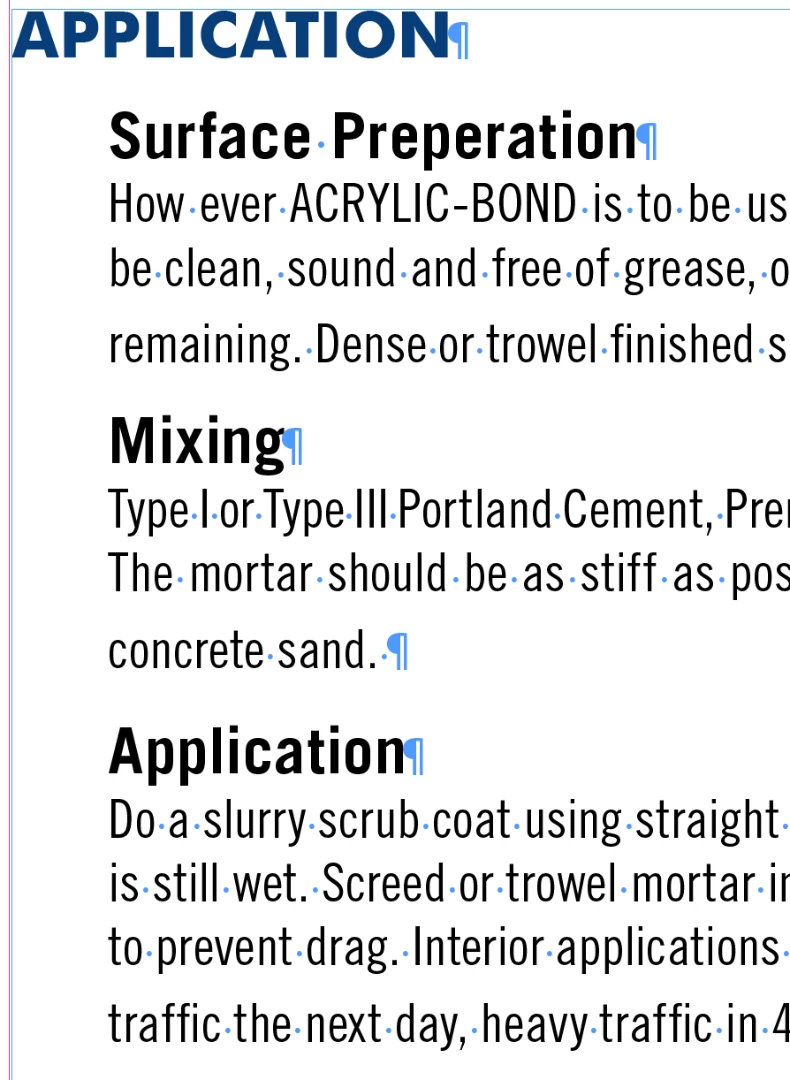
Why would I be getting extra space above the last line in a paragraph? The problem isn't in the leading, space before or space after. Settings are the same for them through the whole paragraph, but the last line still gets set off a little too much. Is this a 2018 problem or am I missing something? Any suggestions for how to fix this?
    Correct answer Barb Binder

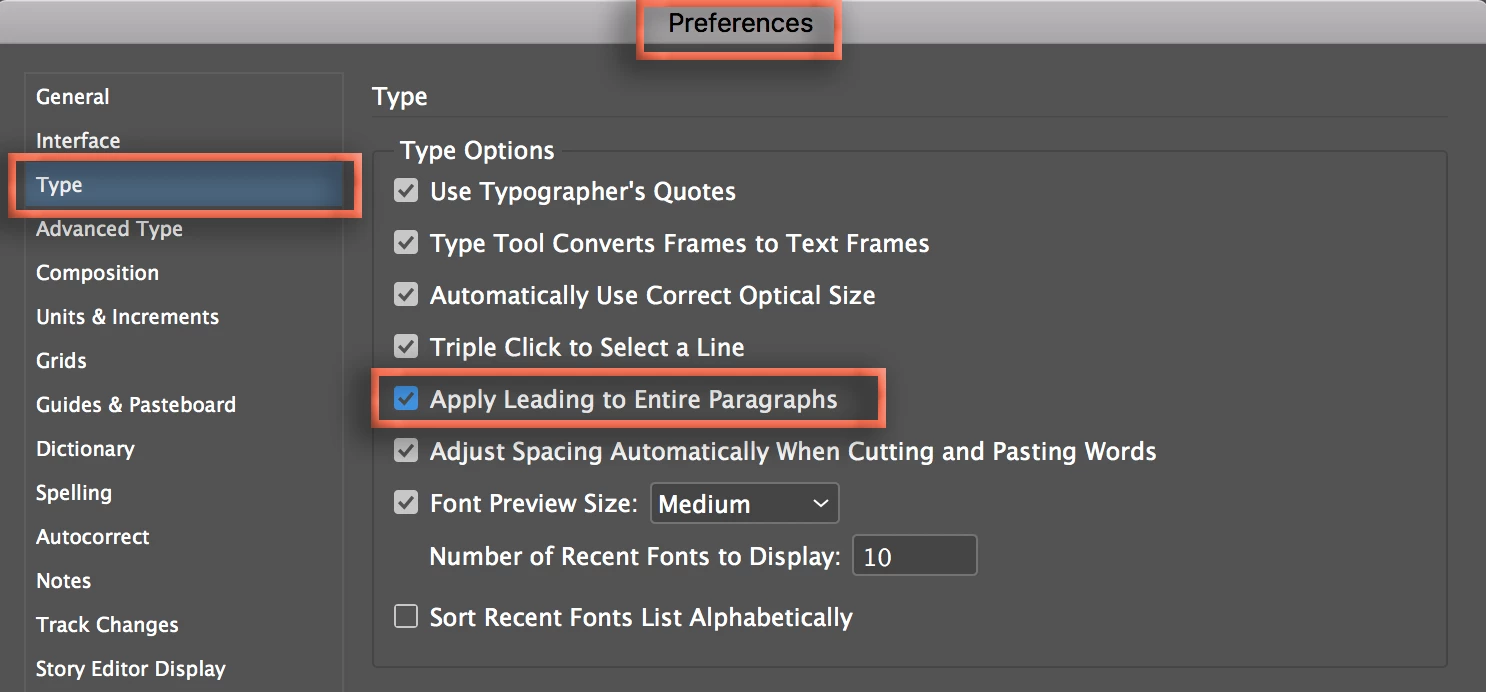
    And to keep this from ever happening again, just enable Apply Leading to Entire Paragraph in Preferences > Type (off as a default).

    8 replies

    johnr48685593
    Participating Frequently
    April 16, 2024

    The short answer is there there is an aspect of the text set to a previous font size. 

    The quick solution is to click 4 times on the text and then change the font size. 

    (Of course, the long solution is to use paragraph styles, but we're not all superusers).

    New Participant
    April 29, 2024

    Thank you so much.

    karenr97262083
    New Participant
    August 11, 2020

    Genius! Thanks so much. I've been scratching my head for yonks on this one!


    Participating Frequently
    June 9, 2020

    Looks like the location for those settings changed. Can't find them anymore.  


    Barb Binder
    Community Expert
    Community Expert
    June 9, 2020

    Ben,  you are sharing a screenshot of Photoshop preferences. Photoshop does not offer the same level of type controls as InDesign. 


    ~Barb

    ~Barb at Rocky Mountain Training
    Participating Frequently
    June 9, 2020

    My apologies, that clears up my confusion. I assumed all Adobe software would have this feature especially Photoshop. Thank you very much. 

    Michael_NextWord
    Participating Frequently
    January 7, 2018

    Thanks to all of you. Problem solved. Changing the preferences was extremely helpful.

    Michael_NextWord
    Participating Frequently
    January 7, 2018

    btw ... I was logged in under my wife's ID. That's how my name changed.

    Barb Binder
    Community Expert
    Barb BinderCommunity ExpertCorrect answer
    Community Expert
    January 7, 2018

    And to keep this from ever happening again, just enable Apply Leading to Entire Paragraph in Preferences > Type (off as a default).

    ~Barb at Rocky Mountain Training
    Inspiring
    December 13, 2023

    This is my biggest beef with Adobe. This program has one job--to correctly format--so why would I ever have to "tell" it to format something correctly?! I came looking for this answer because this has been repeatedly happening to one paragraph in an article, despite it having the proper paragraph style. Who would think you'd have to "prefer" that it follow the paragraph styles the whole program is based on? Maddening!


    The worst is when Adobe "upgrades" something and automatically chooses the new thing in the update; then you have to spend an hour (on deadline) finding out what the new thing is and how to get it back to what you originally had. If I want to try out new updates I know how to find them, Adobe--let me add them on myself!


    Luckily we have these forums so the problems are quick to fix. Thanks for this.

    Rishabh_Tiwari
    Community Manager
    Community Manager
    December 15, 2023

    Hi ,


    Thank you for reaching out and sharing the feedback. I understand how frustrating this can be. For the paragraph styles issue, you can try the suggestions shared in this discussion. For the automatic updates, you can turn it off by following the steps shared here. Feel free to reach out if you need further assistance.

    Thanks

    Rishabh

    jane-e
    Community Expert
    Community Expert
    January 6, 2018

    Select just the pilcrow. It has a different typesize from everything else and you have auto leading for the paragraph. The leading is in parenthesis because it is auto. You will not see this if the entire paragraph has a specific leading. Make the pilcow the same size as the text and the problem goes away.

    There are three ways to select a paragraph:

    • Top to bottom: you may or may not include the pilcrow
    • Bottom to top: you will never include the pilcrow. If you have auto leading and choose a smaller type size you will have this problem. Always.
    • Click 4 times: you will have the pilcrow

    Best practices:

    • Use styles
    • Don't use overrides
    • Don't use auto leading

    Please ask if there is anything that is not clear.

    New Participant
    September 8, 2023

    This method worked for me best, thank you! So simple.

    Willi Adelberger
    Community Expert
    Community Expert
    January 6, 2018

    Work with paragraph and character styles and remove all overrides at the end.
    Apply the paragraph style with holding the ALT key to remove overrides.

    Never work without paragraph styles. Never.

    The reason is that the return will have a different leading.

    New Participant
    November 19, 2021

    This worked for me, thanks so much!

    Inspiring
    January 6, 2018

    Check that all the text has the same leading. The pilcrow (paragraph mark) will have a different leading to the rest of the text.