

Participating Frequently
December 20, 2021
Question

Figure numbering

  • December 20, 2021
  • 4 replies
  • 1174 views

Hi all,

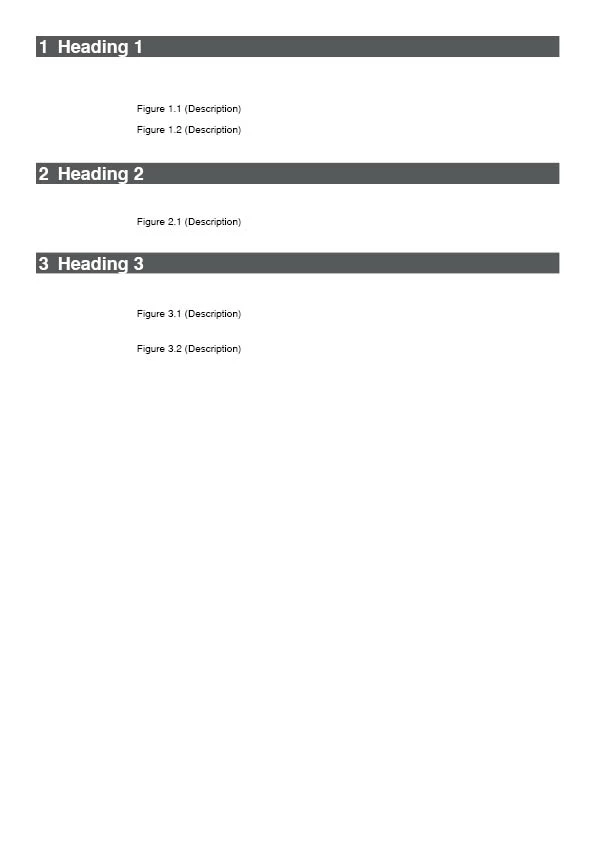
i am trying to create automatic figure numbering solution. Only problem i have, is that after Heading level 1 cannot restart.


Could you please have any ideas?

Attached is what i want to achieve.

This topic has been closed for replies.

4 replies

Barb Binder
Community Expert
Community Expert
December 21, 2021

Thanks for the heads up, Michel. I seem to have added a space at the end of the URL. 🙄


@Peter219791132ji0: I have revised the link, in case you would still like to understand the logic behind why Michel's numbering works. I am including it again here, for your convenience.

https://www.rockymountaintraining.com/adobe-indesign-numbering-headings/


~Barb


Edit: @Geоrge Thank you, too!

~Barb at Rocky Mountain Training
Barb Binder
Community Expert
Community Expert
December 21, 2021

Hi @Peter219791132ji0:


Looking at how Michel set up his file will be very helpful for you. And this post explains the logic.

https://www.rockymountaintraining.com/adobe-indesign-numbering-headings/


Please note that it addresses both numbering within a single file as well as in a book file with multiple chapters—the building blocks are slightly different in the two scenarios. From your screen shot, it looks like you are using a single file—so be sure to read all the way down to the very last paragraph.


~Barb


~Barb at Rocky Mountain Training
FRIdNGE
December 21, 2021

Barbara,


Not really sure the numbering "404" helps a lot here! [joke]  😉


(^/)


Geоrge
Legend
December 21, 2021

] adds some Russian hackers))


Here the right link I think - https://www.rockymountaintraining.com/adobe-indesign-numbering-headings/

Remember, never say you can't do something in InDesign, it's always just a question of finding the right workaround to get the job done. © David Blatner
Dave Creamer of IDEAS
Community Expert
Community Expert
December 20, 2021

I'm not understanding your problem. Are you saying you don't want your figures to reflect the heading level?

If that's the case, you need to "name" your lists so they don't interact with each other. 

Attached is an InDesign file with various numbering examples.

David Creamer: Community Expert (ACI and ACE 1995-2023)
Participating Frequently
December 21, 2021

Hi,

ok, one more time :). I want to have figures numbering linked to heading level 1. But i dont know how to do, that it starts count from x.1 after next heading level 1 appears. On the picture below is what i want. Figure numbers on the picture are not automatically written, and i want to automatize the numbering.


Geоrge
Legend
December 21, 2021

>> You are need to define new list. 

ok, I do repeat a message

>> You are need to define new list. 

Remember, never say you can't do something in InDesign, it's always just a question of finding the right workaround to get the job done. © David Blatner
Geоrge
Legend
December 20, 2021
Remember, never say you can't do something in InDesign, it's always just a question of finding the right workaround to get the job done. © David Blatner