


New Participant
August 23, 2017
Answered

File.read() returns nothing for .txt file

  • August 23, 2017
  • 3 replies
  • 7550 views

Hi,

I'm searching a way to read (and subsequently edit) the contents of a text file on my disk. I thought it works with the File.read() function but when I run the following I get nothing from the file. How does it work? How do I get the string with the file content? I tried different functions like readln() etc but with no luck

var testtextfile = File("/c/users/bernhard-büro/desktop/text.txt");

testtextfile.open("r", undefined, undefined);

//also tried with .open("r"); and .open('r');

var fileContentsString = testtextfile.read();


alert("Full path: "+testtextfile.fsName+"\r\n"+
      "File content:"+fileContentsString+"\r\n"+
      "fileContentsString length:"+fileContentsString.length);
    
testtextfile.close();

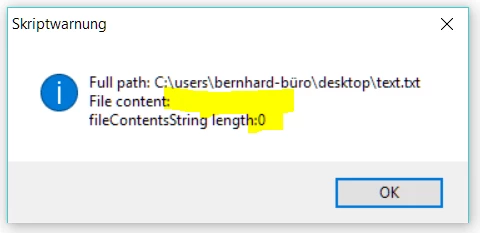
this is the result: (and what is the proper way to format code in this forum?)
Thank you very much!
Cheers
This topic has been closed for replies.
Correct answer Trevor:

Often the cause is encoding related.

Try

var testtextfile = File("/c/users/bernhard-büro/desktop/text.txt");

testtextfile.encoding = 'UTF8'; // set to 'UTF8' or 'UTF-8'

testtextfile.open("r");

var fileContentsString = testtextfile.read();

testtextfile.close();

alert("Full path: " + testtextfile.fsName + "\r\n" +

    "File content:" + fileContentsString + "\r\n" +

    "fileContentsString length:" + fileContentsString.length);

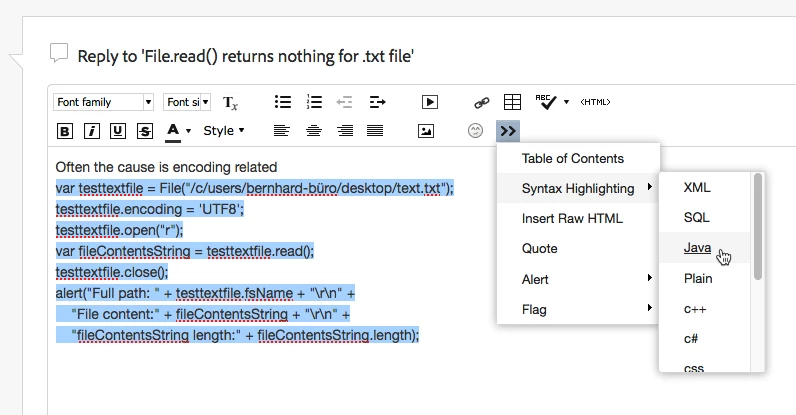
To format the code you go to advanced editor

and then

HTH

Trevor

3 replies

Community Expert
August 23, 2017

Apart from the encoding, another problem might be the u+umlaut in your filename. If Trevor's suggestion doesn't help, rename the file so that its name doesn't have any accented characters, then try again.

Community Expert
August 23, 2017

Hi Peter,

about the u umlaut problem:
I've seen this on Mac OS X where a ü in a file name can be composed out of:

u\u0308

Could that happen on Windows as well?

Regards,
Uwe

Loic.Aigon
Brainiac
August 25, 2017

> Could that happen on Windows as well?

No, it doesn't. One of the few areas where Windows behaves better than the Mac OSs


Hi

I second that. I discovered that recently while resolving image files instance on Mac Os. I got a textual reference with a diacritic such as "marché.jpg" and the file couldn't be found to my surprise. I coudl see the file but using File ("marché.jpg").exists would return false.

Fact is Mac os was using "marche[diacritic].jpg"

Painful indeed.

Trevor:
Trevor:Correct answer
Brainiac
August 23, 2017

Often the cause is encoding related.

Try

var testtextfile = File("/c/users/bernhard-büro/desktop/text.txt");

testtextfile.encoding = 'UTF8'; // set to 'UTF8' or 'UTF-8'

testtextfile.open("r");

var fileContentsString = testtextfile.read();

testtextfile.close();

alert("Full path: " + testtextfile.fsName + "\r\n" +

    "File content:" + fileContentsString + "\r\n" +

    "fileContentsString length:" + fileContentsString.length);

To format the code you go to advanced editor

and then

HTH

Trevor

New Participant
August 28, 2017

Hi Trevor, thanks a lot for that. I still have to find out what exactly is going on in detail about the character encoding on my system (changing it doesn't seem to be necessary in most cases) but now I can parse the text out of my file, great! Kind regards, Stefan

Trevor:
Brainiac
August 28, 2017

Hi Stefan

The need for the encoding is dependent on the contents of the file.

If the files contains just asci then you shouldn't need to set it. ü and most of the diacritics are asci extended and also shouldn't need setting but if the text contains Unicode characters you are generally going to need to set it.

Trevor  

tpk1982
Brainiac
August 23, 2017

Please try this..

var testtextfile = new File("/c/users/bernhard-büro/desktop/text.txt");

testtextfile.open('r');

fileContentsString = testtextfile.readln();

alert("File content:"+fileContentsString);