



Question
Find and apply the paragraph style
Hi there to all of you,
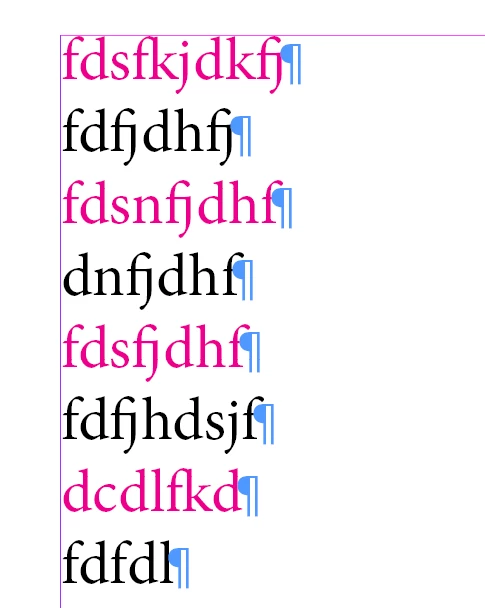
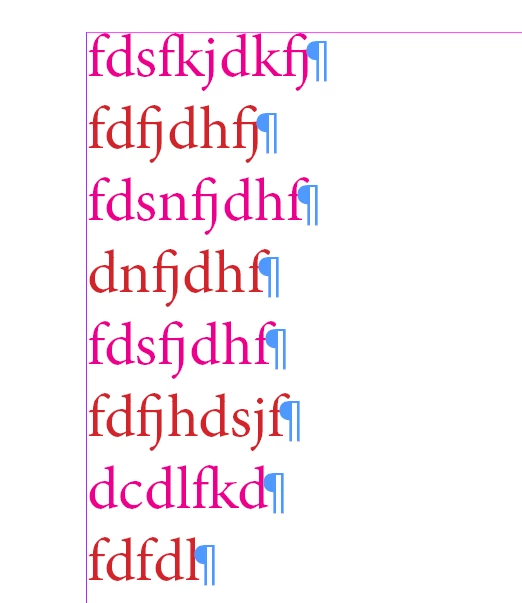
Find the paragraph that follows the paragraph with style sheet "XXX" and give it style sheet "YYYY." I have created a script for the user select the paragraph style group, subgroup, and paragraph styles. It's also showing "find what" and "changeto" styles. but I don't get the expected result. Please check the below scripts for your reference. TIA
Before:
After:
// Function to get all paragraph style groups, subgroups, and styles
function getAllParagraphStyles() {
    var doc = app.activeDocument;
    var groups = [];
    var subGroups = [];
    var styles = [];

    // Function to recursively get styles from a group
    function getStylesFromGroup(group, indent) {
        // Get paragraph styles directly in the group
        for (var i = 0; i < group.paragraphStyles.length; i++) {
            var style = group.paragraphStyles[i];
            styles.push(indent + "Paragraph Style: " + style.name);
        }

        // Recurse into subgroups
        for (var j = 0; j < group.paragraphStyleGroups.length; j++) {
            var subGroup = group.paragraphStyleGroups[j];
            subGroups.push(indent + "Subgroup: " + subGroup.name);
            getStylesFromGroup(subGroup, indent + "  ");
        }
    }

    // Get paragraph styles not in any group (root level)
    for (var k = 0; k < doc.paragraphStyles.length; k++) {
        var style = doc.paragraphStyles[k];
        styles.push("Paragraph Style: " + style.name);
    }

    // Get paragraph styles in the root level groups
    for (var l = 0; l < doc.paragraphStyleGroups.length; l++) {
        var group = doc.paragraphStyleGroups[l];
        groups.push("Group: " + group.name);
        getStylesFromGroup(group, "  ");
    }

    return { groups: groups, subGroups: subGroups, styles: styles };
}

// Create the user interface
function createUI(data) {
    var dlg = new Window('dialog', 'Select Paragraph Styles and Groups');
    dlg.orientation = 'column';
    dlg.alignChildren = ['fill', 'top'];

    dlg.add('statictext', undefined, 'Select Group:');
    var groupDropdown = dlg.add('dropdownlist', undefined, data.groups);
    groupDropdown.selection = 0;

    dlg.add('statictext', undefined, 'Select Subgroup:');
    var subGroupDropdown = dlg.add('dropdownlist', undefined, data.subGroups);
    subGroupDropdown.selection = 0;

    dlg.add('statictext', undefined, 'Select Paragraph Style to Find:');
    var styleDropdown = dlg.add('dropdownlist', undefined, data.styles);
    styleDropdown.selection = 0;

    dlg.add('statictext', undefined, 'Select Paragraph Style to Apply:');
    var applyStyleDropdown = dlg.add('dropdownlist', undefined, data.styles);
    applyStyleDropdown.selection = 0;

    var buttonGroup = dlg.add('group');
    buttonGroup.orientation = 'row';
    var okButton = buttonGroup.add('button', undefined, 'OK');
    var cancelButton = buttonGroup.add('button', undefined, 'Cancel');

    okButton.onClick = function() {
        dlg.close(1);
    };

    cancelButton.onClick = function() {
        dlg.close(0);
    };

    var result = dlg.show();
    if (result === 1) {
        var selectedGroup = groupDropdown.selection ? groupDropdown.selection.text : null;
        var selectedSubGroup = subGroupDropdown.selection ? subGroupDropdown.selection.text : null;
        var selectedStyle = styleDropdown.selection ? styleDropdown.selection.text : null;
        var applyStyle = applyStyleDropdown.selection ? applyStyleDropdown.selection.text : null;

        return { selectedGroup: selectedGroup, selectedSubGroup: selectedSubGroup, selectedStyle: selectedStyle, applyStyle: applyStyle };
    } else {
        return null;
    }
}

// Main function
function main() {
    if (app.documents.length === 0) {
        alert('No documents are open. Please open a document and try again.');
        return;
    }

    var data = getAllParagraphStyles();
    var selectedItems = createUI(data);

    if (selectedItems) {
        var doc = app.activeDocument;
        var findStyleName = selectedItems.selectedStyle ? selectedItems.selectedStyle.replace(/^.*Paragraph Style: /, '') : null;
        var applyStyleName = selectedItems.applyStyle ? selectedItems.applyStyle.replace(/^.*Paragraph Style: /, '') : null;

        // Check if styles are valid
        var findStyle = findStyleName ? doc.paragraphStyles.itemByName(findStyleName) : null;
        var applyStyle = applyStyleName ? doc.paragraphStyles.itemByName(applyStyleName) : null;

        // Alert for debugging
        alert('Selected Find Style: ' + findStyleName + '\nSelected Apply Style: ' + applyStyleName);

        if (!findStyle || !applyStyle) {
            var errorMessage = [];
            if (!findStyle) errorMessage.push('The selected style to find is not valid.');
            if (!applyStyle) errorMessage.push('The selected style to apply is not valid.');
            alert(errorMessage.join('\n'));
            return;
        }

        // Loop through text frames
        for (var i = 0; i < doc.textFrames.length; i++) {
            var textFrame = doc.textFrames[i];
            var paragraphs = textFrame.paragraphs;

            // Loop through paragraphs in the text frame
            for (var j = 0; j < paragraphs.length; j++) {
                var para = paragraphs[j];

                // Check if the paragraph is styled with "findStyle"
                if (para.appliedParagraphStyle === findStyle) {
                    // Apply "applyStyle" to the next paragraph if exists
                    if (j + 1 < paragraphs.length) {
                        paragraphs[j + 1].appliedParagraphStyle = applyStyle;
                        alert('Applied ' + applyStyle.name + ' to the next paragraph.');
                    } else {
                        alert('No next paragraph found to apply style.');
                    }
                }
            }
        }

        alert('The selected style has been applied successfully.');
    } else {
        alert('No items were selected.');
    }
}

// Run the main function
main();
 AdChoices