

Inspiring
September 19, 2017
Question

Find and Replace Font - Redefine styles when changing all

  • September 19, 2017
  • 1 reply
  • 9216 views

Hi,

     I need to enable the checkbox "Redefine Style When Changing All" in Find Font dialog.  How can I enable this check box when replacing fonts??
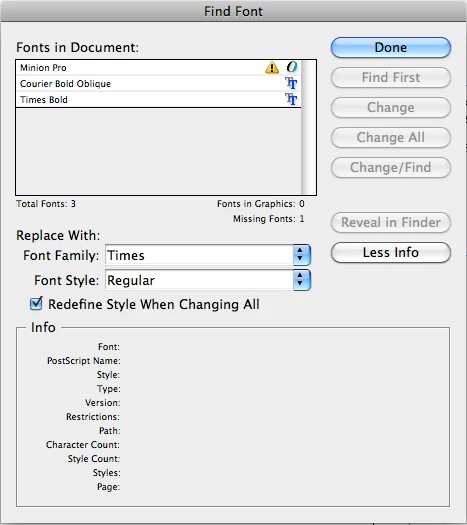
- Sudha K

This topic has been closed for replies.

1 reply

Kasyan Servetsky
Legend
September 19, 2017

As far as I know, this button has no relative property in scripting. However, there's a workaround: you can achieve the same effect by breaking it into three steps.

Find-replace a font

  1. in all paragraph styles
  2. in all character styles
  3. in locally formatted text

Here's a script that uses this approach.

Hope this helps.

— Kas

Sudha_KAuthor
Inspiring
October 5, 2017

Hi,

     Sorry for late reply...

     Thanks it is useful to me...   But when I am checking this with manually, i have confused...

    1. Actual function of "Redefine Styles When Changing All"  in Find Font Menu.

     2. What is the difference between "Redefine Styles When Changing All"  in Find Font Menu  &  the "Redefine Style in Paragraph Style Palete".

     3. I have used the below code. Font is applied for "#" but there is no character. Manually we can replace it. But using programatically its throwing "


- Sudha K

Sudha_KAuthor
Inspiring
October 13, 2017

Hi,

     Thank you for the reply... Its working for the table.... For the empty textframe (Same case "#") is also need to replace. Need to replace commonly in document.

     I want to know how to handle this by using find and replace.. Handle common in document based on fonts using find pallete..


Hi,

     Can I send mail from adobe forum to send the test file.