



rachelh48572089
Participant
April 13, 2024
Question

Find/Change not working in InDesign 2022

  • April 13, 2024
  • 4 replies
  • 394 views

I previusly posted in an old thread and have been advised by a Community Expert to start a new one. Here's my issue:


I do work with an academic journal. When I Place the copy they send me of articles and footnotes (in Word docs), I use the Find Format and Change Format to change the font styles across the whole document. I can Find/Change all font styles except the italicized style of one typeface used very frequently in the footnotes. When I indicate the font family and font style, with all of the footnote copy selected, I get the "Cannot find match." (See image below.) I've tried resetting the Preferences using Bill Silbert's method in a previous post and it does not fix the issue. I've restarted InDesign, restarted the computer. I've made sure I have "text" selected (not GREP) and I've tried various selections under the "Search:" dropdown menu (Selection, Story, etc.). I've checked and uncheked the "include Footnotes" as well. No luck so far. Can someone help me? I much prefer to use Find/Change format for this edit (versus Find/Change Font) as it lets me target specific areas of text versus the entire document. I'm using InDesign 2022 (17.4.1) on an iMac (Monteray 12.6.9).


Thank you for any and all help!
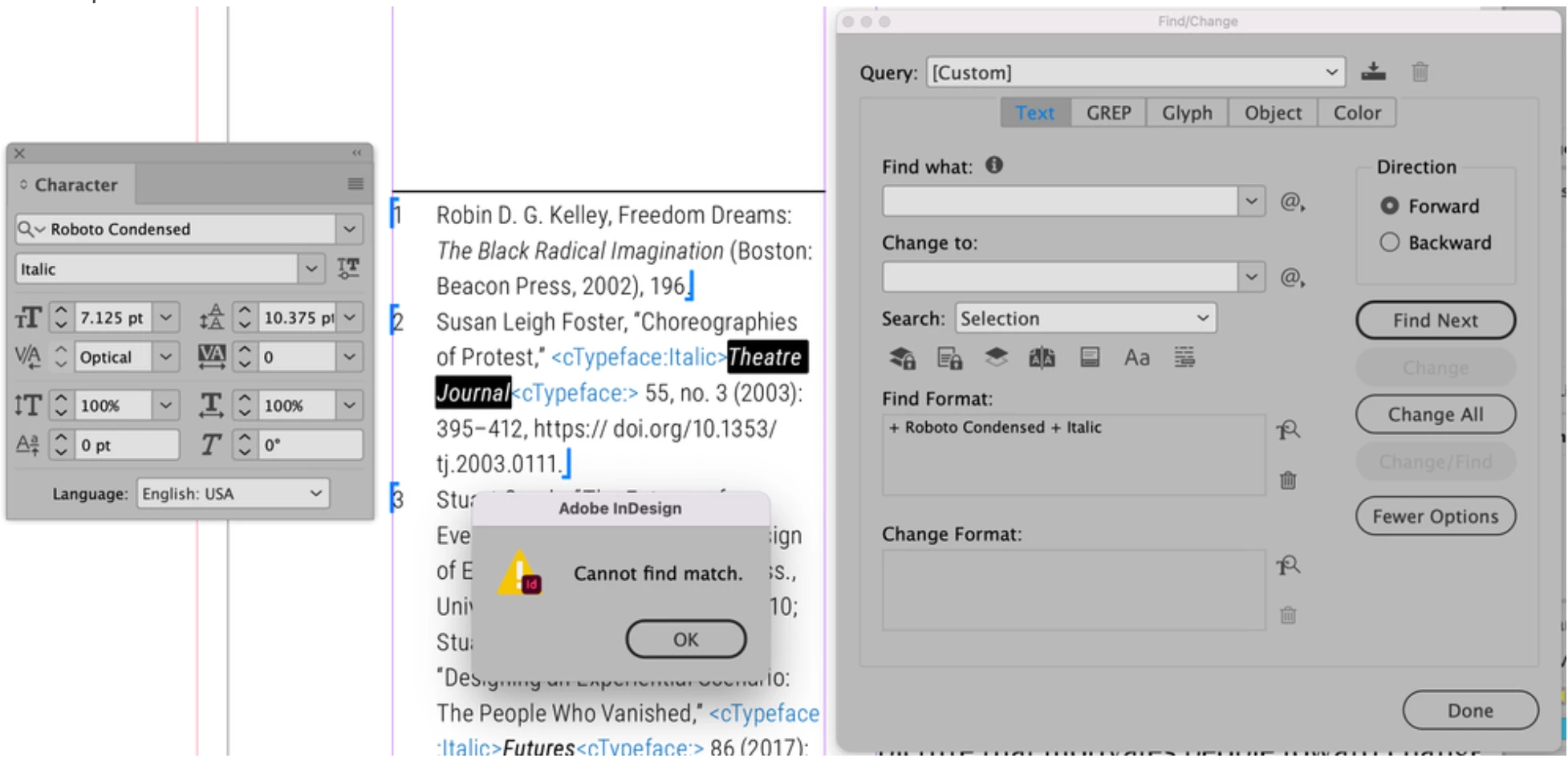


(As a reference, during this Find/Change attempt in the image above, I highlighted just the italicized type and attempted the search and I get "Cannot find match." When I try doing the same serach with the entire footnote copy selected and I get the same results.)


This topic has been closed for replies.

4 replies

Peter Spier
Community Expert
Community Expert
April 14, 2024

If none of the above suggestions help, try using the GREP tab instead of the Text tab.

While I believe it should work there without specifying a search string or a change string, you can enter .+ in the find field to find any string of characters and $0 in Change to repalce the found text with itself.

Community Expert
April 14, 2024

You're only searching the selection - you can see in your dialog box - it's set to selection.

Set it to Document

And also click on all the options underneath, for locked objects, parent pages, etc. 

See if it makes a difference

Robert at ID-Tasker
Legend
April 14, 2024
quote

You're only searching the selection - you can see in your dialog box - it's set to selection.


By @Eugene Tyson


It looks like it's not a Footnote, because, there is no "Selection" when you select text in the Footnote's contents:

OK, I "found" it first - then InDesign doesn't give me an option "Selection" - I need to select text first - then it works.


@rachelh48572089, your text are Endnotes - it still works for me:


Either you document or preferences are corrupted.


And Endnotes are not treated as Footntoes - so there is no need to select  to search in Endnotes.


Mike Witherell
Community Expert
Community Expert
April 13, 2024

Here is some thorough troubleshooting with an effort to be exhaustive:

https://community.adobe.com/t5/indesign-discussions/reset-indesign-preferences-and-other-troubleshooting/td-p/11990234


Are you tending to work by means of paragraph and character styles?

Why are you on these older versions?

Mike Witherell
Robert at ID-Tasker
Legend
April 13, 2024

Can you try IDMLing - export as IDML, open, save with a new name - do not overwrite your original INDD file.