New Participant
January 31, 2021
Answered

Font Size Comparison

  • January 31, 2021
  • 6 replies
  • 2898 views

My book designer used Capitolium News 2, 10pt. for the main text in my coffee-table book that will be 9 x 12". The text seems huge! (I have the PDFs) The font size she used looks like the large print books on the market. I am accustomed to Times New Roman, 12 pt. which I understand is the industry standard. How on earth did an experienced book designer make such a bad decision?


What Capitolium News 2 font size is equivalent to Times New Roman, pt.12?

Thanks for your help.

This topic has been closed for replies.
Correct answer rob day

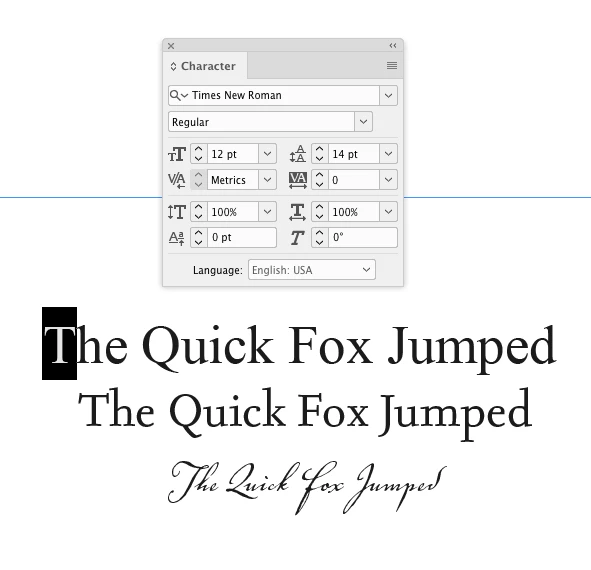
The difference is mostly in the x-height. If I set all caps the cap heights are the same. News has less contrast so it will hold up better under variable printing conditions.


The font’s x-height affects how it sets. This text is all 12pt:


6 replies

rob day
Braniac
January 31, 2021

Just realized in my earlier comparison post I was showing Capitolium 2. The Capitoleum 2 News version has a larger x-height, so upper & lower case settings might appear visually larger when compared to a font with a smaller x-height. Gerard Unger is a highly regarded type designer, so I assume the News version has a larger x-height for legibility at smaller point sizes and the poor printing conditions.


Point size is measured from just above the ascenders to just below the descenders, so fonts with larger x-heights can appear larger at the same point size.


Why don’t you just ask the designer to set the text smaller, or use the Capitolium 2 version?


jmlevy
Braniac
February 1, 2021

I also find that CapitoliumNews 2 seems huge compared to Times using the same size.

rob day
rob dayCorrect answer
Braniac
February 1, 2021

The difference is mostly in the x-height. If I set all caps the cap heights are the same. News has less contrast so it will hold up better under variable printing conditions.


The font’s x-height affects how it sets. This text is all 12pt:


rob day
Braniac
January 31, 2021

The x and cap heights are virtually identical.


12pt:

ollie5FCDAuthor
New Participant
January 31, 2021
Thanks, Rob for responding. Would you mind venturing an explanation of why when my book designer emailed me (as an attachment) a sample page of text from my book it looks like a Times New Roman 14 pt. size. I did absolutely nothing to it except print it out.
Thanks.Ollie
ollie5FCDAuthor
New Participant
January 31, 2021

Was the attachment a PDF? Did you print it at 100%?


Can you share the PDF? If you have AcrobatPro you can get any text’s point size


Yes, the email attachment is PDF. I can share it but not sure how. (I'm not very digital). What if I forwarded it? To whom would I forward it?
Braniac
January 31, 2021

The other thing to bear in mind that the font size depends on your zoom. Zoom from 100% to 200% and it's twice as big. Never assume the size it opens is some kind of industry standard. 

BobLevine
Braniac
January 31, 2021
First of all, this has nothing to do with InDesign. Secondly, are you expecting a bunch of us to agree with you and throw it back out at the designer? If that is your goal, I'm afraid you're going to crash and burn on that.

If you wanted a specific font and size, as already pointed out, it should have been specified. And your remark about TNR 12 point being an industry standard has zero basis in truth. There is no industry standard for a font choice.
Braniac
January 31, 2021

Why would Times New Roman be an industry standard? What industry? 

What's wrong with Capitolium? Why is it a mistake? 

If you wanted to use Times New Roman you should have specified this - Times New Roman is a font that a lot of designers would avoid.


There is a difference - hope this helps - but really should have make specific font requests to the designer. How are they to know what you prefer unless you tell them?

And to be honest, the designer should have gotten this info from you before beginning - it would be part of a discussion at briefing stage.

If no font choices were discussed - then a designer would use something that they felt worked well.


If it's already done and printed - not much you can do. If you want the font changed then it's something you'll have to bring up with your designer.


There is a difference for sure


Derek Cross
Braniac
January 31, 2021

It would be easier to judge if you could post a screenshot of a typical page.