



kyriosity
Inspiring
October 11, 2023
Question

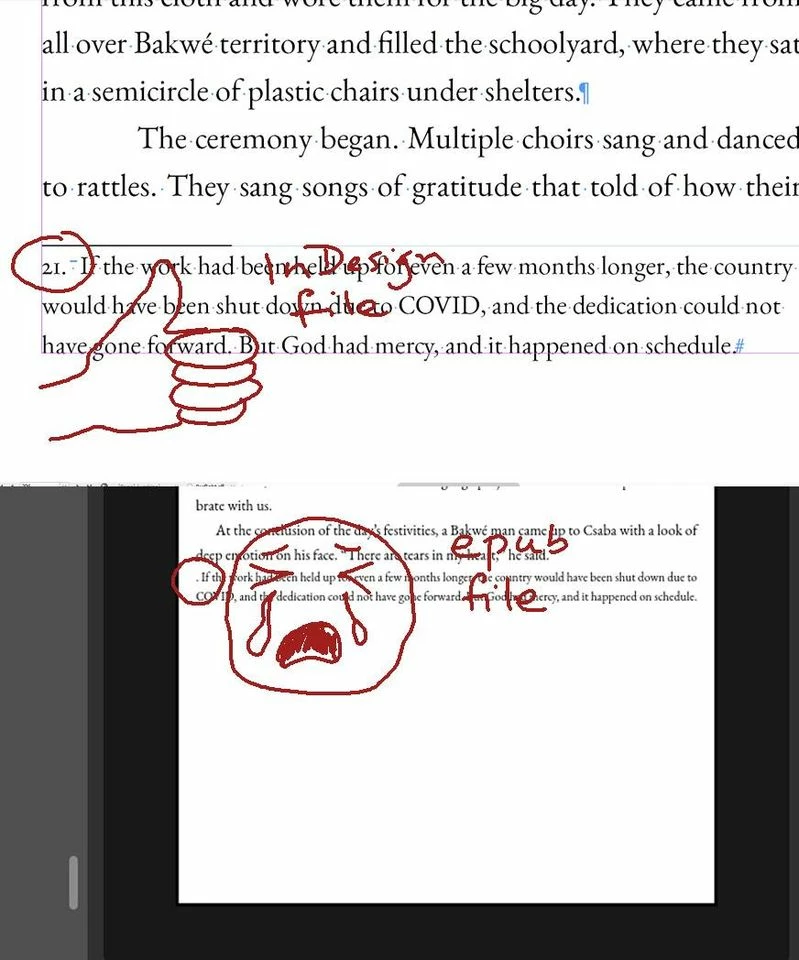
Footnote numbers disappearing in EPUB export

  • October 11, 2023
  • 3 replies
  • 1200 views

I'm exporting from InDesign to epub, and a file that's been exporting OK suddenly loses all of its footnote numbers (not the reference, but in the notes themselves) in the epub. It has happened in more files than I care to count. This is a recurring issue that I'd really like to find a solution to. So far, the only thing that's ever worked is completely rebuilding the file, which is seriously no fun. 


This topic has been closed for replies.

3 replies

kyriosity
kyriosityAuthor
Inspiring
December 2, 2023

Is there anyone else out there who can help me with this? I'm so weary of having to rebuild every file when this issue pops up. One of my clients is having me update something in all of their epubs, which means having to recreate dozens of files.  PLEASE...SOMEONE HELP ME FIGURE THIS OUT AND REALLY RESOLVE IT!!!

James Gifford—NitroPress
Brainiac
December 2, 2023

Well, you didn't answer most of my questions above, which makes it hard for me or anyone else to give any further help. The only way to solve problems like this is to send the file to someone for examination, or work through questions, answer and trial solutions.


FWIW, I believe it's a corrupted file or corrupted style problem. But not knowing, for starters, if it's FXL or reflowable, and if the problem persists in PDF export, there's no way to get to any useful next step.

kyriosity
kyriosityAuthor
Inspiring
December 2, 2023

Sorry. Your "big hammer" solution is so far what it's taking...and what's taking it so long. I'd love to find a less-hammer-more-magic solution. Yes to PDF export. Footnote count varies from doc to doc (one to hundreds).


And...reflowable layout. I have a simple superscript style applied to references. I don't know what else to check, options-wise...nothing looks wonky to me.

James Gifford—NitroPress
Brainiac
October 11, 2023

Footnotes and endnotes in EPUB export are fragile. Did this document originate in Word? That conversion to ID often compounds the problems.


Let's start with the simple fix: export the file to IDML. Open that file and save it as an INDD file under a new name. (Check for any formatting changes... sometimes there are none, sometimes the process messes things up a little.) Try the export again.


Also, sometimes exporting as the very first operation after you open a file works; that is, if you open it, edit a little, change this and that, save, and then export, errors occur that won't if you do the export first thing. I don't know why.


If neither of those fixes your unhappy footnote numbers, check back with updated info.

kyriosity
kyriosityAuthor
Inspiring
October 12, 2023

Thanks, James. Alas, no success with either of those. And yes, it was originally a Word file.

kyriosity
kyriosityAuthor
Inspiring
October 12, 2023

Any other angles of attack you can think of, @James Gifford—NitroPress?

Community Expert
October 11, 2023

@James Gifford—NitroPress  might be best for this one