



brankica
Known Participant
December 20, 2023
Answered

Footnotes restarting even if text boxes are linked

  • December 20, 2023
  • 1 reply
  • 510 views

Hello everyone, I have a problem with footnotes. I Insert for example 2 footnotes and if the text is in columns on the same page they are ok, 1st and 2nd, but when I use enter to make space and move a part of text to the next page, the second one becomes first, I mean I have two 1. Does anyone know how to solve this? Here it is a image describing a problem. Btw also is there any way to put those footnotes from two columns into one? Or under just one line that goes under both of the columns?
This topic has been closed for replies.
Correct answer James Gifford—NitroPress

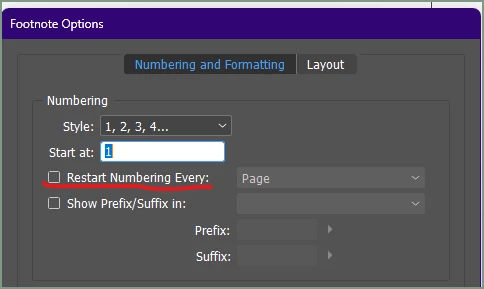
Do you have 'Restart Numbering' set correctly — in this case, the box unchecked so that the numbers will continue sequentially throughout the document?


1 reply

James Gifford—NitroPress
Braniac
December 20, 2023

Do you have 'Restart Numbering' set correctly — in this case, the box unchecked so that the numbers will continue sequentially throughout the document?


brankica
brankicaAuthor
Known Participant
December 20, 2023

OMG, that's it. How dumb am I 😆 Do you know how to align footnotes in collumns at least in one line? Or how to position them at the bottom of all page, not collumns?

James Gifford—NitroPress
Braniac
December 20, 2023

Everything about how footnotes are positioned is contained in the second tab of the menu shown above. If the box at the top is checked, footnotes will span columns. Unchecked, they will appear column by column. YOu can then adjust spacing and so forth with the rest of that pane, and by assigning a specific 'footnote' Paragraph Style and adjusting it.