


Inspiring
July 29, 2019
Answered

Formatting poetry - How to use paragraph styles with returns

  • July 29, 2019
  • 1 reply
  • 2246 views

I'll be using InDesign to format a very long narrative poem written in Word. In the Word doc, a hard carriage return (i.e. an Enter keystroke) has been used to separate the poem into lines, and paragraph breaks are represented by a tab at the beginning of a line. If I'm right, a hard return indicates to InDesign that a new paragraph has been started, but I want a paragraph to consist of multiple lines with carriage returns.

One solution may be to tell InDesign to recognize a new paragraph only after two hard returns. There aren't many paragraphs, so it would be easy to replace the tabs with double hard returns in the Word doc. Is this possible?

Another solution may be to replace all hard carriage returns with soft returns (Shift + Enter), and all tabs with hard returns. If I understand correctly, this will tell InDesign that paragraphs end only where I want them to. The poem is many thousands of lines long, so this will require a lot of replacing, which I'm trying to avoid if possible.

What's the best solution here? If it's the latter, what's the simplest way to replace all hard returns with soft?
This topic has been closed for replies.
Correct answer Bill Silbert

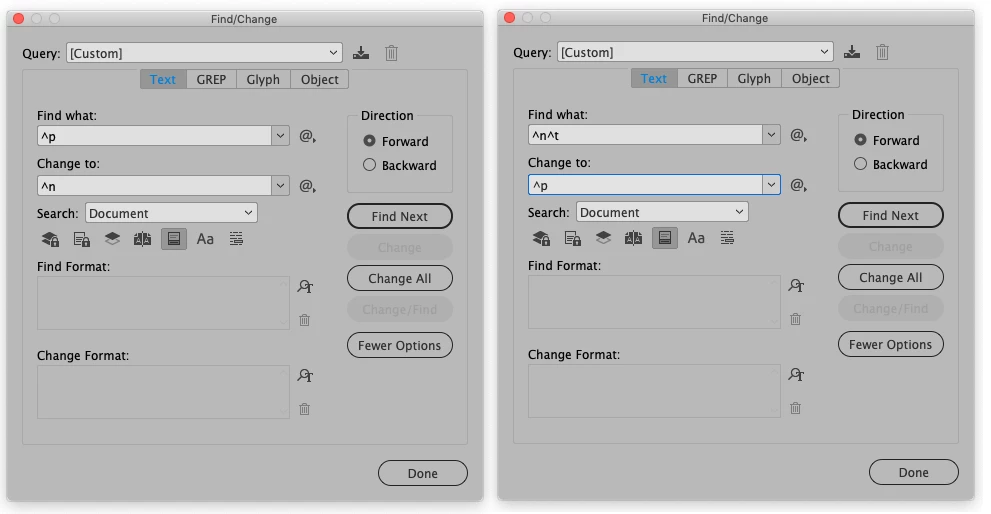
Using Find/Change. First set up as shown in the first picture below globally changing a hard paragraph return to a soft return. That will leave a soft return right before your paragraph defining tabs. For step two then put a soft return and a tab in the find field and globally change them to a hard return. This will give you hard returns at the end of every paragraph without adding an extra space between paragraphs which would have been caused if you left the last soft return in each paragraph as it was.

1 reply

Bill Silbert
Community Expert
Bill SilbertCommunity ExpertCorrect answer
Community Expert
July 29, 2019

Using Find/Change. First set up as shown in the first picture below globally changing a hard paragraph return to a soft return. That will leave a soft return right before your paragraph defining tabs. For step two then put a soft return and a tab in the find field and globally change them to a hard return. This will give you hard returns at the end of every paragraph without adding an extra space between paragraphs which would have been caused if you left the last soft return in each paragraph as it was.

Inspiring
July 29, 2019

Thanks, I think this will do it.

Bill Silbert
Community Expert
Community Expert
July 29, 2019

Happy to help.