


lindac43639193
New Participant
August 13, 2019
Answered

Formatting text causes duplicate text

  • August 13, 2019
  • 2 replies
  • 1845 views

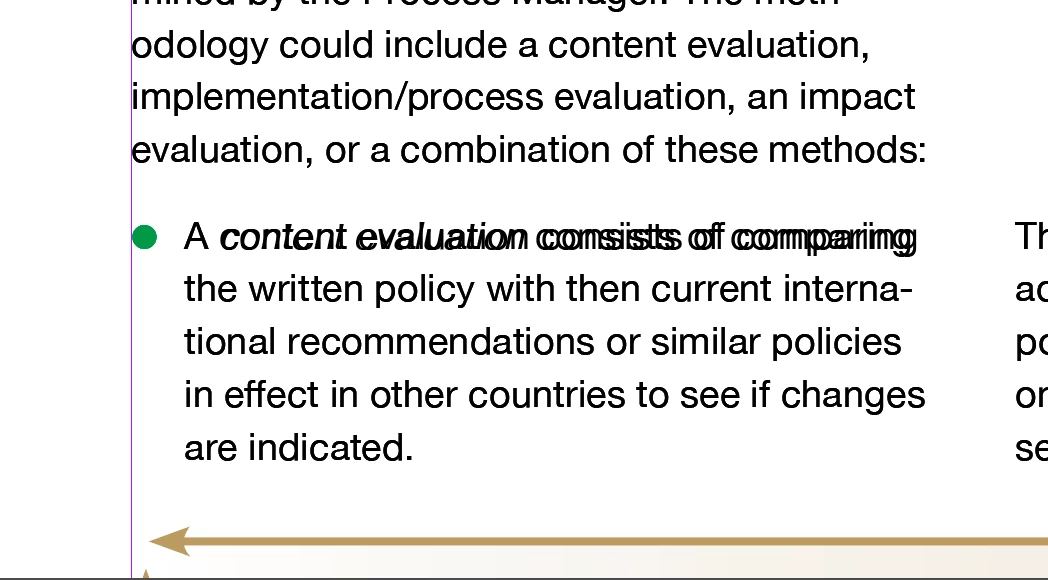
I am working in InDesign CC 2019 and I'm working on a large document (just over 100 pages). I am almost finished with the project and am doing some final tweaking and proofing, but a new problem has arisen. When I go in and format text, for instance make something italic, whether it is with character styles or by changing in the character tab, the type selected plus more type surrounding it becomes duplicated. So the correct formatting is on top of the old formatting. This has happened in the past but would go away when I changed the view. This time it doesn't go away. I tried clearing InDesign cache but that didn't correct the problem. Any ideas about what I should do? I'm working under a deadline!! Yikes!

My image below shows the type that has been reformatted to be in italics and is showing as a duplicate.

Thanks,

Linda 
    This topic has been closed for replies.
    Correct answer lindac43639193

    I've gotten tech support on this, my document has become corrupted. I need to copy it over to a new file. (Sigh!)

    2 replies

    Brainiac
    August 13, 2019

    Hi Linda:

    Duplicate frames or that you need to disable GPU Performance. Click the rocket ship icon on the Application bar.

    ~Barb

    Jongware
    Brainiac
    August 13, 2019

    The most logical cause would be that you have a copy of that text frame on top of it. Can you check that?

    lindac43639193
    New Participant
    August 13, 2019

    No, I don't have duplicate frames.

    lindac43639193
    lindac43639193AuthorCorrect answer
    New Participant
    August 13, 2019

    I've gotten tech support on this, my document has become corrupted. I need to copy it over to a new file. (Sigh!)