


denisep726548
Inspiring
July 27, 2022
Answered

Geometric Bounds help needed in applescript for text box placement

  • July 27, 2022
  • 2 replies
  • 1871 views

I have a line in my applescript to set a text box at a certain area on the document.


Is it possible to set it so that it starts the box point in the lower left of the page?


I am trying to either get it to NOT go off the bottom of the page

OR

Just set all 4 corners at a specific location on the page.

Page sizes can vary.


set slugText to make new text frame with properties {geometric bounds:{(item 4 of page 1's bounds), 0.25, ((item 1 of page 1's bounds) + 1.5), 2}, stroke color:"noprint", stroke weight:1, item layer:"Job Info - Non-Print"}
This topic has been closed for replies.
Correct answer rob day

This works great if the only naming convention is C. I also need it to recognize the last 2 characters as UP or CP...

How would I word it to be the last or last 2 characters in sn?

I would need it to recognize multiple pms name possibilities.


You would have to set up else if statements for the different endings:


		repeat with x in allSwatches
			set sn to name of x
			if word 1 of sn is "PANTONE" and last character of sn is "C" then
				set sn to text 1 thru -2 of sn
			else if word 1 of sn is "PANTONE" and text -2 thru -1 of sn is "UP" then
				set sn to text 1 thru -3 of sn
			else if word 1 of sn is "PANTONE" and text -2 thru -1 of sn is "CP" then
				set sn to text 1 thru -3 of sn
			end if
			if sn is not in ds then
				set ul to ul & sn & return
			end if
		end repeat


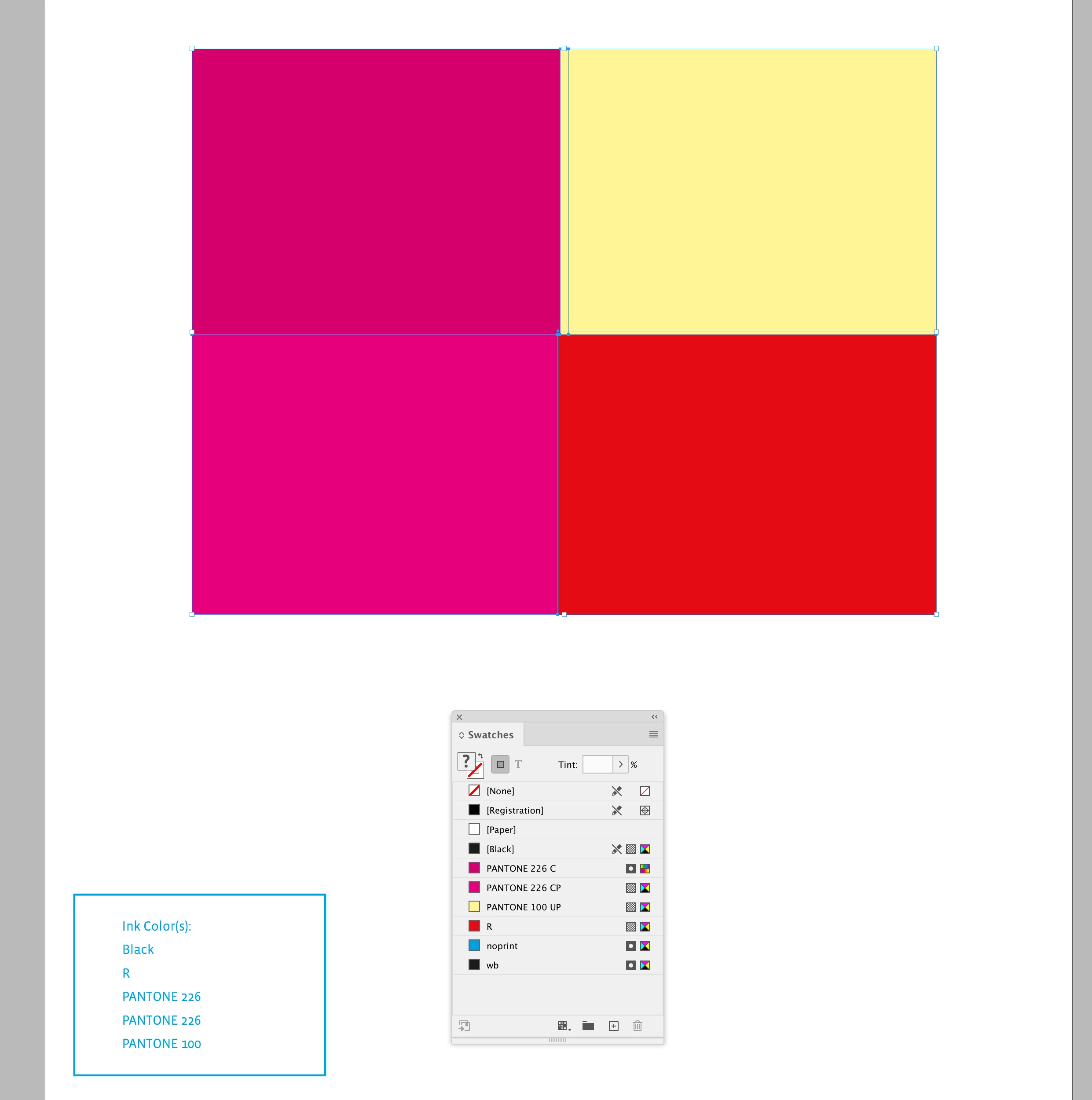
The Pantone’s with different endings have different color values and color modes, so in a case like this there are two different colors used, but they are listed as the same name:


2 replies

rob day
Braniac
July 28, 2022

Is it possible to set it so that it starts the box point in the lower left of the page?


Hi @denisep726548 , Marks’s script is placing the frame to the lower left margin, this would make a 2" x 1" frame placed in the lower left corner. Also, when setting dimensions you’ll need to set the scripting units or ruler units, otherwise the document’s current ruler units will determine what 144 means.


tell application id "com.adobe.indesign"
	set measurement unit of script preferences to points
	tell active document
		tell page 1
			set y to item 3 of bounds
			set fw to 144
			set fh to 72
			set slugText to make new text frame with properties {geometric bounds:{y - fh, 0, y, fw}, stroke color:"Black", stroke weight:1}
		end tell
	end tell
end tell


rob day
Braniac
July 28, 2022

Also, if you want to fit the constructed text frame into the actual document slug

tell application id "com.adobe.indesign"
	set measurement unit of script preferences to points
	tell active document
		--set the bottom slug dimension to 1"
		set slug bottom offset of document preferences to 72
		
		--get the document's bottom bleed
		set bo to document bleed bottom offset of document preferences
		
		--the frame’s height
		set fh to slug bottom offset of document preferences
		
		tell page 1
			--the top of the text frame
			set y to (item 3 of bounds) + bo
			
			--the width of the text frame
			set fw to (item 4 of bounds) * 0.5
			
			set slugText to make new text frame with properties {geometric bounds:{y, 0, y + fh - bo, fw}, stroke color:"Black", stroke weight:1}
		end tell
	end tell
end tell


rob day
rob dayCorrect answer
Braniac
October 7, 2022

This works great if the only naming convention is C. I also need it to recognize the last 2 characters as UP or CP...

How would I word it to be the last or last 2 characters in sn?

I would need it to recognize multiple pms name possibilities.


You would have to set up else if statements for the different endings:


		repeat with x in allSwatches
			set sn to name of x
			if word 1 of sn is "PANTONE" and last character of sn is "C" then
				set sn to text 1 thru -2 of sn
			else if word 1 of sn is "PANTONE" and text -2 thru -1 of sn is "UP" then
				set sn to text 1 thru -3 of sn
			else if word 1 of sn is "PANTONE" and text -2 thru -1 of sn is "CP" then
				set sn to text 1 thru -3 of sn
			end if
			if sn is not in ds then
				set ul to ul & sn & return
			end if
		end repeat


The Pantone’s with different endings have different color values and color modes, so in a case like this there are two different colors used, but they are listed as the same name:


m1b
Braniac
July 27, 2022

Hi @denisep726548, I'm not very skilled in applescript, but see if this helps:

tell application "Adobe InDesign 2022"
	
	set doc to active document
	set page1 to page 1 of doc
	tell page1 to set slugText to make new text frame with properties {layer:layer "Job Info - Non-Print" of doc}
	
	set textFrameHeight to 1.5
	set leftMargin to 0.5
	set rightMargin to 0.5
	set bottomMargin to 0.25
	
	tell slugText
		
		set geometric bounds to {(item 3 of bounds of page1) - textFrameHeight - bottomMargin, leftMargin, (item 3 of bounds of page1) - bottomMargin, (item 4 of bounds of page1) - rightMargin}
		set stroke color to "noprint"
		set stroke weight to 1
		
	end tell
	
end tell

 - Mark