



Copy link to clipboard
Copied
Hi!
I'm new in javascript and I'm having a trouble I can't fix. ![]()
I've wrote a script for Indesign and I want obtain and array from a multiselect listbox.
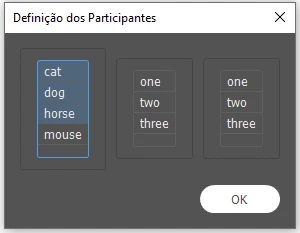
The way I wrote I think I've two problems right now:
Thanks anyway! rs
var listOne;
listParticipants();
function listParticipants(){
//window preferences
var myWindow = new Window ("dialog", "Definição dos Participantes");
var groups = myWindow.add("group");
groups.orientation = "row";
var group1 = groups.add("panel");
group1.orientation = "column";
var list1 = group1.add ("listbox", undefined, ["cat", "dog", "horse", "mouse"], {multiselect: true});
var group2 = groups.add("panel");
group2.orientation = "column";
var list2 = group2.add ('listbox', undefined, ['one', 'two', 'three'], {multiselect: true});
var group3 = groups.add("panel");
group3.orientation = "column";
var list3 = group3.add ('listbox', undefined, ['one', 'two', 'three'], {multiselect: true});
var button = myWindow.add("button", undefined, "OK", {name:"ok"});
button.alignment = "right";
myWindow.show ();
//defining the list
listOne = list1.selection;
alert (listOne)
}
alert (listOne)
try this.......
function listParticipants(){
//window preferences
var myWindow = new Window ("dialog", "Definição dos Participantes");
var groups = myWindow.add("group");
groups.orientation = "row";
var group1 = groups.add("panel");
group1.orientation = "column";
var list1 = group1.add ("listbox", undefined, ["cat", "dog", "horse", "mouse"], {multiselect: true});
var group2 = groups.add("panel");
group2.orientation = "col
...Copy link to clipboard
Copied
try this.......
function listParticipants(){
//window preferences
var myWindow = new Window ("dialog", "Definição dos Participantes");
var groups = myWindow.add("group");
groups.orientation = "row";
var group1 = groups.add("panel");
group1.orientation = "column";
var list1 = group1.add ("listbox", undefined, ["cat", "dog", "horse", "mouse"], {multiselect: true});
var group2 = groups.add("panel");
group2.orientation = "column";
var list2 = group2.add ('listbox', undefined, ['one', 'two', 'three'], {multiselect: true});
var group3 = groups.add("panel");
group3.orientation = "column";
var list3 = group3.add ('listbox', undefined, ['one', 'two', 'three'], {multiselect: true});
var button = myWindow.add("button", undefined, "OK", {name:"ok"});
button.alignment = "right";
myWindow.show ();
//defining the list
listOne = list1.selection;
alert (listOne)
selected = [];
for (var i = 0; i < listOne.length; i++) {
selected.push (listOne.text);
}
}
alert (selected)
you'll have to do the same for the other two listboxes.
Regards
Mike
Copy link to clipboard
Copied
The alert inside your function is working because it has access to all the variables it needs: list1, group1, groups, myWindow. If you declare all of these variables without using the keyword "var", they become globals and therefore are available to the top level of your script.
This means that all of your variables would have to be globals, which kind of defeats one of the purposes of writing listParticipants as a function. If it were me, I'd start like this:
var allLists = listParticipants(); // the variable will populated by your function.
after myWindow.show() in the function, list1 will contain an array of listItems. The info you want is the .text property of each listItem, so you need to loop throiugh them. For instance:
var listOne = new Array;
for (var i = 0, i < list1.length; i++) {
listOne.push(list1.text);
}
At this point, listOne is an array of strings (cat, dog, whatever). I assume that you want to repeat this process for list2 and list3. So you create similar arrays called listTwo and listThree. At the end of your function, add:
return [listOne, listTwo, listThree];
which become the alllLists variable in the top level of your script. It's an array of three arrays, so allLists[0] is listOne, allLists[1] is listTwo, etc.
Hope this helps
Bob
Copy link to clipboard
Copied
Thank you so much!
Both answers helped a lot.
I couldn't make it work using this:
var listOne = new Array;
for (var i = 0, i < list1.length; i++) {
listOne.push(list1.text);
}
So I put together both answers and it worked perfectly like this:
#target Indesign
var allLists = listParticipants();
function listParticipants(){
//window preferences
var myWindow = new Window ("dialog", "Definição dos Participantes");
var groups = myWindow.add("group");
groups.orientation = "row";
var group1 = groups.add("panel");
group1.orientation = "column";
var list1 = group1.add ("listbox", undefined, ["cat", "dog", "horse", "mouse"], {multiselect: true});
var group2 = groups.add("panel");
group2.orientation = "column";
var list2 = group2.add ('listbox', undefined, ['one', 'two', 'three'], {multiselect: true});
var group3 = groups.add("panel");
group3.orientation = "column";
var list3 = group3.add ('listbox', undefined, ['one', 'two', 'three'], {multiselect: true});
var button = myWindow.add("button", undefined, "OK", {name:"ok"});
button.alignment = "right";
myWindow.show ();
//defining the lists
var aux = list1.selection;
var listOne = new Array;
for (var i = 0; i < aux.length; i++) {
listOne.push (aux.text);
}
var aux = list2.selection;
var listTwo = new Array;
for (var i = 0; i < aux.length; i++) {
listTwo.push (aux.text);
}
var aux = list3.selection;
var listThree = new Array;
for (var i = 0; i < aux.length; i++) {
listThree.push (aux.text);
}
return [listOne, listTwo, listThree];
}
alert ("List One: " + allLists[0] + "\nList Two: " + allLists[1] + "\nList Three: " + allLists[2]);
Copy link to clipboard
Copied
FYI
the for loop has a typo after the zero.....
var listOne = new Array;
for (var i = 0, i < list1.length; i++) {
listOne.push(list1.text);
}
it should be....
var listOne = new Array;
for (var i = 0; i < list1.length; i++) {
listOne.push(list1.text);
}
Regards
Mike ![]()
Copy link to clipboard
Copied
Yes! I had seen that, but it didn't work also. Mbut now I could solve. I already put it another code in order to create all the script and it's working perfectly the way you showed the function as a variable!
Thanks!
Copy link to clipboard
Copied
Good catch, Mike.
Bob
Get ready! An upgraded Adobe Community experience is coming in January.
Learn more