


Known Participant
December 21, 2012
Answered

get document swatches in [arrays]: In loop to Peter kahrel & Jump_over previous thread.

  • December 21, 2012
  • 1 reply
  • 1229 views

Hi forum,

this is reg, getting swatches available inside the document pallette into [arrays], instead of typing the document swatches as i did.

(this is my ongoing UI script related to previous thread, answered by jump_over and peter kahrel).

Im storing manually the swatches names in [arrays] and calling it from dropdown list, instead of automatically getting available swatches inside the document...

    var arrays2 = ["Black", "Red", "Blue"]; // here i want to automatically assign the available swatches inside the "document - swatches pallette".

    myGroup1.add("statictext", undefined, "Color");

    var ddown2= myGroup1.add("dropdownlist", undefined, arrays2);

screen shot is:
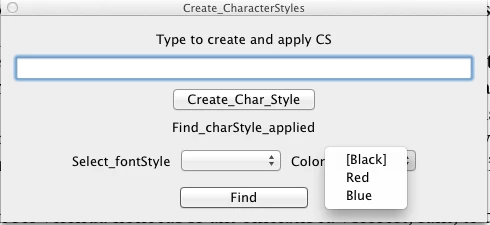
also if Im answered to get the available system fonts for fontstyle that would be greatest of great, instead of ["Regular", "Bold", "Italic"] etc.,

thanks.

shil...

This topic has been closed for replies.
Correct answer Vamitul

Frankly Vamitul,

Not...known about fontStyleNameNative....

and i can see the list of fontstyles inside it. One question is, should I need to delete the duplicates directly or through script.. (im not a great skill set scripter to delete duplicates through script).

thanks vamitul,... greatfull to you...

thanks

shil


ofcourse, throug scriping, before using the array.

removing duplicates from a sorted array is one of the easyest things to do in almost any language. Google and stackoverflow are your friends for this, but for completion's sake:

let's say your array is called myArray:

//first you sort it:

myArray.sort();

//then iterate throug it:

for(var i = 1; i < myArray.length; i++) {

          if(myArray === myArray[i - 1]) {         //check for duplicate value

                    myArray.splice(i--, 1);                      // remove said duplicate

          }

}

ps. please don't use my code "as is", as i can't check it right now, and i have a tendency to misspell, forget closing brackets etc.

1 reply

Vamitul
Legend
December 21, 2012

var array2=myDoc.swatches.everyItem().name

and.. if you are feeling truly adventurous, you can check this out:

http://forums.adobe.com/thread/780105?tstart=0

beware, understanding Marc's coding is truly an art form.

shilpa25Author
Known Participant
December 21, 2012

hi vamitul,

thanks for the reply,

also, if i use: app.fonts.everyItem().name;..

it show like the below screenshot: 

instead i wish to get only the fontStyles, when i click the fontstyles dropdown like;;

Regular,

Condensed Light,

Condensed,

Italic,

Bold,

etc., and not the font family like the above.

very thanks in advance,,

SHIL...


Vamitul
Legend
December 21, 2012

thanks so much vamitul,

sort(), work very well.. for a doubt...== is equals,, ===..?

and what is splice..... where can i get these constructors & references...

other way your sort() out loop, explicits a neat appearance in fontstyles dropdownlist....

thanks so much vam.....

shil...


here you go:

http://www.javascriptkit.com/jsref/comparison_operators.shtml

http://www.javascriptkit.com/jsref/arrays.shtml