Inspiring
August 27, 2015
Answered

Get previous xml element of xml comment in document

  • August 27, 2015
  • 1 reply
  • 2052 views

Hi,

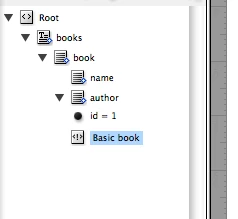
     I need to get previous element of xml comment from indesign document.  My selection is xml comment. I need to select previous element (author) of xml comments (basic book).  How can I get that xml elemant?

Thanks in advance,

Sudha K

This topic has been closed for replies.
Correct answer Roland Dreger

Yes, document contains more comments. Some comments dont have previous tag, only having parent tag.  I tested tag length but for me its returned only 0. I dono the issue.

Tag name contains prefix. So need I add any namespace or anything else to test??


Yes, ALL namespaces must be declared. And especially in the loop, the problem is that evaluateXPathExpression does not »see« the namespace declatration of the parent tags.

Workaround: temporary Declaration of the namespace

_tempNSDeclaration = _comments.parent.xmlAttributes.add( "xmlns:cl", "http://www.namespace.xyz" );

_precTags = _comments.parent.evaluateXPathExpression("child::comment()/preceding-sibling::*[position() = 1]");

_tempNSDeclaration.remove();

Or iterating over _comments.parent.xmlElements

By the way, it is easier to help you, if you provide a test file with the complete structure.


Roland

1 reply

Braniac
August 27, 2015

Hi,

Like this ... ?

var myXMLelement = app.selection[0];

myXMLelement.parent.select();

alert(myXMLelement.parent.markupTag.name)

Regards

Ronald

Sudha_KAuthor
Inspiring
August 27, 2015

yes... I can get parent element but i want to get the previous element of comments....

Sudha_KAuthor
Inspiring
August 29, 2015

Hello Sudha,

maybe this works?

var _doc = app.activeDocument,

    _root = _doc.xmlElements[0],

    _comments = _root.evaluateXPathExpression("descendant-or-self::comment()"),

    i;


for(i=0; i<_comments.length; i++) {

  $.writeln("Comment: " + _comments.value);

  $.writeln("Previous Tag: " + _comments.parent.evaluateXPathExpression("child::comment()/preceding-sibling::*[position() = 1]")[0].xmlContent.contents);

}


But it depends on the whole structure, e.g. if several comments exists in the book-tag.

Or if you only want the previous tag (without comment).

_prevXMLTags = _root.evaluateXPathExpression("descendant-or-self::comment()/preceding-sibling::*[position() = 1]");

Roland


Hi,

      When I using the code for both comment and previous element, its throwing error in document.  .

But its running for the below one. I dono the reason.

- Sudha K