



Global Variables only Called Once then Lost their Scope!
Hi Experts,
I Have a Problem with my Script and hope helping me, and thanks in advance, i still learning javascript and try to learn somthing new everyday, i have a script that draw modeless interface (palette) and have button including (option) that make another new palette (for options), i made the variables as globals for the option palette, but the problem is the global variables is only called once!, and the script lose the global variable scope!.
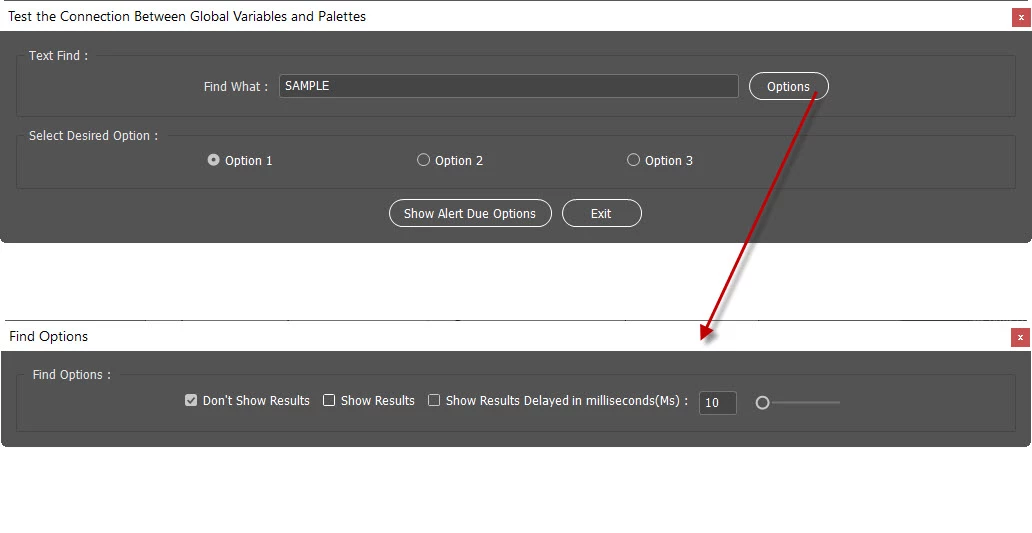
here is the code (i made it short as i can to be just example) :
//Global Variables only Called Once then Lost their Scope!
#targetengine "session1";
var w = new Window("palette", {independent:true}); //Main Palette Windows
var findoptions = new Window("palette"); //Options Palette

function Main() {
    // Check to see whether any InDesign documents are open.
    // If no documents are open, display an error message.
    if (app.documents.length > 0) {
        var myDoc = app.activeDocument;
    }else{
        // No documents are open, so display an error message.
        alert("No InDesign documents are open. Please open a document and try again.");
    }
}

//---------------------------------------------------------
//Making Palettes Windows
//---------------------------------------------------------
#targetengine "session1";
var w = new Window("palette", {independent:true}); //Main Palette Windows
var findoptions = new Window("palette"); //Options Palette
//gqmanager is the (GREP Query Manager) outside the main Function
w.text = "Test the Connection Between Global Variables and Palettes";
w.preferredSize.width = 500;
w.alignChildren = ["center", "center"];  //"left";
w.orientation = "column"; //"row";
w.spacing = 10;
w.margins = 16;

//Parent - Input Panel Prepare
var InputPanel = w.add("panel", undefined, undefined, { name: "panel1" });
InputPanel.text = "Text Find : ";
InputPanel.preferredSize.width = 1000;
InputPanel.orientation = "row";
InputPanel.alignChildren = ["center", "center"];
InputPanel.spacing = 10;
InputPanel.margins = 16;

//Children -  input Panel Inside Prepare
var myInputPanelInside = InputPanel.add("group", undefined, { name: "myInput" });
//--Adding Find What
myInputPanelInside.add("statictext", undefined, "Find What :");
//myInputPanelInside.alignment = "center";
var myGREPString = myInputPanelInside.add("edittext", undefined, "SAMPLE");
myGREPString.helpTip = "Enter Your Text"
myGREPString.characters = 20;
myGREPString.enabled = true;
myGREPString.preferredSize.width = 460;

var Button1 = myInputPanelInside.add("button", undefined, "Options");

//Parent - Radio Panel Prepare
var RadioPanel = w.add("panel", undefined, undefined, { name: "panel2" });
RadioPanel.text = "Select Desired Option : ";
RadioPanel.preferredSize.width = 1000;
RadioPanel.orientation = "row";
RadioPanel.alignChildren = ["center", "center"];
RadioPanel.spacing = 10;
RadioPanel.margins = 16;

//Children -  input Panel Inside Prepare
var myRadioPanelInside = RadioPanel.add("group", undefined, { name: "myRadio" });
myRadioPanelInside.preferredSize.width = 500;
myRadioPanelInside.alignChildren = ["center", "center"];

//Adding Radio Buttons
var radio1 = myRadioPanelInside.add("radiobutton", undefined, "Option 1");
var radio2 = myRadioPanelInside.add("radiobutton", undefined, "Option 2");
var radio3 = myRadioPanelInside.add("radiobutton", undefined, "Option 3");
radio1.preferredSize.width = 200;
radio2.preferredSize.width = 200;
radio3.preferredSize.width = 200;
//Previous Default Condition
radio1.value = true;

var myButtonGroup = w.add("group");
myButtonGroup.alignment = "center";

var Button2 = myButtonGroup.add("button", undefined, "Show Alert Due Options");
var Button3 = myButtonGroup.add("button", undefined, "Exit");

Button1.onClick = function () {
    CalltheFindOptions();
    }
Button2.onClick = function () { Find(); };
function Find() {
    doRadioButtonOpt();
}

Button3.onClick = function() {Canceled();};
function Canceled() {
    ExitSure();
}

//After Drawing Interface
var a = w.show();

function ExitSure() {
  var a = w.close();
  exit(0);
}

//User Selection for Radio Buttons
function doRadioButtonOpt() {
    myDoc = app.activeDocument;
  if (radio1.value == true) {
    TestVars();
    }
}

function TestVars() {
    #targetengine "session1";
    var myDoc = app.activeDocument
    var TimeMs = Number(SliderControlText.text); //Converting Text to Number
    //Show Results Found as User Wish
if (DontShowResults.value == true) { //no Show only Apply
    alert("you Select not to Show Results!");
            }else{ //Direct Show and Apply
        if (ShowResultsDirect.value == true) {
    alert("you Select to Show Results in real time!");
            }else{ //Show and Apply By WaitinhTime!
                if (ShowResults.value == true) { //Show and Apply
            alert("you Select to Show Results with Specific time!");
            $.sleep(TimeMs); //Wait ms
                    }
                }
            }
alert("Do you need somthing else?, try again", "Finish Report");
}

var DontShowResults;
var ShowResultsDirect;
var ShowResults;
var SliderControlText;
var slider;
//--------------------------------------------Building the Find Options Palette-----------------------------------------//
//--------------------------------------------------------------------------------------------------------------------------------//
function CalltheFindOptions() {
#targetengine "session1";
//Find Options Window
findoptions.text = "Find Options";
//Parent - Input Panel Prepare
SelectPanel = findoptions.add("panel", undefined, undefined, { name: "panel1" });
SelectPanel.text = " Find Options : ";
SelectPanel.preferredSize.width = 1000;
SelectPanel.orientation = "row";
SelectPanel.alignChildren = ["center", "center"];
SelectPanel.spacing = 10;
SelectPanel.margins = 16;

//Children -  input Panel Inside Prepare
mySelectPanelInside = SelectPanel.add("group", undefined, { name: "mySelOpt" });
DontShowResults = mySelectPanelInside.add("checkbox", undefined, "Don't Show Results");
DontShowResults.value = true; //by Default
DontShowResults.alignment = "left";

ShowResultsDirect = mySelectPanelInside.add("checkbox", undefined, "Show Results");
ShowResultsDirect.value = false; //by Default

ShowResults = mySelectPanelInside.add("checkbox", undefined, "Show Results Delayed in milliseconds(Ms) :");
ShowResults.value = false; //by Default

//Adding Slider to Control MS Time
SliderControlText = mySelectPanelInside.add ("edittext", undefined, 10, {readonly: false}); //read only prevent user Entering Nums
SliderControlText.characters = 3;
slider = mySelectPanelInside.add ("slider {minvalue: 1, maxvalue: 100, value: 10}");

//Slider Listener Plus SliderControl Text Listener
slider.onChanging = function () {SliderControlText.text = slider.value;} //Listen to Slider
var c = findoptions.show();
}
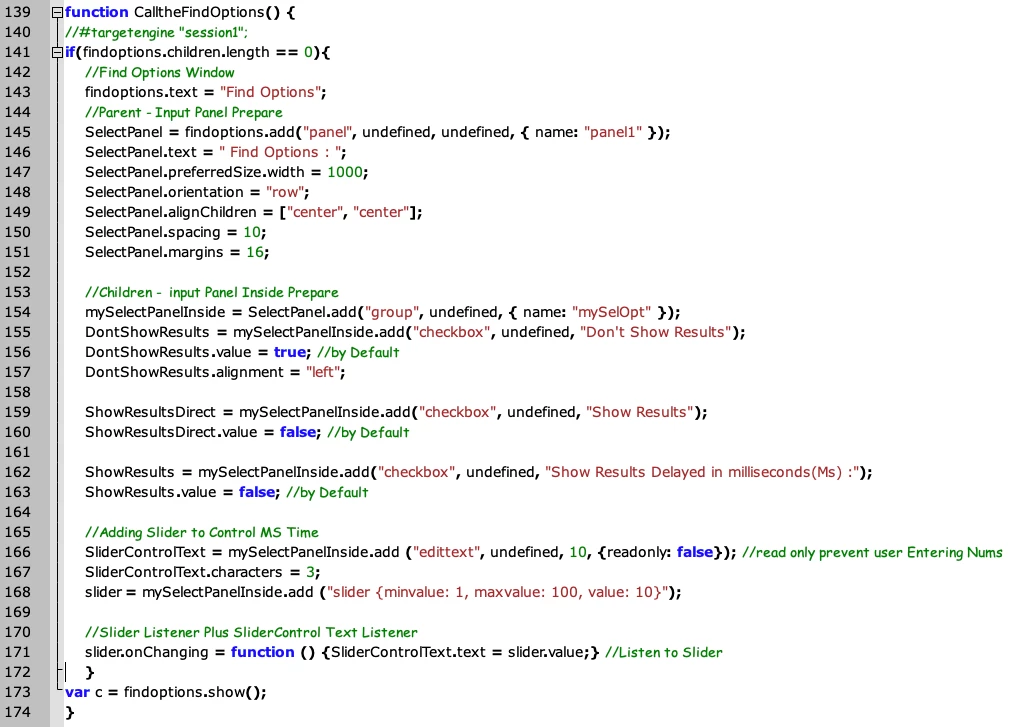
so my question is how to make the variables not losing its scope and retain in the memory? as long the script run, as an Example if the user move the slider and hit (Show alert due options) its only run once and then lose the scope, even the slider no longer interact with the user and update text box, please test the code to see the problem, and thank again for any help or advice.
 AdChoices