



vickin42001666
Participating Frequently
December 3, 2021
Question

Gradient Banding in Indesign Displaying Wrong and Lines Everywhere

  • December 3, 2021
  • 5 replies
  • 6300 views

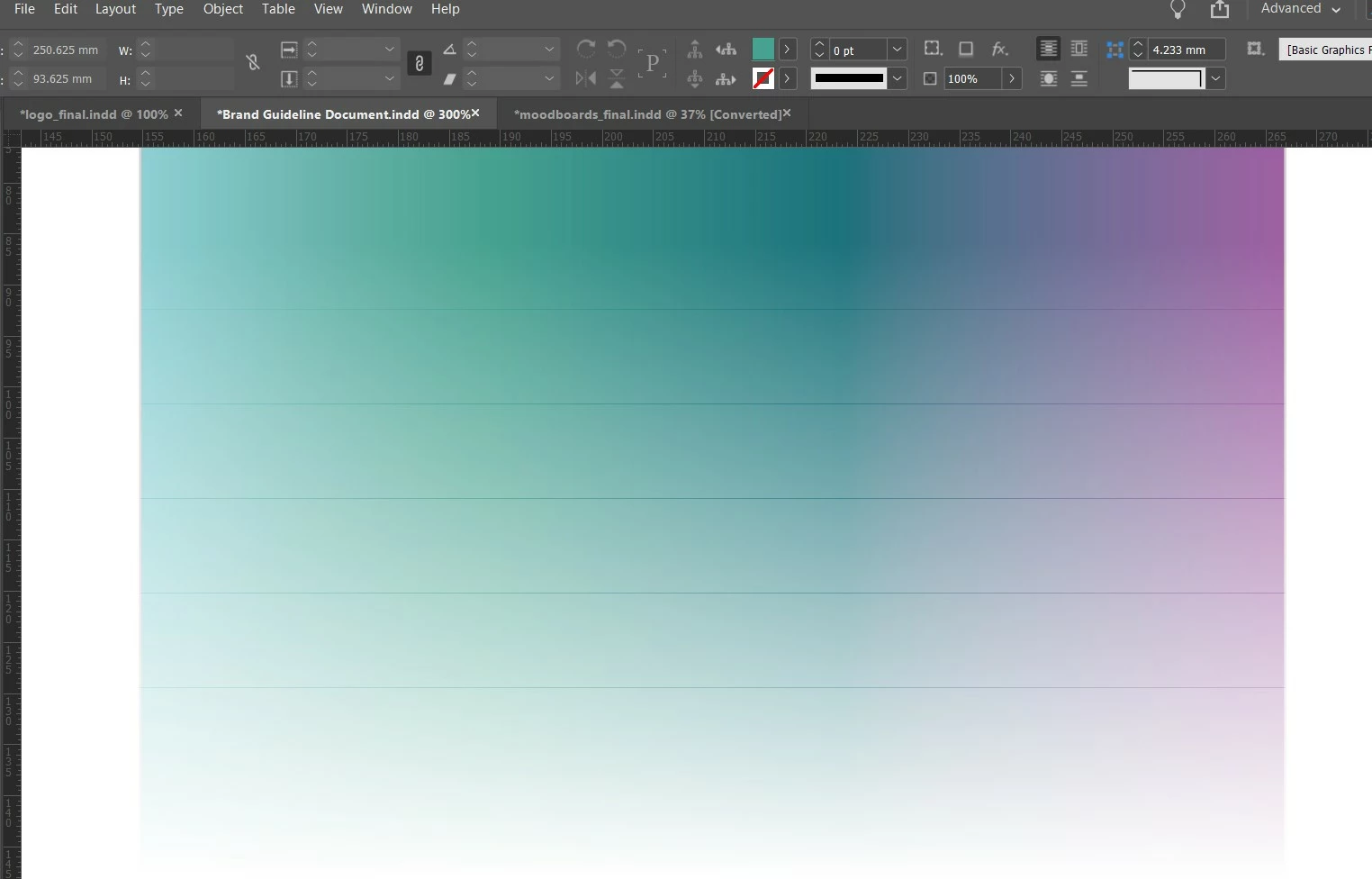
Hey all - I wondered is anyone is having the same issues but my gradients used to be super smooth and never had any issues now every time I create gradients I seem to have very disinctive banding and it often transfers over to jpegs too. Also does the same with the gradient feather tool too. 

This is becoming a majot problem for me now and holding up most of my projects.

What can I do - is there a fix for this glitch? TIA 
 

5 replies

Rishabh_Tiwari
Community Manager
Community Manager
April 19, 2024

Hi,


Sorry to hear about the trouble. Have you tried updating the display drivers? If not, please try that and if that doesn't help, please try re-installing the graphics driver and let us know if that resolves the issue or if you need further assistance. 


Thanks

Rishabh

John Mindiola III
Participating Frequently
April 17, 2024

This happened to me, too! I think I found a fix, or at least a workaround. I noticed the faint stripes when two things were present: a shape with less than 100% opacity, and the view mode was "regular" or default. 


When I went to View > Overprint Preview, then the stripes went away, no matter if my graphic was 100% opacity or less.


It's definitely a weird bug. It never used to happen until a few weeks ago. Maybe the most recent update is the issue...? I don't know.

Willi Adelberger
Community Expert
April 17, 2024

It is not a bug. It is caused by printing. That is why anyone should add noise to smooth colors or gradients as I have written in my answer 2 Years ago. 

John Mindiola III
Participating Frequently
April 17, 2024

Banding of gradients is a printing thing. I know that. The issue the OP and I have is thin black lines — NOT banding — appearing in InDesign. 👍

vickin42001666
Participating Frequently
March 30, 2022

I am still having major issues with gradients - even feathered edges too - can anyone make any suggestions for settings on InDesign on a PC? TIA 

Willi Adelberger
Community Expert
March 30, 2022

As. Randy wrote, make it in Photoshop and add a small amount of noise to it. 

Community Expert
December 6, 2021

In addition to Bill's suggestion, another option you may want to consider would be to create your gradient as an Adobe Illustrator or Photoshop graphic and placing it in your InDesign document. It's an extra step, but it does produce good results.


Randy

Bill Silbert
Community Expert
December 4, 2021

Try turning off GPU Performance in InDesign preferences.

vickin42001666
Participating Frequently
December 6, 2021

Thanks for that but I don't have that option in my preferences.