


Participating Frequently
June 14, 2022
Answered

Grep (maybe?) help with table formatting

  • June 14, 2022
  • 1 reply
  • 298 views

Hi!

I'm trying to set up styles etc. so that we can import a table and have it ready to go, but there are various stoppers I think can be solved with Grep work.

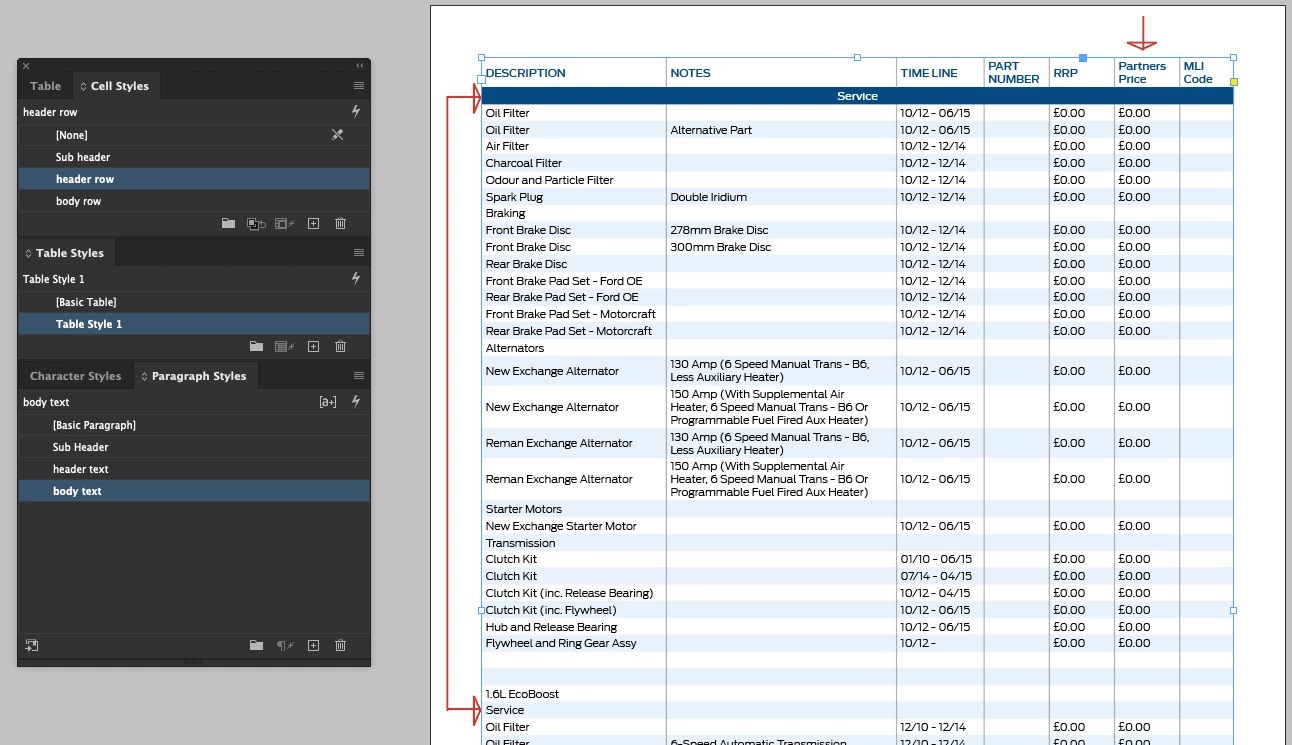
Firstly, adding inside column strokes (as shown) can only be applied manually I think.

Secondly, I need the body text on the second-from-last column to be bold (not the header).

Thirdly, the curveball to scupper the above... every now and again on the excel there is a merged row that I need a style for... like an 'if row is merged, then style like this' sort of thing. I've styled the top one and shown an unstyled example below it on the grab here.

This topic has been closed for replies.
Correct answer Mike Witherell

Cellstyles can be made to dress the top Header and bottom Footer and the left and the right column.

A tablestyle can orchestrate that for you automatically.


But anything fancier than that like the next-to-last column: you have to make an additional cellstyle and apply it manually to that column after the tablestyle/cellstyles has done most of the layout.

Column strokes should be possible for you entirely within the cellstyles.

To my knowledge, there is no "if row is merged, then style like this". In fact, merged cells wreck tablestyles/cellstyles unless you manually apply something AFTER allowing the table/cellstyles to cover 95% of the table dressup.

1 reply

Mike Witherell
Community Expert
Mike WitherellCommunity ExpertCorrect answer
Community Expert
June 22, 2022

Cellstyles can be made to dress the top Header and bottom Footer and the left and the right column.

A tablestyle can orchestrate that for you automatically.


But anything fancier than that like the next-to-last column: you have to make an additional cellstyle and apply it manually to that column after the tablestyle/cellstyles has done most of the layout.

Column strokes should be possible for you entirely within the cellstyles.

To my knowledge, there is no "if row is merged, then style like this". In fact, merged cells wreck tablestyles/cellstyles unless you manually apply something AFTER allowing the table/cellstyles to cover 95% of the table dressup.

Mike Witherell
Participating Frequently
June 23, 2022

Thanks, Mike. Certainly aa complex setup but yes, as you say, I've found it only possible by manually applying some styles. We are now using the easycatalogue plugin by 65bit which has made it far easier thankfully. 

Thanks again!