



Chris Panny
Inspiring
April 7, 2025
Question

Grep To Clear Overrides

  • April 7, 2025
  • 1 reply
  • 381 views

I have a 100+ page InDesign file that has tons of overrides for the 20+ paragraph styles. How can I use Grep to clear these overrides? 

I tried doing the following but it's not working:

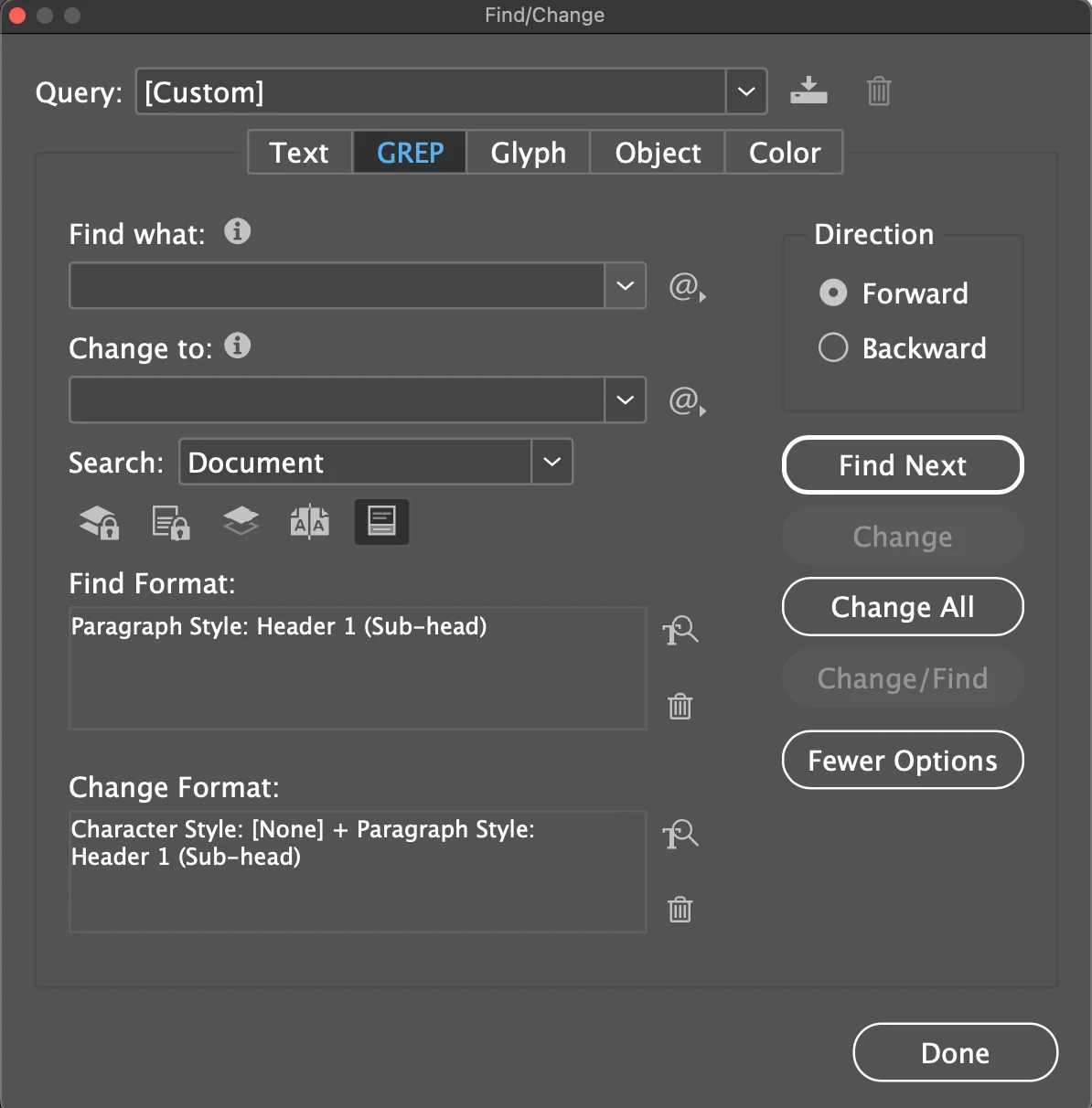
Find / Change > Grep

Find what and Change to blank

Find Format > Style Options: Character Style - Any; Paragraph Style set to specific style

Change Format > Style Options: Character Style - [None]; Paragraphy Style set to style specified in Find Format.


1 reply

Dave Creamer of IDEAS
Adobe Expert
April 7, 2025

Character styles are not considered "overrides". Can you select all, or large portions, of the text? If so, there is a clear overrides button at the bottom of the Paragraph Styles panel.

Also, there is a script that can do this:

https://www.id-extras.com/clear-overrides-throughout-document/


David Creamer: Community Expert (ACI and ACE 1995-2023)
Chris Panny
Inspiring
April 7, 2025

I didn't know about the button at the bottom of the P style panel. thanks for that! 


The method I posted was given to me by Ann-Marie Concepcion over 10 years ago. I just went back and tried it again, but this time, rather than click Change, I clicked Change All and it worked for the entired document for the loaded P style. 


The script didn't work for completely. I ran it and it said overrides cleared, but as i went through the doc, there were still lots of ovverides still in place. 

It's only an island if you look at it from the water.
Chris Panny
Inspiring
April 7, 2025

Just to clarify, when you say overrides, are you referring to BOTH manual formatting AND character styles? Again, character styles applied to text are NOT considered overrides. The thought process here is one created a character style and then applied the character style, so it was done on purpose and not a manual adjustment since it can be edited globally.


The button at the bottom of the Paragraph Styles panel will only remove the manual formatting. To remove character styles, while you have the text selected, click on None in the Character Styles panel. After you perform the two settings, any formatting left will only be from a paragraph style. 


The document has over 30 P styles. Most of the copy is in Chinese and at one point had a different typeface applied to the p styles. However,  the old typeface was still displaying for most of the document. When I drop the cursor in a paragraph, the style would display a + sign. I'd right click on the style and choose Clear Overrides and that would load the correct typeface for the style. With this being such a long document I didn't want to do this manually. So, no it wasn't a character style override, yet the trick Anne-Marie showed me with Find | Change works. 

It's only an island if you look at it from the water.