


Participating Frequently
January 11, 2024
Answered

Greyed out boxes even though the view and object display set to high quality and links fine

  • January 11, 2024
  • 4 replies
  • 2459 views

Hi. I have had  LONG...break from using Indesign having previously used an old CS2 (2007) version installed on an old windows XP latop. We now have an Adobe Indesign subscription using windows 10 Pro on our desktop computer. For the first time I have moved my book files across to the new computer and tried to access my files on there. All was perfect on the old CS2 program but now, when I open up my files, strangley, even though it says the links are okay (it has automatically relinked to them all), and EVEN though the view display is set to high...many of the boxes for my eps files (music notation files imported from Sibelieus) are greyed out (not all, but MANY of my hundereds of links). Also strangely, when I click on an individual box and then click 'relink', clicking on the same file/link that it is already linked to, it then displays the image for a bit, until I scroll to another page then come back again then it's not showing again! It's all very strange and inconsistent. What is the problem? It is not merely a display issue since when I try and print, it also shows as grey boxes. As I say, all worked well on old laptop using CS2 (still does- I'm only moving since I'm concerned it may conk out one day) and if I use the old version it displays and prints well, just it's a problem when I try and move it all to the new version v19.1 Many thanks if anyone can help.
This topic has been closed for replies.
Correct answer Brad @ Roaring Mouse

I received your files, and I was actually able to reproduce your issue.


One of my suspicions is correct; it was an incompatibility with the previews (proxies) that are attached to the EPS files by Sibelius 4 (which is what you used to create them). Based on a quick search, I found several anecdotal reports of Sibelius 4 EPS preview problems. It seems newer software doesn't like the one-bit previews Sibelius added. Hence, your new InDesign install is having an issue reading them, so it's defaulting to a grey box when it fails to read them properly.


Rest assured, your EPS files are actually fine otherwise. Ironically, they open perfectly in my Mac InDesign... It only seems to happen with the Win version. So, what to do: Since I doubt you have the ability now to reopen the files in a newer version of Sibelius and resave them as new files, I suggest the following:


You can try option 2 first, but I recommend option 1 to solve the issue going forward.


Option 1). Convert all the EPS files to PDF, and replace them in your ID files. The easy way to do this (assuming you have ANY version of Acrobat that's not Reader) is to open them in Acrobat, which will invoke Distiller and render the file as a PDF and save it as such. (You can also right-click on one of them and select Convert to PDF if it appears. OR If you happen to have an Icon of Acrobat on your desktop, you can simply drag the EPS files onto it to start this process. If you get asked whether you should trust the file, say Yes.)


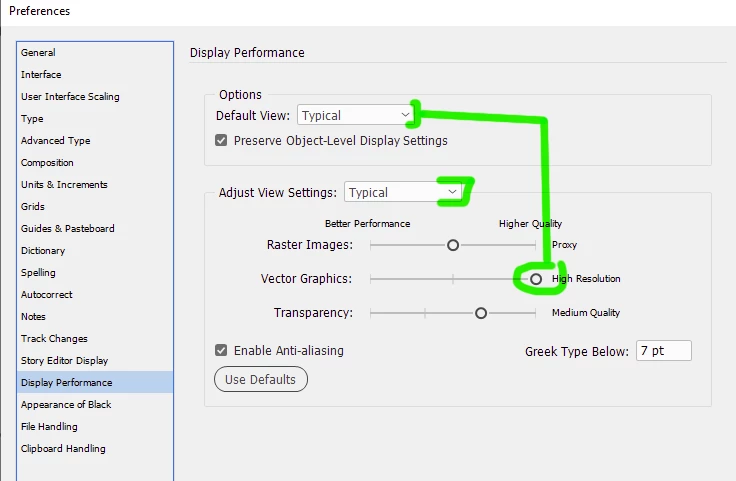
Option 2), If you don't have Acrobat, let InDesign create its own previews for the existing EPS, so it ignores the bad embedded preview/proxies. First, In your ID Display preferences, check which setting you have. If you have it set to Typical (default), change the setting for Vector to High Resolution instead of Proxy. Or, change your Display Setting to High Resolution which already has that setting for Vector.

Now, open your ID file and save it as an IDML file. Then, reopen that IDML in ID and it should recreate the previews in high resolution and your links should now show (This worked for me in my tests).

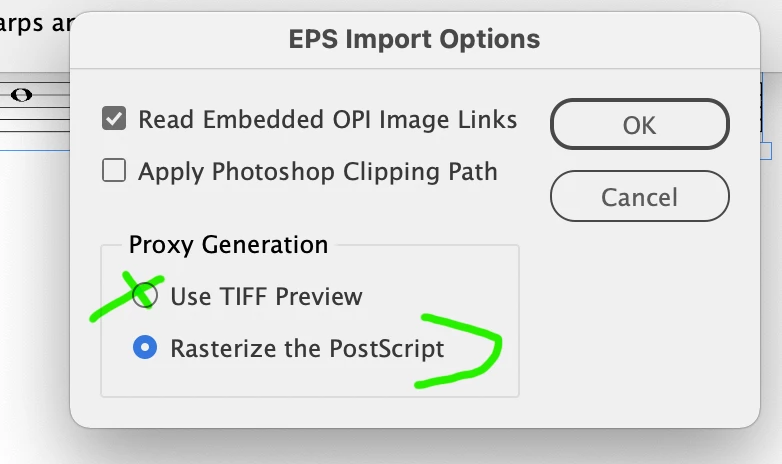
Alternatively, you can Relink each file in your Links Manager (making sure you select Import Options so you can select Rasterize Postscript instead of Use Tiff Proxy).


Option 3) Open the EPS files in Adobe illustrator and resave them as new files, either AI or PDF. Based on your two sample files, this is the last ditch approach, as they open weird because of the way Sibelius cropped things, so you would have a bunch of work cleaning that all up.

4 replies

Brad @ Roaring Mouse
Community Expert
Community Expert
January 12, 2024

Also: what kind of printer are you printing to, and are you printing directly to it from InDesign? (as oppsed to exporting a PDF, THEN printing)

If so, and your printer is non-Postscript, your EPSs can only print the low-res preview attached to the file. If this preview is corrupt or missing (which may explain the grey boxes), then all you can expect is the same grey box, or at best, a pixelated version of the file)

Participating Frequently
January 12, 2024

Printing to a Canon IP8750. I have tried printing both directly from indesign as well as exporting to PDF, both with same issues

Brad @ Roaring Mouse
Community Expert
Community Expert
January 12, 2024

"Printing to a Canon IP8750"

Yah, you won't be able to print EPS graphics directly from ID to that one as it's definitely not a PS printer, so your workflow would have to involve exporting a PDF then printing that.

Brad @ Roaring Mouse
Community Expert
Community Expert
January 12, 2024

Based on a quick Googlin', Sibelis-generated EPS files have been notoriously bad (to the point Sibelius remived the ability to make them in more current versions... which is actually good thing as EPS files aren't a favored these days for many reasons), so I'm going to say that there's something in them that is causing issues now even though they haven't before. Fonts have been an issue, even if they were embedded in the EPS. Even opening them In Illustrator has been reported to fail.

One thing to try is to try open one of them in Acrobat, if you have a full version as oppsed to Reader, even if it's an older one. This should invoke Distiller and hopefully open the file that you can then save as a PDF. If that fails, there's definitely something wrong.

Can you upload some sample files? The forum may not allow uplaods of EPS files, but if you have a way to provide a link to them (say from a dropbox/google drive), we can take a look.


Participating Frequently
January 12, 2024

I don't have the latest version of acrobat. I have only a subscription to Adobe Indesign running on my desktop windows 10 computer in which I have problematic files (which run so perfectly  on CS2!!). All my files were done using CS2 or 3  Adobe Indesign and Photo Shop. Is Adobe photoshop called illustrator these days? I should also mention that, whilst my tiff files (done with Adobe Photoshop CS3) appear fine on screen, they print in really low quality , bitty resolution, looking awful. I guess it's an incompatibility issue. 

Yes i have google dropbox. How can I send some of these eps files to you? Ideally I would wish to reinstall CS2 on a different windows XP laptop (if I can buy one) and I have the installation disk, proof of purchase and serial number etc. My current laptop is on it's deathbead and I fear won't last much longer

Brad @ Roaring Mouse
Community Expert
Community Expert
January 12, 2024

What happens if you export a PDF? Do the images show up in there?

Where are your files stored? locally? network server?

Participating Frequently
January 12, 2024

Yes, same as on screen (in high display mode), in same places. When I export and print to pdf it appears greyed out in the same places.

leo.r
Community Expert
Community Expert
January 11, 2024

Will the problem go away if you resave the files (from either Sibelieus or Illustrator)?

Participating Frequently
January 11, 2024

I will also add that the problem persists if I save as pdf - the eps links (most of, not all) are greyed out

Participating Frequently
January 11, 2024

You can download Illustrator trial (you can run it for 7 days I think) and see if resaving to EPS from there makes a difference. Right now, like I mentioned,  I think the goal is to verify if resaving to EPS helps at all.


If it does, then you can plan further steps. If not, then the point is moot anyway.


EPS by now is indeed pretty much obsolete format (although legacy files usually should work as expected).


Thanks for your post. I admit I am a bit nervous about the trial period. I have heard horror stories of people who've tried to cancel before the seven days is up and have struggled to do so and still been charged. Is there no package deal for Adobe Indesign PLUS Illustrator? You would think that if you had both that the combined product would be cheaper than buying both independantly 😞 It's so fustrating since I have all this on my old laptop with the 2007 files which currently works perfectly, and I paid a huge amount of money (over £700) for this all. My books are in print and selling and everything works perfectly. I am only on a subscription for Indesign now (on my desktop) as I'm worried that my laptop will stop working one day and then I'll be really stuck. I just want to do a few small jobs on the files, of a few mintues,  and as result I may end up having to pay £42 ish per month for a whole year.