


kimh75624408
New Participant
April 10, 2018
Answered

Guides Won't Show Up

  • April 10, 2018
  • 6 replies
  • 44845 views

My documents suddenly won't show the Bleed guide lines, Margin guide lines, or text frame guides when I toggle between Preview and Normal view.  Instead, it's showing an extended white artboard, which looks like Bleed view.  I have the document settings set up with a .125 bleed and they should be showing up as red guide lines. 

Deleting Indesign Preferences did not work.  Anyone know how I can get these guides back and how to make Preview view cut that white border out?
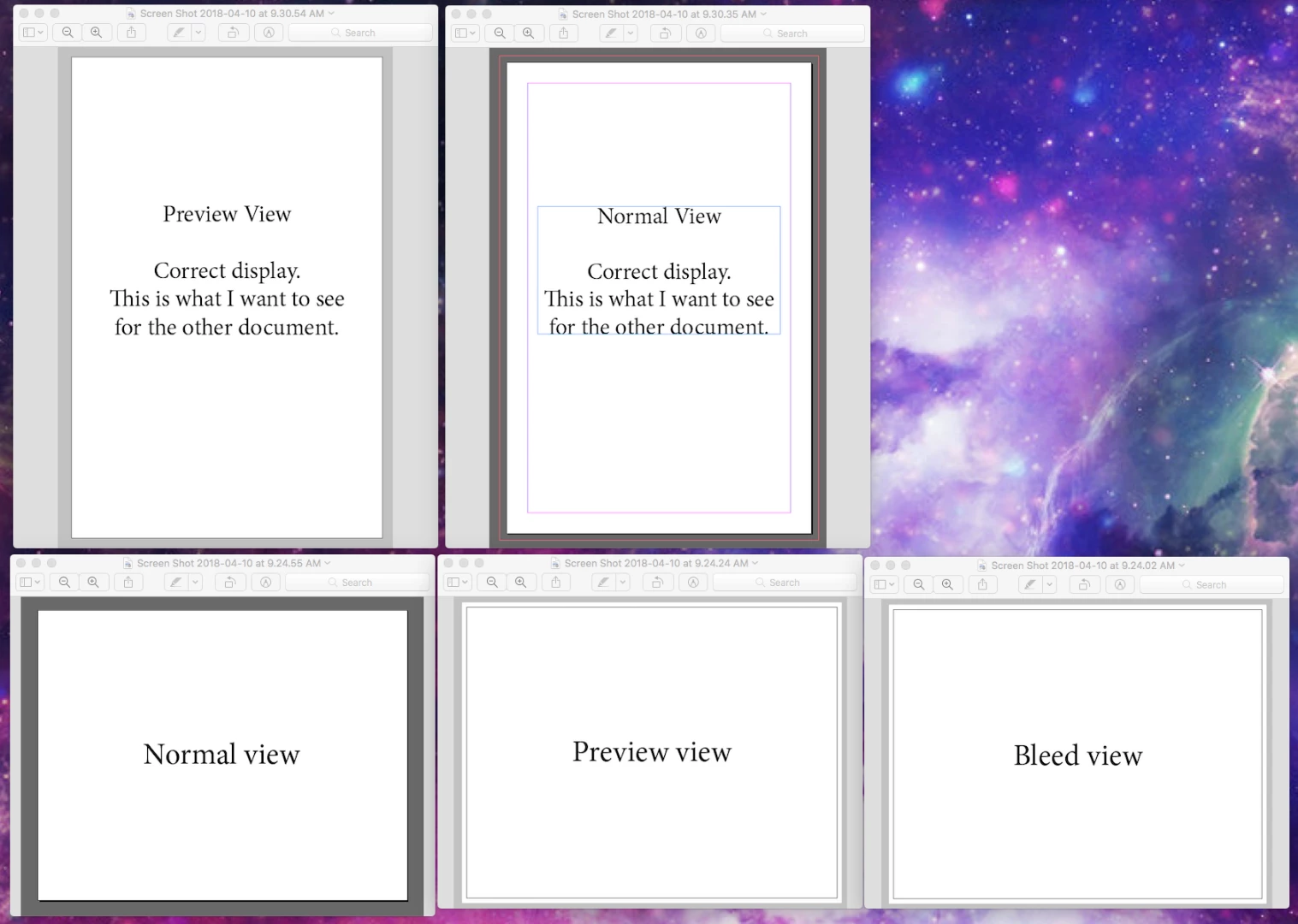
Thanks

Correct answer spotte10353908

Hi Bill,

Any thoughts: My InDesign guides are not showing up at all, and they are checked to show guides, to show frame edges and to show smart guides.  Nothing.  I can't see the guides on the master pages, or any of the live pages.  I closed InDesign and restarted. Still blank.  Still using CS6 for book design.   Actually just found it:  View > Screen Mode > Normal. That worked. 


6 replies

New Participant
January 25, 2023

I also lost this view.  I want to see the pink column lines and I no longer can.  I set them and they showed and I could toggle on and off with W and now I don't see them at all.  Only the text boxes I created turn in and off. I tried to add columns but they do not show. I tried some of the suggestions but can't bring them back.  Also not sure how to delete prefence file upon opening.  That suggestion didn't bring anything up for me.  What else is happening? 

New Participant
August 3, 2023

Had it happen on a huge document (180" wide).
Nothing worked until I made a new doc at 50% size and scaled everything accordingly.
Then the guides showed up normally. I'm thinking ID doesn't like huge pasteboards.

Adobe Expert
November 10, 2021

"When I pull a guide it tells me it's at "NaN mm". It's a bug."


Well, it's a damaged InDesign document perhaps.

I would do a duplicate of the file, open the duplicate, export to IDML, open the IDML file as document, save it to a new name and see if the issue is gone.


Regards,
Uwe Laubender

( ACP )

Participating Frequently
November 10, 2021
Thanks - that gets the guide back up but since the image files are with the
repro house for retouching and making an idml just gives me grey boxes I'll
have to get them to do it.
daytonc83433242
New Participant
October 21, 2021

I was experiencing certain pages that wouldn't show guides. Tried turning the view off and back on. That worked on one page. The next page doing that didn't work. I turned off view guides and pulled a guide out of the ruler and ID put the column guides back in AND showed the guide. The next page, cycling the view and pulling a guide with view turned off didn't work. But pulling a guide from the side WORKED, then one from the top also worked. Something's screwy.

Participating Frequently
November 10, 2021

Guides appearing on some spreads but not others - same master - normal screen mode. When I pull a guide it tells me it's at "NaN mm". It's a bug.

addiezilla
New Participant
July 13, 2021

I am having a similar issue-- I have tried hiding and re-showing the guides, showing the document grid, and toggling the w key. It won't even let me pull the guide from the ruler.

New Participant
July 16, 2021

I've got the same issue too!

New Participant
July 16, 2021

I've solved it by deleting my preferences folder. Press and hold cmd + alt + ctrl + shift on start up of indesign

kwray62
New Participant
August 7, 2019

I have the guides-view guides turned on but they still are not appearing

Bill Silbert
Adobe Expert
August 7, 2019

Are you in Normal View (the pasteboard around the page shows) or Preview view (the pasteboard and any bleeds do not show)? Try typing a "W". This will toggle between the views.

New Participant
February 26, 2020

Thank you, Bill! Today I learned something that I will never forget - the power of the "W". 🙂

Bill Silbert
Adobe Expert
April 10, 2018

For the guides go to View>Grids & Guides> Show Guides or try the keyboard command Command (Mac)/Control (PC)-;

For the Frame Edges go to View>Extras>Show Frame Edges.

New Participant
June 1, 2020

Bill_Silbert

I found your support here helpful - perhaps you can answer a similar question here—I have a 16pg document in InDesign that refuses to show rules on pages 4-5—the rest of the document is fine - whatever command is performing this action copies over when making a new file. Any ideas? Never seen anything like it in any Adobe file ever/ stevie@compliancealliance.com

Adobe Expert
June 8, 2020

Hi TBAmarketing,

could be that your preferences for guides are set that guides always showing in the background.

So if you have a filled rectangle on pages 4-5 the guides on the pages will be obscured by the rectangle.

You can change that by changing your preferences so that guides always show on top of all other elements on a spread.


Preferences > Guides & Pasteboard > Guide Options

[  ] Guides in Back

( this option should be unchecked )


Regards,
Uwe Laubender

( ACP )