Participant
April 4, 2019
Answered

Having issues exporting In-Design document

  • April 4, 2019
  • 2 replies
  • 1397 views

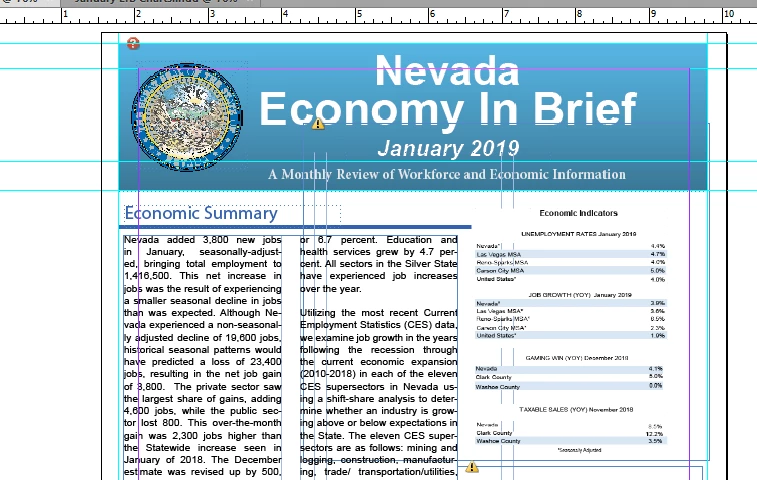
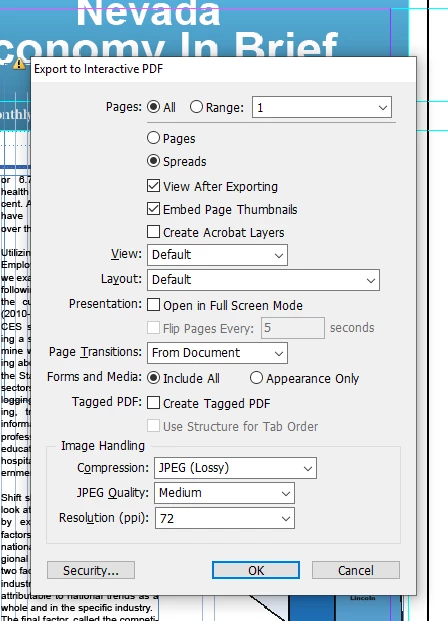
I am no expert so pardon me. Done this for 4 years now and never an issue. So, the first picture is my in-design project. The middle is a dialog box that comes up. I typically do not make any adjustments. The third is how it is coming out. the end goal is to make a pdf out of it and put it up on a website. Any tips or trick on how to not have it put that phantom white space in it?
This topic has been closed for replies.
Correct answer Mike Witherell

Also there appears to be a frame sitting on the page about where your white box is. Can you select it and delete it, if empty?

2 replies

Community Expert
April 17, 2019

Hi trwilcox197805 ,

here another sample for a "white box" after PDF Export:

White box around graphics when printing to PDF- InDesign

Reason: Missing link.

Regards,
Uwe

Scott Falkner
Community Expert
Community Expert
April 4, 2019

There are at least two problems I can see with our InDesign file, although these might not be causing your problem. Still, best to rule them out. One of your images is missing and one has been edited outside of InDesign and the link has not been updates. These are shown by the question mark in a red circle (linked file is missing) and exclamation mark in a yellow triangle (linked file has been modified). Open your links panel and clear up these problems then try again.

If your InDesign file does not have interactive features like animations, navigation buttons, or a slide show you might be better off exporting a PDF for print. The format is the same and some interactivity will work in a PDF exported for print, like bookmarks, hyperlinks, and table of contents. Try exporting as PDF for print as well.

Mike Witherell
Community Expert
Community Expert
April 4, 2019

Shouldn't you rather choose Pages; not Spreads?

Mike Witherell
Community Expert
April 17, 2019

There is/was a frame that coincided with my "economic indicators" item. Strange how it never caused an issue in 4 years but today, it did.


Hi trwilcox197805 ,

that frame is showing a not updated graphic or not updated image contents.

I guess, that's the real reason why it was exported with a white background to PDF Interactive.

If the frame's contents would have been a link to an updated graphic or image, even if the image was moved outside of the frame's area, I guess that would not have happened. Of course that would depend of the actual graphic's contents.

What kind of image was in that frame?

Regards,
Uwe