


Zeror_rk
Participant
September 25, 2018
Answered

Hide text in prints, but not in PDF

  • September 25, 2018
  • 4 replies
  • 3970 views

I'm trying to do something in InDesign, but i can't figure it out how.

I want to hide text in prints, but i do want them to show up in my interactive PDF.

How can i do that?

I tried to put te text on a layer with print disabled, but then it won't show up on the PDF either.
    This topic has been closed for replies.
    Correct answer Geоrge

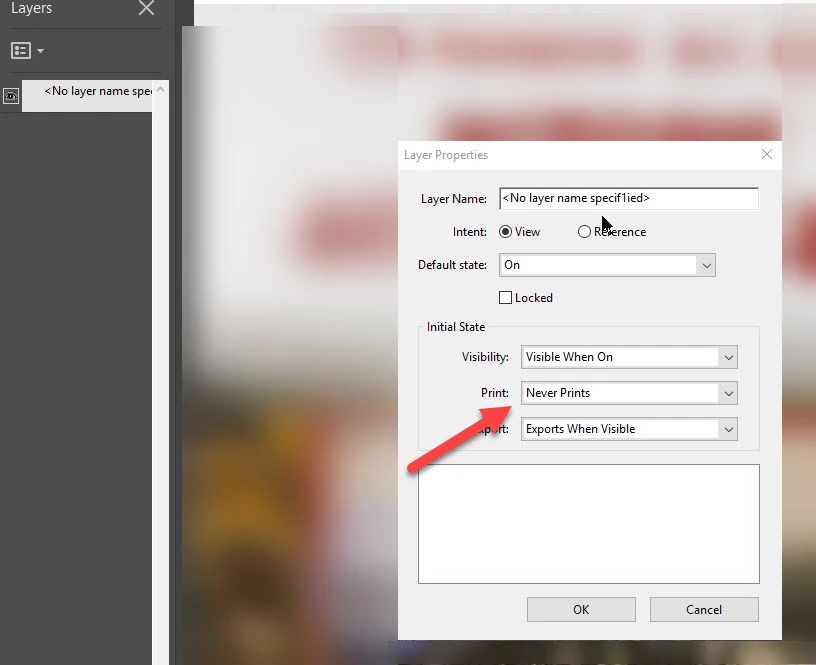
    You're need to open layers panel in Acrobat and do this -

    4 replies

    Zeror_rk
    Zeror_rkAuthor
    Participant
    September 26, 2018

    I haven't found another solution yet, so i am going with George_Salniks solution to do it with Acrobat instead.

    BobLevine
    Community Expert
    Community Expert
    September 25, 2018

    Why not create two files?

    Lukas Engqvist
    Community Expert
    Community Expert
    September 25, 2018

    If you want to control it from InDesign (you may have a document that keeps changing) and you don't find it practical to fix in Acrobat you could convert the non printing text to a button and uncheck printable.

    This does require you to export as interactive PDF, if you export as Print PDF interactive objects will not be included.

    Zeror_rk
    Zeror_rkAuthor
    Participant
    September 25, 2018

    @ Lukas:

    I tried this.

    This doesn't do what i want. Checking this off, means it won't show up in PDF either.

    Checking this on will show it on both prints and PDF.

    BobLevine
    Community Expert
    Community Expert
    September 25, 2018

    With all the time you've wasted you could have easily created two files.

    Geоrge
    GeоrgeCorrect answer
    Legend
    September 25, 2018

    You're need to open layers panel in Acrobat and do this -

    Remember, never say you can't do something in InDesign, it's always just a question of finding the right workaround to get the job done. © David Blatner