Hi @GiGiTexas,
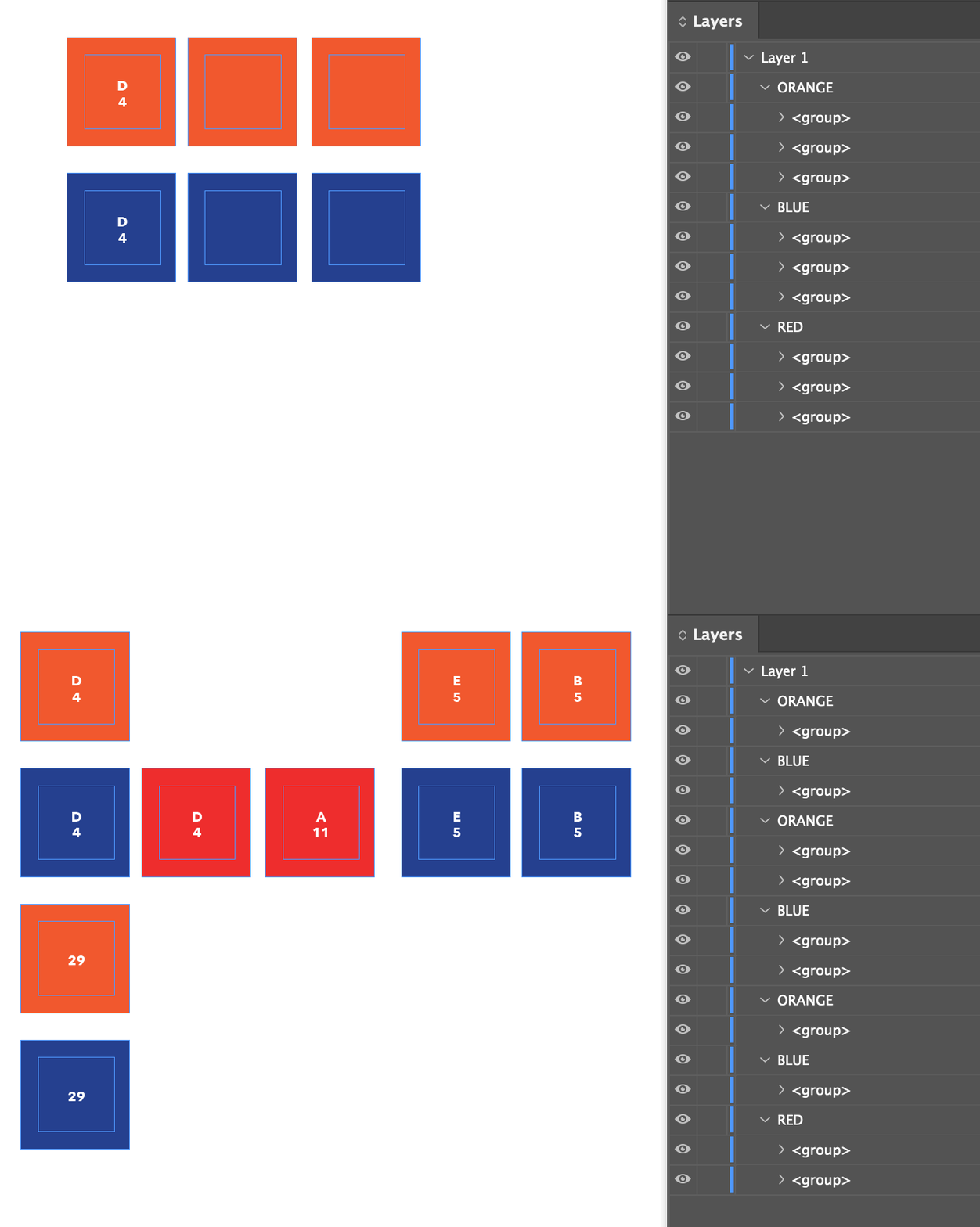
If you're willing to use a scripting approach, I've put together a demo—using your sample files—that does what (I think) you are asking. Feel free to modify to suit your needs. I wasn't sure if you were merging multiple records per page, etc.
It works by first labelling (see Indesign's ScriptLabel Panel) the placeholder text frames, then does the merge, then checks the merge document(s) and removes the containing groups of any empty text frames that match the label.
Let me know if you end up using it. I've just written it now, so hasn't been tested much and might have bugs.
- Mark
/**
 * Demonstration of one approach to "Cleaning up" after
 * a datamerge by searches for empty placeholder stories.
 * When customizing this script, look at:
 * (a) `labelPlaceholder` function which labels the empty
 * placeholder's textFrame, and
 * (b) `processEmptyPlaceholder` function which targets that
 * textFrame's containing group.
 * @author m1b
 * @discussion https://community.adobe.com/t5/indesign-discussions/hiding-empty-objects-after-data-merge/td-p/14277290
 */


// this identifies an empty text placeholder story
const IS_EMPTY_PLACE = /^[\s\uFEFF]*$/;

// labels are a convenient way to mark objects
var LABEL = 'checkMe';

/**
 * Adds a label to the placeholder's textFrame.
 * @note Adjust this function to suit your document.
 * @param {DataMergeTextPlaceholder} placeholder - the placeholder to mark.
 */
var labelPlaceholder = function (placeholder) {
    placeholder.storyOffset.parentTextFrames[0].label = LABEL;
};

/**
 * Removes an empty placeholder's parent group.
 * @note Adjust this function to suit your document.
 * @param {Story} story - the empty placeholder Story.
 */
var processEmptyPlaceholder = function (story) {
    if (story.textContainers[0].label === LABEL) {
        story.textContainers[0].parent.remove();
        // story.textContainers[0].parent.visible = false;
    }
};

// adjust these to suit your data merge
var dataMergeOptions = {
    createNewDocument: true,
};

// adjust these to suit your data merge
var dataMergePreferences = {
    recordSelection: RecordSelection.RANGE,
    recordsPerPage: RecordsPerPage.SINGLE_RECORD,
};


app.doScript(main, ScriptLanguage.JAVASCRIPT, undefined, UndoModes.ENTIRE_SCRIPT, 'Remove Empty Placeholders');

function main() {

    var doc = app.activeDocument,
        startDocs = app.documents.everyItem().getElements(),
        placeholders = doc.dataMergeTextPlaceholders,
        dm = doc.dataMergeProperties;

    if (placeholders.length === 0)
        return alert('There are no datamerge placeholders in this document.');

    // label all the datamerge text placeholders
    // so we can process them after the merge
    for (var i = placeholders.length - 1; i >= 0; i--)
        if (placeholders[i].storyOffset.parentTextFrames.length > 0)
            labelPlaceholder(placeholders[i]);

    var range = prompt('Enter record range:', '1-3');

    if (range == null)
        return;

    dataMergePreferences.recordRange = range;

    // apply settings
    doc.dataMergeOptions.properties = dataMergeOptions;
    dm.dataMergePreferences.properties = dataMergePreferences;

    // do the merge
    dm.mergeRecords();

    // get the merge document(s)
    var docs = allExceptThese(app.documents.everyItem().getElements(), startDocs);

    // process each new merged document
    for (var d = 0; d < docs.length; d++) {

        var newDoc = docs[d],
            stories = newDoc.stories;

        for (var i = stories.length - 1; i >= 0; i--)
            if (IS_EMPTY_PLACE.test(stories[i].contents))
                processEmptyPlaceholder(stories[i]);

    }

};

/**
 * Returns array of things excluding some things
 * @param {Array<*>} all - array of things.
 * @param {Array<*>} exceptThese - array of things to exclude.
 * @returns {Array<*>}
 */
function allExceptThese(all, exceptThese) {

    var things = [];

    for (var i = 0, len = all.length; i < len; i++)
        if (indexOf(all[i], exceptThese) === -1)
            things.push(all[i]);

    return things;

};

/**
 * Returns index of obj in arr.
 * Returns -1 if not found.
 * @param {any} obj
 * @param {Array} arr
 * @returns {Number}
 */
function indexOf(obj, arr) {
    for (var i = 0; i < arr.length; i++)
        if (arr[i] === obj)
            return i;
    return -1;
};



 AdChoices