


daitranthanhoa
Inspiring
July 19, 2022
Answered

How can add a action of button create from script?

  • July 19, 2022
  • 1 reply
  • 839 views

I want create a Button from script.

I had add by script:

var doc=app.documents[0];
var txtMain=doc.textFrames[0];

var oCell_URL=txtMain.tables[0].cells[1];
var btnLink=oCell_URL.buttons.add();

Now, How can add action for this button?

Ex:
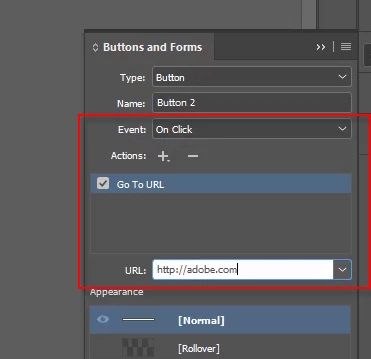
 

This topic has been closed for replies.
Correct answer Laubender

Hi @daitranthanhoa ,

look up the DOM documentation for the Button object.

You'll add a gotoURLBehavior to the button object.

Sample code:


var doc = app.documents.add();
var myButton = doc.buttons.add({ geometricBounds : [0,0,"50mm","50mm"]});
myButton.gotoURLBehaviors.add
(
	{
		behaviorEvent : BehaviorEvents.MOUSE_DOWN ,
		enableBehavior : true ,
		url : "http://adobe.com"
	}
);


https://www.indesignjs.de/extendscriptAPI/indesign-latest/#Button.html

https://www.indesignjs.de/extendscriptAPI/indesign-latest/#GotoURLBehavior.html


Regards,
Uwe Laubender
( Adobe Community Professional )

1 reply

LaubenderCorrect answer
Community Expert
July 19, 2022

Hi @daitranthanhoa ,

look up the DOM documentation for the Button object.

You'll add a gotoURLBehavior to the button object.

Sample code:


var doc = app.documents.add();
var myButton = doc.buttons.add({ geometricBounds : [0,0,"50mm","50mm"]});
myButton.gotoURLBehaviors.add
(
	{
		behaviorEvent : BehaviorEvents.MOUSE_DOWN ,
		enableBehavior : true ,
		url : "http://adobe.com"
	}
);


https://www.indesignjs.de/extendscriptAPI/indesign-latest/#Button.html

https://www.indesignjs.de/extendscriptAPI/indesign-latest/#GotoURLBehavior.html


Regards,
Uwe Laubender
( Adobe Community Professional )

daitranthanhoa
Inspiring
July 20, 2022

Thank you @Laubender.

What is Behavior for this Event & Action?


Community Expert
July 20, 2022

Try the ShowHideFieldsBehavior. Look it up in the DOM documentation:

https://www.indesignjs.de/extendscriptAPI/indesign-latest/#ShowHideFieldsBehavior.html#d1e186415


Regards,
Uwe Laubender
( Adobe Community Professional )