


Exit
  • Global community
    • Language:
      • Deutsch
      • English
      • Español
      • Français
      • Português
  • 日本語コミュニティ
  • 한국 커뮤니티
0

How can I include the table of contents as an entry in the table of contents?

Explorer ,
Oct 25, 2023 Oct 25, 2023

I tried adding the words "table of contents" with a style I included and put it on the table of contents page, I also tried putting the words in a hidden layer, nothing works. It's strange to not be able to include this in the list of items for the table of contents. Am I missing something? Help most appreciated.   
TOPICS
How to
411
Translate
Report
Community guidelines
Be kind and respectful, give credit to the original source of content, and search for duplicates before posting. Learn more
community guidelines

correct answers 1 Correct answer

Community Expert , Oct 25, 2023 Oct 25, 2023

I don't recall seeing this question before. The reason for a table of contents is to help the user navigate to a specific page. If they are already on the table of contents, I'm unclear why we would want to tell them how to get there.


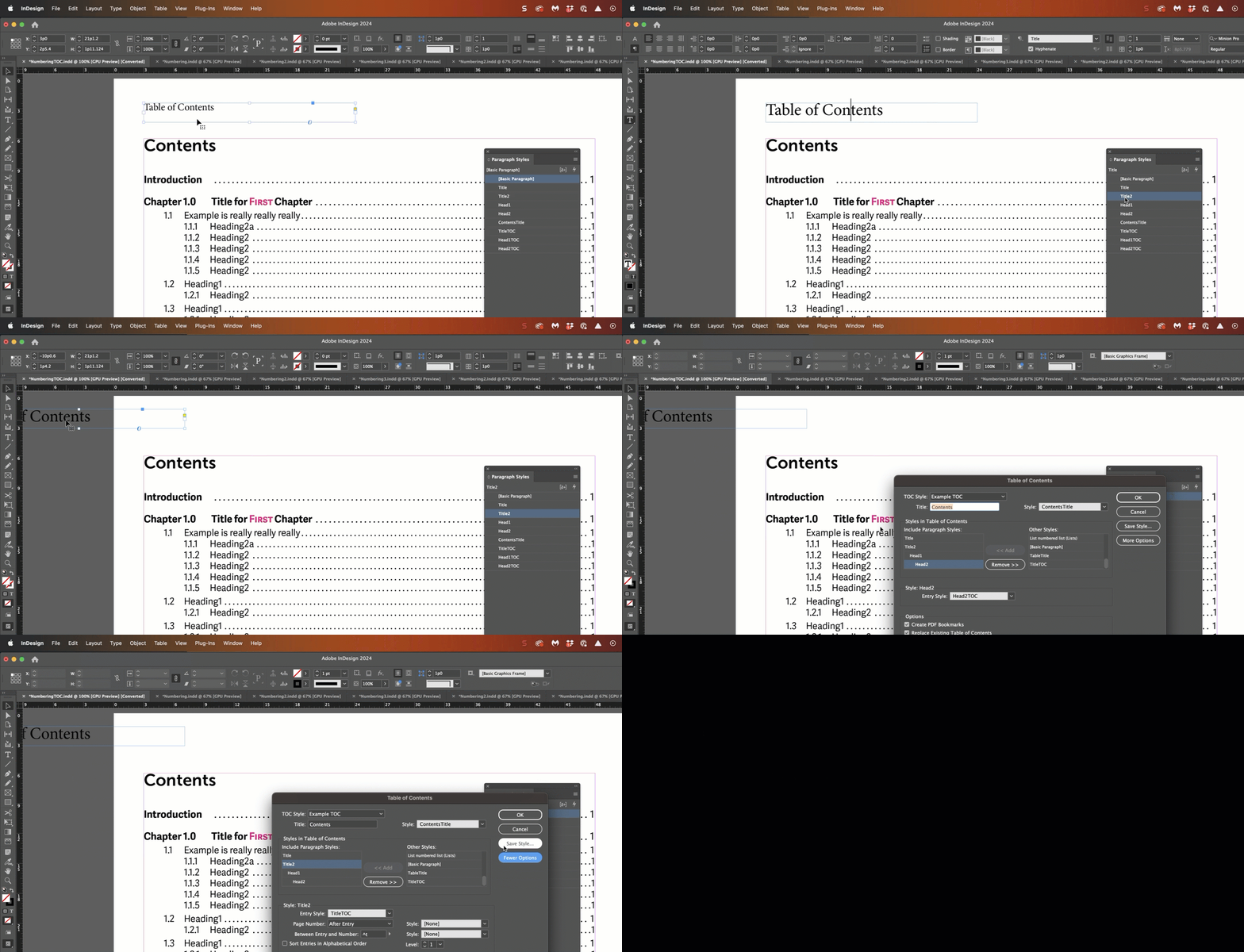
That conundrum aside, InDesign can't add the Contents title to the generated file. If you really feel you need it, you could add the title to the page and assign it a heading style, and then drag it to the pasteboard so that just the text frame is overlapping, no

...
Translate
Community Expert ,
Oct 25, 2023 Oct 25, 2023

I don't recall seeing this question before. The reason for a table of contents is to help the user navigate to a specific page. If they are already on the table of contents, I'm unclear why we would want to tell them how to get there.


That conundrum aside, InDesign can't add the Contents title to the generated file. If you really feel you need it, you could add the title to the page and assign it a heading style, and then drag it to the pasteboard so that just the text frame is overlapping, not the actual text.


~Barb


2023-10-25_17-50-31 (1).gif

Translate
Report
Community guidelines
Be kind and respectful, give credit to the original source of content, and search for duplicates before posting. Learn more
community guidelines
Explorer ,
Oct 26, 2023 Oct 26, 2023

Thank you for this. Your suggestion works great. The reason for including the TOC in the TOC is before the TOC we also list title page, dedication, copyright page which come before the TOC, so it seems odd to skip it, especially when using the TOC in the side panel with the Epub. 

Translate
Report
Community guidelines
Be kind and respectful, give credit to the original source of content, and search for duplicates before posting. Learn more
community guidelines
Community Expert ,
Oct 26, 2023 Oct 26, 2023

I've seen very few books that list the minutiae of the front material in a TOC. For e-books, there is sometimes a link to the cover or first page, since readers tend to default to the start of the main text.

Translate
Report
Community guidelines
Be kind and respectful, give credit to the original source of content, and search for duplicates before posting. Learn more
community guidelines
Explorer ,
Oct 26, 2023 Oct 26, 2023

Understood, but this book is for the Chinese readers, and they tend to include TOC in TOC. I have another question: How do I remove page numbers on specific pages from table of contents (but keeping them on the pages themselves)? Do I do that manually? And do manual changes mess things up in the TOC?

Translate
Report
Community guidelines
Be kind and respectful, give credit to the original source of content, and search for duplicates before posting. Learn more
community guidelines
Explorer ,
Oct 26, 2023 Oct 26, 2023

This is a fixed layout ePub, that's why we have page numbers.

Translate
Report
Community guidelines
Be kind and respectful, give credit to the original source of content, and search for duplicates before posting. Learn more
community guidelines
Community Expert ,
Oct 26, 2023 Oct 26, 2023

You can define whether a TOC entry has an associated page number or not within the style defintion for that 'style' in the TOC menu. (Confusing, because "TOC Style" is a misnomer and because it calls both the format for each type entry a 'style' and then allows you to apply a Paragraph Style. This menu desperately needs some cleanup and reorganization.)

Translate
Report
Community guidelines
Be kind and respectful, give credit to the original source of content, and search for duplicates before posting. Learn more
community guidelines
Explorer ,
Oct 26, 2023 Oct 26, 2023

thanks!

Translate
Report
Community guidelines
Be kind and respectful, give credit to the original source of content, and search for duplicates before posting. Learn more
community guidelines
Community Expert ,
Oct 26, 2023 Oct 26, 2023

Okay. A link to the TOC in the dynamic reader TOC seems... somewhere between redundant and circular. 🙂

Translate
Report
Community guidelines
Be kind and respectful, give credit to the original source of content, and search for duplicates before posting. Learn more
community guidelines
Explorer ,
Oct 26, 2023 Oct 26, 2023

I hear you, but it's a book with many images and poems, it's easier to refer to different poems on other pages without having to add links.

Translate
Report
Community guidelines
Be kind and respectful, give credit to the original source of content, and search for duplicates before posting. Learn more
community guidelines
Community Expert ,
Oct 26, 2023 Oct 26, 2023
LATEST

Hi Cindy:


You can set the page numbers individually for each paragraph style. For example, to disable the page numbers on the Title paragraphs, see screenshot below. This would remove the page numbers from the Titles, but leave them on the Head1s and Head2s. 

2023-10-26_15-53-56.png


As for your question about manual edits: ideally, you do not want to do anything manually in a table of contents. If you can automate everything, then you can just update the table of contents after a book update, and all the page numbers will be correct. The more manual edits we add to a table of contents the more resistant we are to updating the table of contents, because we have to put them all back in again. And that's how TOCs are published with the wrong page numbers. 


~Barb

Translate
Report
Community guidelines
Be kind and respectful, give credit to the original source of content, and search for duplicates before posting. Learn more
community guidelines