


Answered
How can show message with UTF8 Text with CAlert in SDK 2021?
I want show a message with UTF8 Text:
This my code:
CAlert::InformationAlert("メディア: FAメカニカル\n(C)2009-2021 Inc. ");
Result:
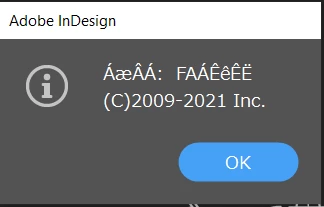
How can show message with UTF8 Text?

I want show a message with UTF8 Text:
This my code:
CAlert::InformationAlert("メディア: FAメカニカル\n(C)2009-2021 Inc. ");
Result:
How can show message with UTF8 Text?
Try this.
CAlert::InformationAlert(PMString(_T("メディア: FAメカニカル\n(C)2009-2021 Inc. ")));
Already have an account? Login
Enter your E-mail address. We'll send you an e-mail with instructions to reset your password.
 AdChoices