New Participant
May 6, 2014
Answered

How do I change text direction adobe indesign?

  • May 6, 2014
  • 4 replies
  • 55824 views

Hello! I am trying to format Arabic in InDesign CC. I have read several forums but I do not have the option to change the text direction in either the character panel or the paragraph panel.

Please help!

This topic has been closed for replies.
Correct answer Willi Adelberger

YOu can keep it installed, they will be installed on the very same place. Inside the app package are additionally plugins installed. Although the program will launch in the language of the OS, but these plugins will be active in any localization when they have been installed.

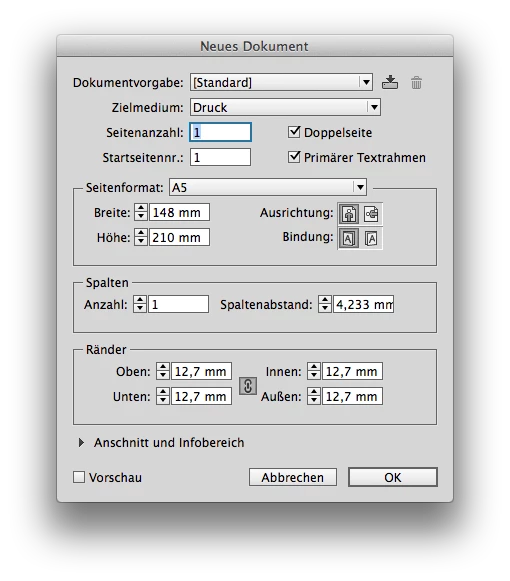
It will beginn with a different new document, binding (Bindung here in German) is added:
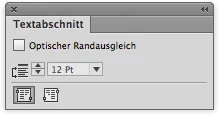
The story can go in different directions:
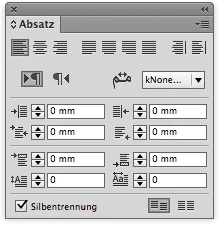
Paragraphs have more options, like direction:
And even a character string can change its direction:
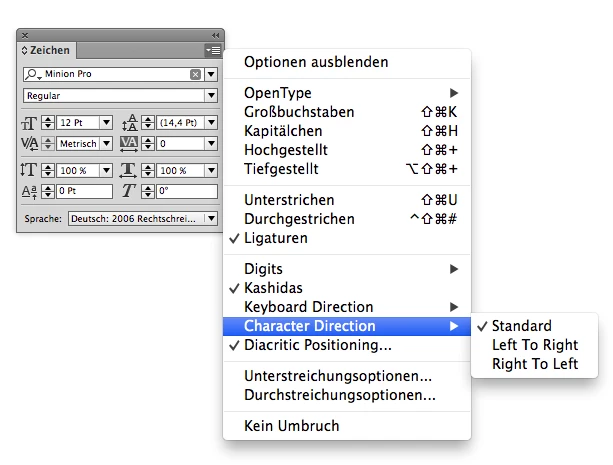
And as you see, even if I have a German Loc installed, some additional menus are still in English.

But there are a lot more menus, additional options in all styles, tables have also some linguistig and directional menus, and you will find a lot more.


4 replies

Adobe Expert
September 9, 2022

Willi Adelberger said: "You don't need to uninstall. Change language and install above the other lnaguage as missing plugins will be added to your primary version. …"


Hi Willi,

I wonder if this could go wrong with e.g. InDesign 2022 version 17.4 on a German system, because of a bug where the localization folder in InDesign's cache is not named de_DE, but en_US. This went wrong when updating from 17.3 to 17.4 on Windows. Perhaps also on Macs.


@Lydia25117064r8sn ,

what is the locale of your initial InDesign 2022 version?
English, US English, something else?


Regards,
Uwe Laubender
( Adobe Community Professional )

Participating Frequently
September 9, 2022

English, on Mac. Uninstalling and reinstalling after changing to English يدعم العربية worked, it was not a huge issue in the end. I was able to save my workspace preferences so nothing important was lost in uninstalling.

Participating Frequently
July 21, 2016

Yep! Got that one to. But as I mentioned; no result as I wished for. Indesign keeps ignoring the textdirection and those fancy textdirection buttons still don't show:

I rebooted Indesign and all. No result. It's frustrating because I know it is probably a tiny little setting I am missing... But... Aaaargggh!

Salah Fadlabi
Inspiring
July 21, 2016

On adobe cc desktop after you select language that support arabic, return to cc desktop Apps tab and select indesign to install.

Willi Adelberger
Adobe Expert
May 8, 2017

i use id cc17, and this option is not appear to me...
Can you help me please?


Did you read my posts above? There lays the answer.

Willi Adelberger
Adobe Expert
May 6, 2014

Hi,

In the creative cloud application you can choose the language of your applications. There are also English with Arabic and English with Hebrew support available. If you install those versions (you can additional install several language versions if you change the language and install it again). That will add some language specific plugins which will cause additional panels, menu entries, more options in dialog boxes and so on.

E.g. if you install Arabic, Hebrew, German, Asian and run later the German loc you will see those additional fuctionality in English in the German version.

New Participant
May 6, 2014

Willi,

Can I keep the different versions installed? Or will I have to uninstall and re-install every time I need to change languages?

Thank you,

Crystal

Willi Adelberger
Willi AdelbergerCorrect answer
Adobe Expert
May 6, 2014

YOu can keep it installed, they will be installed on the very same place. Inside the app package are additionally plugins installed. Although the program will launch in the language of the OS, but these plugins will be active in any localization when they have been installed.

It will beginn with a different new document, binding (Bindung here in German) is added:

The story can go in different directions:

Paragraphs have more options, like direction:

And even a character string can change its direction:

And as you see, even if I have a German Loc installed, some additional menus are still in English.

But there are a lot more menus, additional options in all styles, tables have also some linguistig and directional menus, and you will find a lot more.

John T Smith
Adobe Expert
May 6, 2014

Ask in InDesign

This forum is about the Cloud as a delivery process, not about using individual programs

If you start at the Forums Index http://forums.adobe.com/index.jspa

You will be able to select a forum for the specific Adobe product(s) you use

Click the "down arrow" symbol on the right (where it says ALL FORUMS) to open the drop down list and scroll

Romsinha-9KMEUt
Adobe Employee
Adobe Employee
May 6, 2014

Moving to Indesign forum.

Regards,

Romit Sinha