


Inspiring
May 22, 2025
Answered

How do I share a Document Tttle across multiple files in book file

  • May 22, 2025
  • 3 replies
  • 1188 views
I have several files in a book file. The first file has the document title, p-tagged as "Document Title". I then use a variable also called <Document Title> in the footer, like this:
 
© 2025 MyCompany Inc. Proprietary and Confidential
<Document Title>
 
Here's the variable definition:
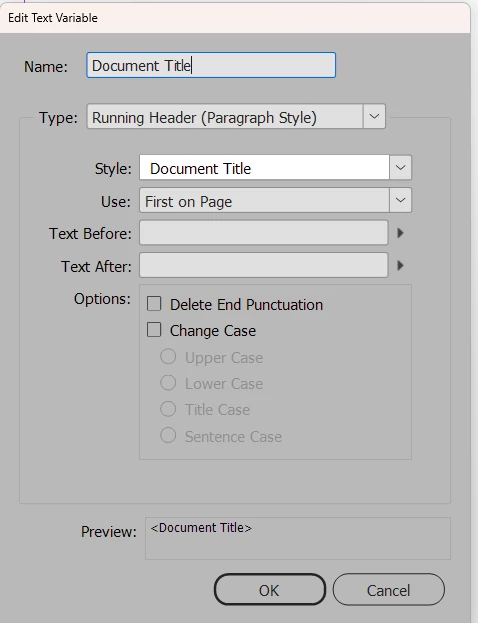
 
The document title appears in the footer of all pages of the first file, as expected, but it does not appear in any of the later files in the book. That space is blank. I synchronized the later files to the first file, but that didn't change anything.
 
How do I share the document title across all the files? Or do I need to set this up differently?


Correct answer Robert at ID-Tasker
quote

When I change the variable type to Custom Text, I lose the option to use the Document Title paragraph style. So I would have to type the full title in the Custom Text variable. Maybe that's the only way.


By @jeanne_c


Yeah, that's the only way.


It looks like information about the "last" RH from the previous document isn't transferred to the next document.


It could be scripted - probably even for free, but with a limited functionality - or if you work on Windows and would like to try my paid solution, test it for free for some time - please let me know.


3 replies

Barb Binder
Community Expert
May 22, 2025

Hi @jeanne_c:


Syncing the text variables as I described will sync all variables, but you will still need to call them in the parent page, which is an other option in the Synchronize Options. 


~Barb

~Barb at Rocky Mountain Training
jeanne_cAuthor
Inspiring
May 22, 2025

Thank you, Barb and Robert. Between you both, I think I've got a solution..

Barb Binder
Community Expert
May 22, 2025

Excellent! I belatedly realized I misunderstood your question so came back to clean up my answer but happy to hear you are back in business!


~Barb

~Barb at Rocky Mountain Training
Robert at ID-Tasker
Brainiac
May 22, 2025

You need to declare your variable as Custom Text:


But this will mean changing it manually every time you need a new "title".


Robert at ID-Tasker
Brainiac
May 22, 2025

@jeanne_c


Have you changed your mind about marking my reply as a "correct answer"? Just asking, to check if system is broken again.


jeanne_cAuthor
Inspiring
May 22, 2025

I think that when Barb marked my comment as a Correct answer, the system got confused.

Barb Binder
Community Expert
May 22, 2025

Hi @jeanne_c:


Two options (the second is significantly faster):

  • You can open another file, choose Type > Text Variables > Define and use the Load button to load the variables from another file, or
  • You can use Synchronize Options in the book window panel menu. Uncheck everything except for Text Variables to just sync the variables to the other files in the book. Read up on the process first by scrolling down to Synchronize book documents
    on this page: https://helpx.adobe.com/indesign/using/creating-book-files.html


~Barb


~Barb at Rocky Mountain Training
jeanne_cAuthor
Inspiring
May 22, 2025

Neither of those options accomplished my goal.