

New Participant
March 31, 2015
Answered

How importing text from Illustrator to InDesign ?

  • March 31, 2015
  • 7 replies
  • 46551 views

How importing text from Illustrator to InDesign, kepping it editable ?

    Correct answer pentagramwookie

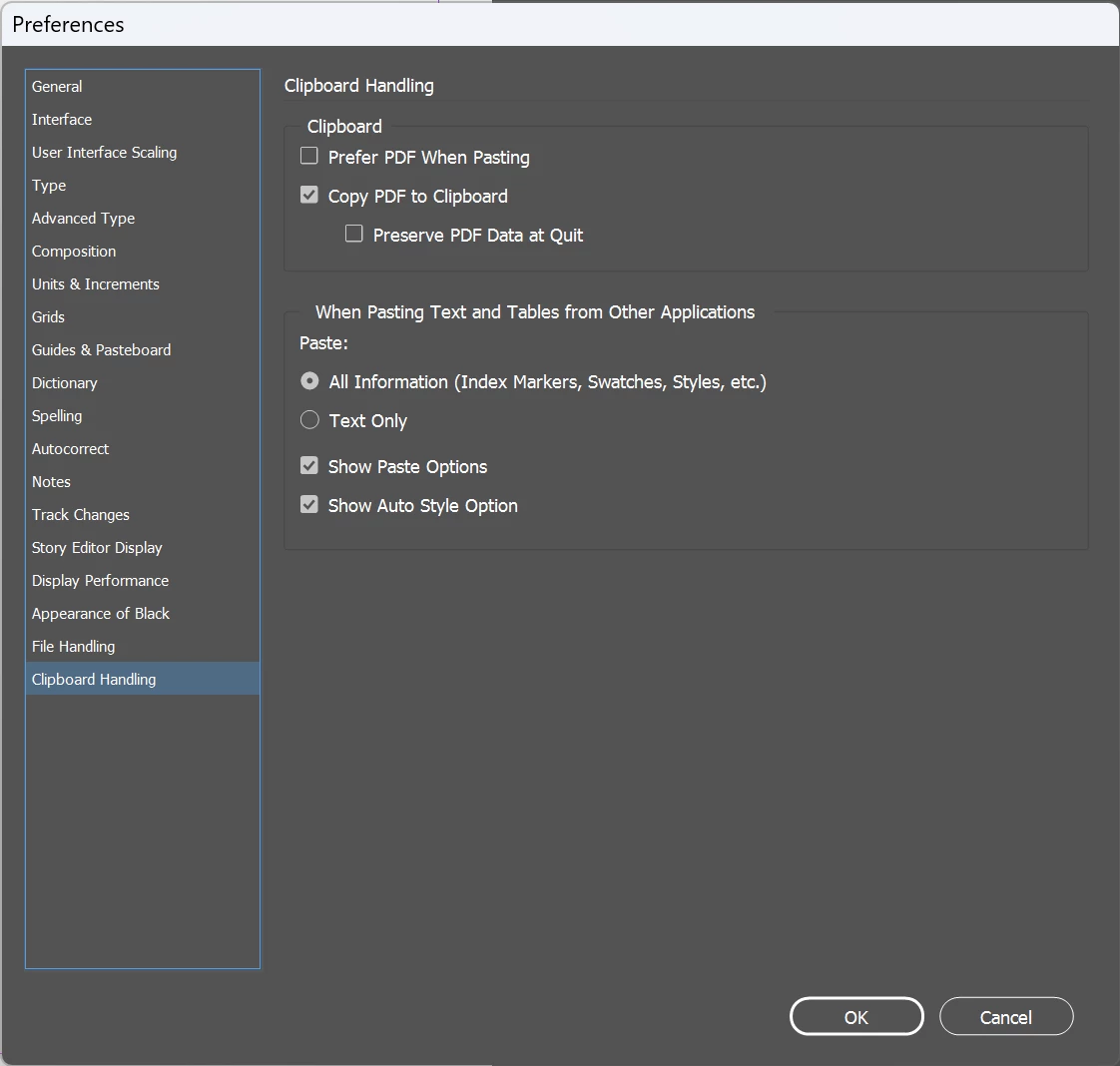
    Okay actually, in Indesign CC 2023 these Clipboard Handling settings work for what I was trying to do. Not sure if it helps anyone else! At least it retains the font.
     

    7 replies

    New Participant
    December 26, 2024

    You can select the text frame in illustrator and drag and drop it in indesign document.

    Community Expert
    June 8, 2022

    "What a waste of time and energy."

    "pretty pathetic that we cannot simply copy and paste the exact formatting and design from Ai to Id"


    I agree. It should work seamlessly. And that could be copy/paste.

    What's missing: a common exchange format like the IDMS snippet format is for InDesign. Just something between InDesign, Illustrator and PhotoShop.

    E.g.: Drag a text frame out from Illustrator to the desktop to do the exchange file, drag in or place the file to InDesign; the next best thing after copy/paste.


    Regards,
    Uwe Laubender
    ( Adobe Community Professional )

    Community Expert
    August 23, 2021

    Hi Brussobaum5ECF,

    you answered a thread from 2015.


    Nowadays you could transfer formatted text as shared Text assets from Illustrator to InDesign through CC Libraries:

    https://helpx.adobe.com/indesign/using/creative-cloud-libraries-sync-share-assets.html


    Regards,
    Uwe Laubender

    ( ACP )


    Markcq
    Known Participant
    April 7, 2022

    It's still a mission. Add it to a Library from Illustrator. Place it in InDesign from the Library. Delete the Library item, because it's not something you want to keep there. What a waste of time and energy.

    • Cmd/Ctrl C
    • Switch app
    • Cmd/Ctrl V

    What could be simpler?

    New Participant
    June 8, 2022

    Man, could not agree more, pretty pathetic that we cannot simply copy and paste the exact formatting and design from Ai to Id...just wrong...

    New Participant
    August 20, 2021

    "they have incopatible textengines"

    and you are all just completely fine with that right?  wtf.

    Adobe is not able to change that thing for 10+ years because F*** it!

    Copy text from one program to  another with styling is so basic even wordpad can do it.


    What a joke.


    BobLevine
    Community Expert
    August 20, 2021

    So use Wordpad.

    Benji-11
    Inspiring
    October 16, 2021

    This is not a good answer to users that pay money. Copying and pasting are simple tasks. Also this is one of my problems too. I hope you undrestand what I mean.

    Willi Adelberger
    Community Expert
    March 31, 2015

    You have to buy a 3rd party plugin like ID2PDF. It will convert PDFs (and this means also AI files) to InDesign.

    Mike Witherell
    Community Expert
    March 31, 2015

    Hi Willi,

    I think you mean Markzware PDF2DTP for $199.00

    Mike Witherell
    Willi Adelberger
    Community Expert
    March 31, 2015

    Yes.

    Mike Witherell
    Community Expert
    March 31, 2015

    Generally you can only copy n paste. But...

    What if you wanted to preserve the look by means of Illustrator's paragraph styles? They don't directly export, yet here is a work-around:

    You *might* try to Save As the Illustrator file to PDF; open the PDF in Acrobat Pro; choose Save As Other... to a Word doc (Acrobat XI); then file>place that. Oddly, you will get different generic paragraph style names, but the editable text will be tagged with paragraph styles.

    I wish it were more harmonious than this work-around!

    Mike Witherell
    Participating Frequently
    September 13, 2019

    Seems like such a basic expectation…that you can paste formatted text from one Adobe app to another. You CAN paste formatted text from Illustrator into Photoshop…why is Photoshop smarter than InDesign when it comes to typography. Absolutely confounding.

    Steve Werner
    Community Expert
    March 31, 2015

    If you choose the text in Illustrator using the Text tool, you can copy the (unformatted) text to the clipboard. In InDesign, make a text frame or click in a text frame and choose Paste.

    Sadly, there is no way to retain the formatting on the text, but it is still editable. InDesign and Illustrator have incompatible text engines.

    pentagramwookie
    Inspiring
    January 20, 2023

    Making InDesign and Illustrator text engines compatible would be a great feature. Anywhere to vote for that?

    pentagramwookie
    pentagramwookieCorrect answer
    Inspiring
    January 20, 2023

    Okay actually, in Indesign CC 2023 these Clipboard Handling settings work for what I was trying to do. Not sure if it helps anyone else! At least it retains the font.